

Eclipse: Digital Watch Face
Personalization
0.0
552 Lượt tải
"Futuristic digital watch face with color themes and smart customization."
Cài đặt trên Google Play
Ứng dụng trả phí


Về ứng dụng này
Eclipse – Digital Watch Face for Wear OS by Active Design
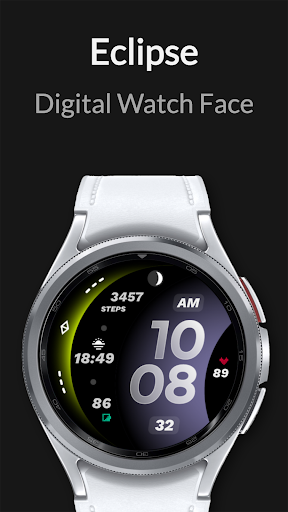
Experience the perfect fusion of futuristic style and everyday functionality with Eclipse. Its bold curved layout and glowing gradient accents create a striking visual experience while keeping essential information clear and accessible throughout your day.
KEY FEATURES
• Unique curved digital design with a futuristic, space-inspired look
• Glowing gradient accents optimized for AMOLED displays
• Clean, modern interface built for fast readability
• Optimized for Galaxy Watch, Pixel Watch, and all Wear OS devices
• Steps counter*
• Heart rate monitoring*
• Battery indicator
• Date with AM/PM and seconds display
• Automatic 12h / 24h time format
• Multiple gradient color combinations
• 2x custom app shortcuts for fast access
• 1x custom complication for personalized data
• Battery-optimized Always-On Display (AOD) mode
• Clear, simplified AOD layout for easy viewing
• Lightweight, smooth, and battery-efficient performance
• Ideal for users who enjoy futuristic, glowing, and minimalist watch faces
HOW TO USE
1. Install Eclipse from Google Play.
2. Ensure your smartwatch is running Wear OS 5 or later.
3. Touch and hold your current watch face, then scroll and select Eclipse by Active Design.
NOTE
• Health data (steps, heart rate, etc.) is provided by your watch sensors and system services.*
• Grant all required permissions for full functionality.
ABOUT ACTIVE DESIGN
Active Design creates premium digital, analog, and hybrid watch faces with a focus on clarity, customization, and modern aesthetics. Discover more by searching "Active Design Watch Face" on Google Play.
Activate Eclipse today and bring a futuristic glow to your wrist.
Experience the perfect fusion of futuristic style and everyday functionality with Eclipse. Its bold curved layout and glowing gradient accents create a striking visual experience while keeping essential information clear and accessible throughout your day.
KEY FEATURES
• Unique curved digital design with a futuristic, space-inspired look
• Glowing gradient accents optimized for AMOLED displays
• Clean, modern interface built for fast readability
• Optimized for Galaxy Watch, Pixel Watch, and all Wear OS devices
• Steps counter*
• Heart rate monitoring*
• Battery indicator
• Date with AM/PM and seconds display
• Automatic 12h / 24h time format
• Multiple gradient color combinations
• 2x custom app shortcuts for fast access
• 1x custom complication for personalized data
• Battery-optimized Always-On Display (AOD) mode
• Clear, simplified AOD layout for easy viewing
• Lightweight, smooth, and battery-efficient performance
• Ideal for users who enjoy futuristic, glowing, and minimalist watch faces
HOW TO USE
1. Install Eclipse from Google Play.
2. Ensure your smartwatch is running Wear OS 5 or later.
3. Touch and hold your current watch face, then scroll and select Eclipse by Active Design.
NOTE
• Health data (steps, heart rate, etc.) is provided by your watch sensors and system services.*
• Grant all required permissions for full functionality.
ABOUT ACTIVE DESIGN
Active Design creates premium digital, analog, and hybrid watch faces with a focus on clarity, customization, and modern aesthetics. Discover more by searching "Active Design Watch Face" on Google Play.
Activate Eclipse today and bring a futuristic glow to your wrist.
Thông tin ứng dụng
Đánh giá và nhận xét
0.0
Tổng số đánh giá
5
4
3
2
1
J
Jeremiah Dudek
Oct 18, 2025
Literally perfect except it needs a bugfix. There is a graphical error on top that covers up the top part of the steps number.


