

Key WF76 Minimalist Watch Face
Personalization
0.0
615 Lượt tải
"Key WF76 is an Analog Watch Face with Classic Design for Wear OS"
Cài đặt trên Google Play
Ứng dụng trả phí




Về ứng dụng này
Buy One Get One, BOGO Promotion :
1. Buy any of our Watch Faces
2. Send email to [email protected]
3. Attach RECEIPT from Google to the email
4. Wait for the Coupon
5. You can not choose the free WF
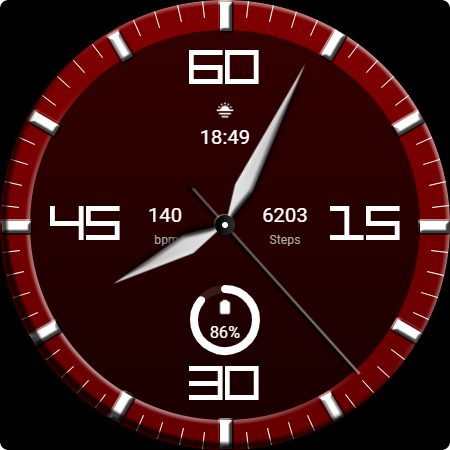
Key WF76 is an Analog Watch Face with Classic Design for Wear OS. The Key WF76 is a classically elegant analog watch face, designed to give your wrist a timeless and stylish look. With subtle visual details and a clean aesthetic, the Key WF76 is the perfect choice for those who love simplicity but still want to look classy.
Features
- Analog Watch Hand for Hour and Minute
- Have theme colors and background style
- Short Circle Complications
IMPORTANT!
This is a Wear OS Watch Face app. This app only supports smartwatch devices running with WEAR OS
AOD:
Key WF76 features an analog watch face with a simple look.
Color adjustments:
1. Press and hold your finger at center on the watch display.
2. Press the button to adjust.
3. Swipe left or right to switch between the different customizable items.
4. Swipe up or down to change the options/color of the items.
1. Buy any of our Watch Faces
2. Send email to [email protected]
3. Attach RECEIPT from Google to the email
4. Wait for the Coupon
5. You can not choose the free WF
Key WF76 is an Analog Watch Face with Classic Design for Wear OS. The Key WF76 is a classically elegant analog watch face, designed to give your wrist a timeless and stylish look. With subtle visual details and a clean aesthetic, the Key WF76 is the perfect choice for those who love simplicity but still want to look classy.
Features
- Analog Watch Hand for Hour and Minute
- Have theme colors and background style
- Short Circle Complications
IMPORTANT!
This is a Wear OS Watch Face app. This app only supports smartwatch devices running with WEAR OS
AOD:
Key WF76 features an analog watch face with a simple look.
Color adjustments:
1. Press and hold your finger at center on the watch display.
2. Press the button to adjust.
3. Swipe left or right to switch between the different customizable items.
4. Swipe up or down to change the options/color of the items.
Thông tin ứng dụng
Phiên bản
Cập nhật vào
N/A
Kích thước
Yêu cầu Android
ID gói
com.watchfacestudio.keywf76
Lượt cài đặt
615
Danh mục
Personalization


