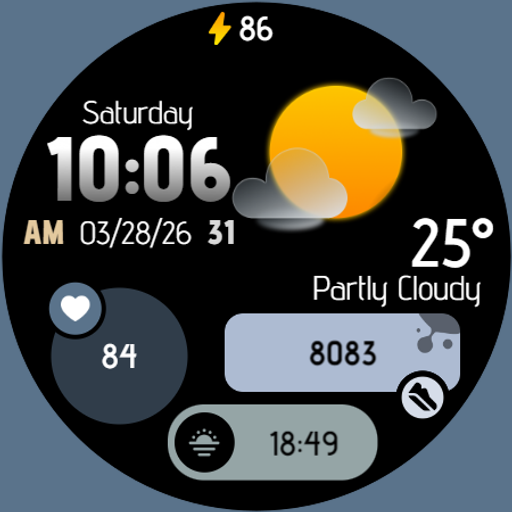
Watch face Material 1
Personalization
0.0
249 Lượt tải
"Material Design Wear OS digital face: weather, 3 complications & 2 AOD modes"
Cài đặt trên Google Play
Ứng dụng trả phí


Về ứng dụng này
Material 1 Watch Face for Wear OS
Bring a fresh, organic look to your smartwatch with the Material 1 Watch Face for Wear OS. Inspired by modern Material Design aesthetics, this digital watch face uses stylish, pill-shaped widgets to beautifully organize your essential daily data.
Key Features:
• Material Design Layout: Enjoy a clean, modern interface with soft, rounded data widgets that perfectly complement your smartwatch.
• Detailed Weather: View a prominent, clear weather icon and current temperature directly on the dial.
• 3 Customizable Complications: Personalize your display with three dedicated slots at the bottom for the information you value most.
• Essential Daily Data: Keep track of the Date and your current Battery Status at a glance within their own stylish blocks.
• 20+ Color Themes: Match your style effortlessly by choosing from a wide variety of vibrant and pastel color themes.
• 2 Always On Display Modes: Manage your battery life with two distinct AOD options: an informative dimmed mode that retains your colorful widgets, and a minimal mode displaying only the digital time.
Installation:
1. Ensure your watch is connected via Bluetooth.
2. Download from the Google Play Store.
3. Long-press your watch screen, scroll to the end, and select the watch face to apply.
Compatibility:
Designed exclusively for Wear OS 5+ devices, including:
• Samsung Galaxy Watch 8 & Ultra
• Google Pixel Watch 4
• And other newer devices running Wear OS 5 or higher.
Thông tin ứng dụng
Phiên bản
Cập nhật vào
Aug 12, 2026
Kích thước
Yêu cầu Android
Lượt cài đặt
249
Danh mục
Personalization
Có gì mới
Updating targetSDK
Đánh giá và nhận xét
0.0
Tổng số đánh giá
5
4
3
2
1
C
Craig Ippolito
Apr 03, 2026
material at its finest! another great watchface!! the use of multiple weather icons styles on various faces is amazing.
C
Craig Ippolito
Nov 11, 2025
modern material design looking very sharp on my GW7. Great work! a must have!! highly recommended.
S
Simon Archer
Jun 19, 2025
This has to be my absolute favourite 😍 love it,what an amazing face ,can't praise 👏 it enough
P
Paul Thebert
Jun 16, 2025
This is a beautiful watch face.