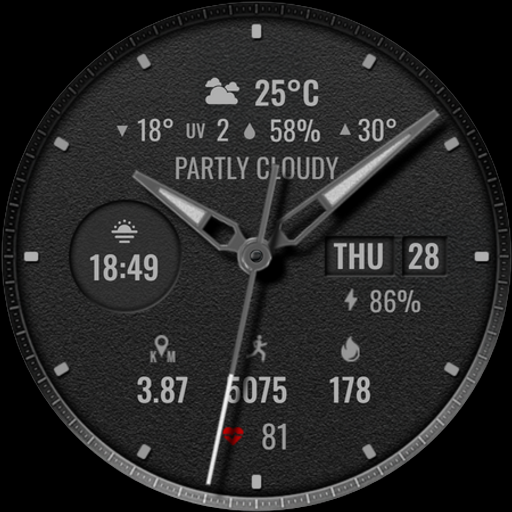
Neon minimal MOD Classic
Personalization
0.0
169 Lượt tải
"Dark Classic AMOLED Watch face"
Cài đặt trên Google Play
Ứng dụng trả phí


Về ứng dụng này
Dark Neon Classic AMOLED Watch face for Wear OS
Basic moments
- A high resolution;
- Changeable colors
- Custom complications
- AOD mode full and minimal
Compatible with Wear OS devices running API level 30 and above, including Samsung Galaxy Watch 4, 5, 6, 7, 8 and Pixel Watch.
**Installation**
1. Install the watch face app on your phone.
2. Make sure your Wear OS watch is connected to your phone and uses the same Google account.
3. Select your watch as the installation device and complete the installation.
4. After installation, select the watch face from your watch face gallery.
If installation is delayed, check the internet connection on both devices, wait a minute or two, or restart your watch and try again.
**Customization**
• Touch and hold the watch face, then tap **Customize** to access the available settings.
• For the best experience, we recommend configuring the watch face directly on your watch. Video guide:
https://youtu.be/YPcpvbxABiA
**Support**
If you have any questions or installation issues, please contact: [email protected]
**More watch faces by WIN**
Explore other watch faces:
https://play.google.com/store/apps/dev?id=6789054753742990227
Thông tin ứng dụng
Phiên bản
Cập nhật vào
Oct 05, 2026
Kích thước
Yêu cầu Android
Lượt cài đặt
169
Danh mục
Personalization
Có gì mới
New colors added
Quyền ứng dụng
-
Other
- full network access
- Google Play license check

Đánh giá và nhận xét
0.0
Tổng số đánh giá
5
4
3
2
1
O
Oleg K
Sep 08, 2026
Nice! Not my favorite but still really nice for a minimalist.