

Pure Line
Personalization
0.0
12 Lượt tải
"Wear OS clock face."
Cài đặt trên Google Play
Ứng dụng trả phí






Về ứng dụng này
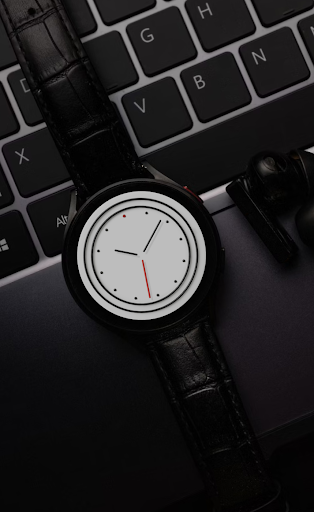
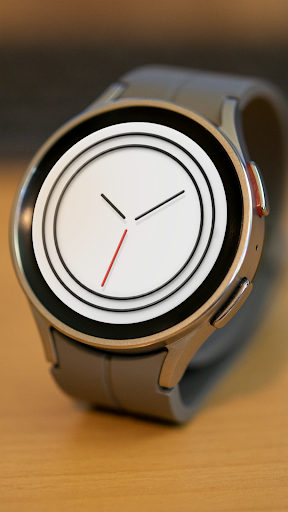
Wear OS clock face.
Pure Line: Dynamic Day & Night
Experience the perfect harmony of elegance and functionality with this sophisticated, minimalist watch face. Designed for those who appreciate clean aesthetics without unnecessary clutter, while keeping your most important information just a tap away.
Key Features:
Pure Line: Dynamic Day & Night.
The watch face seamlessly adapts to the time of day. Enjoy a bright, crisp white background during daylight hours, transitioning to a calming, deep black tone at dusk—designed to save your eyes and conserve battery life.
Customizable Indices: Tailor the look to your preference. Choose between a clean, empty dial or enable the hour indices to suit your personal style and readability needs.
Customizable Shortcut: Access your favorite app with a single touch. Set it to your preference, whether it’s your fitness tracker, weather updates, or music player.
Graphic Clarity: Two concentric rings and precise, refined hands create a modern, architectural aesthetic that looks stunning on any Wear OS device.
Optimized for Efficiency: Expertly crafted to be energy-efficient and perfectly readable, even in bright, direct sunlight.
Modern design. Intelligent adaptation. Your style, your rules.
Wear OS clock screen companion app for Phone:
Immediately after installing the mobile application, a message will appear when you open the application.
To start the process of installing the watch face on your watch, tap INSTALL ON WATCH. (To speed up connection and loading, open the GALAXY WEARABLE app or other clock management program. Downloading to your watch will begin immediately.).
Once the installation process is complete, the companion app can be deleted.
After installation, browse the watch face library to find the screen face.
IMPORTANT AFTER INSTALLATION - after installation, the phone will open a refund link that will be visible on the watch. To find a watch face don't press refund and browse the watch face library to find a watch face.
Note:
Email for feedback and suggestions ===> [email protected]
Thông tin ứng dụng
Phiên bản
Cập nhật vào
N/A
Kích thước
Yêu cầu Android
ID gói
com.watchfacestudio.pureline
Lượt cài đặt
12
Danh mục
Personalization
Quyền ứng dụng
-
Other
- full network access
- prevent device from sleeping
- Google Play license check

Đánh giá và nhận xét
0.0
Tổng số đánh giá
5
4
3
2
1
F
FELIX Architect
Jul 26, 2026
amazing design


