

Watch face 10h08.com #66
Personalization


Về ứng dụng này
🟥 Information:
- High resolution, sharp image quality
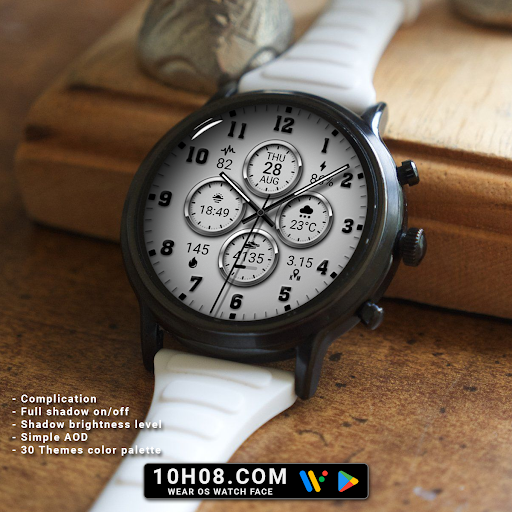
- Classic watch face
- Analog time
- Day, date and month
- Weather
- Sunrise & sunset
- Steps count, steps goal, distance, heart rate, calories
- Battery level
- Complication
- Full shadow on/off
- Shadow brightness level
- Simple AOD
- 30 Themes color palette
🟨 How to custom this watch face?
1. Press and hold watch face screen
2. Tap “Customize” button
3. Swipe left or right, up or down to customize watch face
🟦 How to install watch face on your watch?
1. Install watch face from Google Play store
2. Press and hold watch face screen
3. Swipe right to left and tap “Add watch face”
4. Scroll to the bottom of the page and selectwatch face in the “downloaded” section
🟧 Compatible with smart watches running Wear OS 5+ SDK 34+
For example: Galaxy Watch 6, Galaxy Watch 7 Ultra, Ticwatch Pro 5, Pixcel Watch 2, Watch 2 Pro,...
🟩 See all my watch faces: https://play.google.com/store/apps/dev?id=5487081600241990978
🟪 Follow my social media pages for the latest watch face updates:
https://www.facebook.com/10h08com/
https://www.instagram.com/10h08com/
https://www.pinterest.com/10h08com/
https://x.com/10h08com/
https://www.threads.com/@10h08com/
Thông tin ứng dụng
Có gì mới
Đánh giá và nhận xét
good
So I love how this watchface looks and there is a good deal of customization around the colors and shadows. What I don't like is that only one of the complications is customizable. You can only change the left-most larger spot, which is showing the sunset time in the images. This is very disappointing and I wish Google demanded that watchface developers include a detailed image showing which areas are customizable and which are fixed.
The user customizable complication (9 o'clock) is always in white, even when the background is a light colour when all other complications are in black. Please fix this.
I just love ❤️ 😍 the watchfaces I have a few
Ứng dụng tương tự

Watch face 10h08.com #59

Watch face 10h08.com #98

Watch face 10h08.com #86

Watch face 10h08.com #88

Watch face 10h08.com #141
