

Black Face Watch Face
Personalization
0.0
2.2K+ Lượt tải
"Black Face watch face for Wear OS"
Cài đặt trên Google Play
Ứng dụng trả phí




Về ứng dụng này
Elevate your wrist with the Black Face watch face, designed to bring a minimalist and modern aesthetic to your Wear OS device. Experience ultimate personalization with customizable complications that keep your essential data visible in a sleek, simply styled digital format.
BLACK FACE FEATURES:
- Easy to read digital time display
- Customizable complications *
- Customizable app shortcut
- Multiple color options
- High resolution
- 12/24 hours mode based on device settings
- Show/hide seconds indicator
- AM/PM marker
- Date
- Battery information
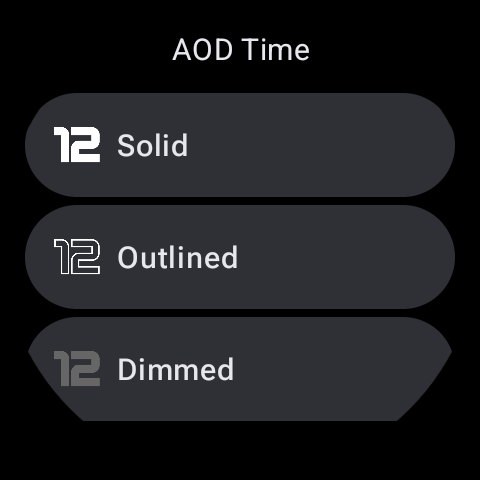
- 3x Always-On Display styles (Solid, outlined, dimmed)
- Designed for Wear OS device with Watch Face Format
CUSTOMIZABLE COMPLICATIONS:
- SHORT_TEXT complication (Step count, heart rate, weather, and more)
- MONOCHROMATIC_IMAGE/SMALL_IMAGE complication (App shortcuts)
- RANGED_VALUE complication (Battery and more)
INSTALLATION:
- Connect your watch device to the phone
- On the Play Store app, select your watch device from the install drop-down button. Then tap install.
- After a few minutes the watch face will be installed on your watch device
- You can also install directly to watch device via on-watch Play Store or mobile browser Play Store using search function with "Black Face watch face" keyword between quotation mark.
* Customizable complications data depends on your installed applications and watch manufacturer software.
BLACK FACE FEATURES:
- Easy to read digital time display
- Customizable complications *
- Customizable app shortcut
- Multiple color options
- High resolution
- 12/24 hours mode based on device settings
- Show/hide seconds indicator
- AM/PM marker
- Date
- Battery information
- 3x Always-On Display styles (Solid, outlined, dimmed)
- Designed for Wear OS device with Watch Face Format
CUSTOMIZABLE COMPLICATIONS:
- SHORT_TEXT complication (Step count, heart rate, weather, and more)
- MONOCHROMATIC_IMAGE/SMALL_IMAGE complication (App shortcuts)
- RANGED_VALUE complication (Battery and more)
INSTALLATION:
- Connect your watch device to the phone
- On the Play Store app, select your watch device from the install drop-down button. Then tap install.
- After a few minutes the watch face will be installed on your watch device
- You can also install directly to watch device via on-watch Play Store or mobile browser Play Store using search function with "Black Face watch face" keyword between quotation mark.
* Customizable complications data depends on your installed applications and watch manufacturer software.
Thông tin ứng dụng
Quyền ứng dụng
-
Other
- Google Play license check

Đánh giá và nhận xét
0.0
Tổng số đánh giá
5
4
3
2
1
J
Jas Barard
Jan 16, 2026
In my life seconds are part of time. On this watch face seconds blend beautifully with minutes and hours.


