

Flip Clock Weather Watch Face
Personalization
0.0
432 下載次數
"A digital watch face for Wear OS with weather reports"
在 Google Play 上安裝
付費應用




關於此應用
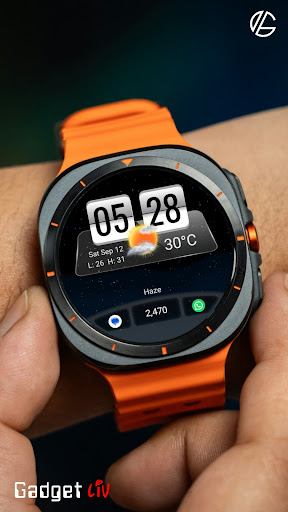
Flip Clock 2 is a digital watch face based on a classic flip clock style, combined with current weather and everyday information.
The watch face shows time, date, step count, and current weather conditions with large, realistic icons that update throughout the day. Everything is designed to stay clear at a glance without adding clutter.
You can switch between light and dark themes, choose from available wallpapers, and set up shortcuts or complications for quick access to the things you use most.
✨ Key Features
- Current weather with realistic, changing icons
- Displays weather conditions and temperature
- Light and dark theme support
- 5+ AMOLED-friendly wallpapers
- 3+ glass styles
- 3+ dock styles
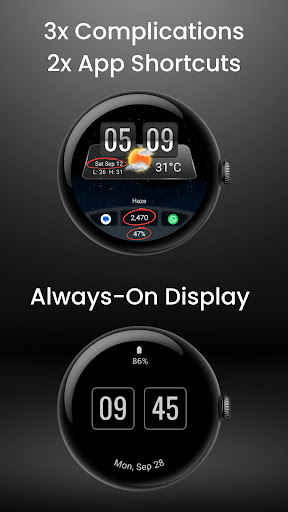
- 3 customizable complications
- 2 custom app shortcuts
- Always-on display optimized for battery life
- Supports 12-hour and 24-hour formats
☀️ IMPORTANT: If the weather doesn't update:
1. Try switching between watch faces
2. Open the default 'Weather' app on your watch and enable location permission.
3. Ensure location access is set to "Always Allow" for both the watch face and the weather provider.
4. Check that Location (GPS) is toggled ON in both the watch and the paired smartphone settings.
5. Turn off battery Power Saving mode to allow background data sync.
⚠️ Compatibility
This watch face is designed for smartwatches running Wear OS 5 or newer, built using the latest Watch Face Format.
Compatible devices include:
- Samsung Galaxy Watch Series (including Classic and Ultra models)
- Google Pixel Watch Series
- Other smartwatch brands running Wear OS 5 or newer
Contact Us
If you have questions or feedback, feel free to contact me at [email protected] for support.
The watch face shows time, date, step count, and current weather conditions with large, realistic icons that update throughout the day. Everything is designed to stay clear at a glance without adding clutter.
You can switch between light and dark themes, choose from available wallpapers, and set up shortcuts or complications for quick access to the things you use most.
✨ Key Features
- Current weather with realistic, changing icons
- Displays weather conditions and temperature
- Light and dark theme support
- 5+ AMOLED-friendly wallpapers
- 3+ glass styles
- 3+ dock styles
- 3 customizable complications
- 2 custom app shortcuts
- Always-on display optimized for battery life
- Supports 12-hour and 24-hour formats
☀️ IMPORTANT: If the weather doesn't update:
1. Try switching between watch faces
2. Open the default 'Weather' app on your watch and enable location permission.
3. Ensure location access is set to "Always Allow" for both the watch face and the weather provider.
4. Check that Location (GPS) is toggled ON in both the watch and the paired smartphone settings.
5. Turn off battery Power Saving mode to allow background data sync.
⚠️ Compatibility
This watch face is designed for smartwatches running Wear OS 5 or newer, built using the latest Watch Face Format.
Compatible devices include:
- Samsung Galaxy Watch Series (including Classic and Ultra models)
- Google Pixel Watch Series
- Other smartwatch brands running Wear OS 5 or newer
Contact Us
If you have questions or feedback, feel free to contact me at [email protected] for support.
應用資訊
新功能
- Updated images based on recent watch face design changes
應用權限
-
Other
- full network access
- prevent device from sleeping
- Google Play license check

評分與評論
0.0
總評分
5
4
3
2
1
V
Vladimir Radjenovic
Oct 02, 2026
Good watch face. The only remark is it keeps to display weather in F°, no way to customize it.Watch model is Xiaomi watch 5, and it follows unit from Mi fitness app, where I set unit to C°.
E
Erik Tsyhankov
Jul 10, 2026
The date always shows June 30. The developer has fixed it


