

UsA Scalar Watch Face - USA103
Personalization
4.3
3.7K+ 下載次數
"Unique Circular Digital with Analog Movement for Wear OS Watch"
在 Google Play 上安裝
付費應用




關於此應用
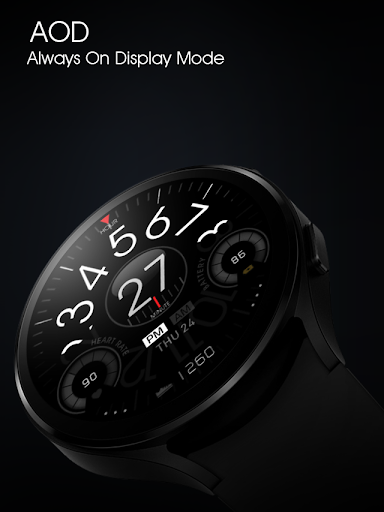
Unique design combines analog with digital for Wear OS watch. The hour top section is a circular analog showing time, you can read the minute digital in the center. And also a digital second at the bottom. The time is available only in 12-hour mode.
This watch face requires Wear OS API 33+ (Wear OS 4 or newer). Compatible with Galaxy Watch 4/5/6/7/8 Series and newer, Pixel Watch series and other watch face with Wear OS 4 or newer.
Make sure you are purchasing using the same Google account registered on your watch. The installation should begin automatically on the watch after a few moments.
After the installation is completed on your watch, do these steps to open the watch face on your watch :
1. Open the watch face list on your watch (tap and hold the current watch face)
2. Scroll to the right and tap "add watch face"
3. Scroll down and find new installed watch face in the "downloaded" section
Packed with multiple colors combination between hour display and minute display through the "customize" menu.
Tap and hold the watch face and go to the "customize" menu (or settings icon under the watch face) to change the styles and also manage the custom shortcut complication.
The heart rate synced with S-Health data and you can change the reading interval setting on the S-Health HR setting. Make sure to allow "sensor" permission to be able showing the heart rate.
Special designed Always On Display ambient mode. Turn on the Always On Display mode on your watch settings to show a low power display on idle. Please be aware, this feature will use more batteries.
Join our Telegram group for live support and discussion
https://t.me/usadesignwatchface
This watch face requires Wear OS API 33+ (Wear OS 4 or newer). Compatible with Galaxy Watch 4/5/6/7/8 Series and newer, Pixel Watch series and other watch face with Wear OS 4 or newer.
Make sure you are purchasing using the same Google account registered on your watch. The installation should begin automatically on the watch after a few moments.
After the installation is completed on your watch, do these steps to open the watch face on your watch :
1. Open the watch face list on your watch (tap and hold the current watch face)
2. Scroll to the right and tap "add watch face"
3. Scroll down and find new installed watch face in the "downloaded" section
Packed with multiple colors combination between hour display and minute display through the "customize" menu.
Tap and hold the watch face and go to the "customize" menu (or settings icon under the watch face) to change the styles and also manage the custom shortcut complication.
The heart rate synced with S-Health data and you can change the reading interval setting on the S-Health HR setting. Make sure to allow "sensor" permission to be able showing the heart rate.
Special designed Always On Display ambient mode. Turn on the Always On Display mode on your watch settings to show a low power display on idle. Please be aware, this feature will use more batteries.
Join our Telegram group for live support and discussion
https://t.me/usadesignwatchface
應用資訊
新功能
Wear OS 5 (GW7 and Pixel Watch 3 series) now supported
評分與評論
4.3
總評分
5
4
3
2
1
T
Tim Han
Jan 14, 2026
looks great on my galaxy watch 8.
J
Jessie Whiley
Oct 01, 2024
Surely it doesn't take half a year to update a watchface. I'll never support this dev again.
S
Scott Davis
Sep 18, 2024
great watch face was my everyday face for a long time. But will not work on my new galaxy watch ultra hope it gets updated.
A
Adam Gordon
Nov 09, 2023
Daily driver. Shows what I want to see and the customization options are nice
G
Greg Meadows (koldmiser)
May 02, 2023
Love it. Just wish it had a 24hr option.
E
Evan Thomas
Dec 25, 2022
Looks cool
相似應用

OMG 407 - Minimal Watch Face
OMG Watch Faces™
0.0

Casual Complex Watch Face
Turcu Radu
0.0

Overlapp Turntable ZKin Watch
ZKin
0.0

UsA ScalarX Premium - USA140
USA Design Watch Face
4.3

HMK WD013
HMKWatch
0.0

UsA Scalar Black - USA104
USA Design Watch Face
4.1
開發者的更多應用

UsA Gear X Animated - USA193
USA Design Watch Face
0.0

UsA Butter Three Anim - USA192
USA Design Watch Face
0.0

UsA Butter Two Anim - USA191
USA Design Watch Face
5.0

UsA Doodle 2 Animated - USA190
USA Design Watch Face
4.9

UsA Flip Watch Face - USA189
USA Design Watch Face
4.8

UsA Doodle Animated - USA188
USA Design Watch Face
4.7