

Inku: Smart AI Calendar
Productivity




عن هذا التطبيق
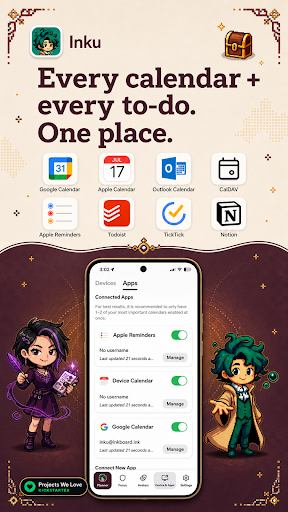
Bring your calendars, tasks and reminders into one clear view. Inku helps you see what comes next, make room for focused work and notice when a quick scroll turns into a long one.
YOUR DAY IN ONE PLACE
Connect your existing calendars and supported task services. Keep meetings, appointments and to-dos together instead of switching between apps. Use home screen widgets to keep your plans visible.
SCROLL LESS, MAKE ROOM FOR YOUR DAY
Turn on the optional Doomscroll Tracker to count short videos in supported apps, including Instagram, YouTube, TikTok, Facebook and Snapchat. See a floating counter and your companion's changing appearance as your count grows. Review your scrolling patterns in charts.
Set a daily video limit and enable automatic pauses. When you reach your limit, Inku interrupts the scroll with a pause screen, including a pixel garden that invites you to stop and breathe. You set it up once; Inku steps in when you reach the limit.
PROTECT YOUR FOCUS
Choose the distracting apps you want to block during a focus session. Use focus sessions and recurring routines to make time for work, study or a break from your phone.
AI SUMMARIES AND A LITTLE PERSONALITY
Read the essentials of your events without digging through every detail. Get personalized commentary from your companion, and choose themes and avatars that make your planner feel like yours.
A CLEARER START
If you lose track of time, underestimate tasks or feel stuck in front of a long to-do list, start with a clearer view of today. Inku is also for people looking for an ADHD-friendly planner.
The full Inku experience requires a subscription or trial.
ANDROID ACCESSIBILITY SERVICE
With your permission, Inku uses the AccessibilityService API to detect when you open an app you selected to block during a focus session and show a blocking screen. If you enable the Doomscroll Tracker, it also reads on-screen labels in the supported short-video apps to count videos. This tracking data stays on your device. You can turn off the tracker and revoke accessibility access in Android settings.
Privacy policy: https://inkboard.ink/policies/privacy-policy
Terms of service: https://inkboard.ink/policies/terms-of-service
معلومات التطبيق
ما الجديد
🔓 Easier Focus setup: Focus and the Doomscroll Tracker now need only the Accessibility permission.
📅 Clearer event conflicts: Events that overlap now show as one conflict, even when they come from more than one calendar.
أذونات التطبيق
-
Calendar
- read calendar events plus confidential information
- add or modify calendar events and send email to guests without owners' knowledge
-
Location
- approximate location (network-based)
- precise location (GPS and network-based)
-
Photos/Media/Files
- read the contents of your USB storage
- modify or delete the contents of your USB storage
-
Storage
- read the contents of your USB storage
- modify or delete the contents of your USB storage
-
Camera
- take pictures and videos
-
Microphone
- record audio
-
Wi-Fi connection information
- view Wi-Fi connections
-
Other
- update component usage statistics
- receive data from Internet
- view network connections
- pair with Bluetooth devices
- access Bluetooth settings
- full network access
- change your audio settings
- run at startup
- draw over other apps
- control vibration
- prevent device from sleeping
- Google Play license check


التقييمات والمراجعات
I am enjoying the app very much. It is helping me stay organized and motivated. It keeps my calender and schedule fun which helps keep me motivated to use a planner.
As a kickstarter backer I have to say, so far my experience has been pretty meh. I keep having issues with the focus time (trying to keep myself off my phone during the day) and then while I have the actual device, I'd rather use the app because the battery is atrocious! Everytime I turn around its dead and needs a charge. I charged it last night and it already lost 20% over morning! 😵💫 But I'm also going to agree with other people (since I got my friends to get the app) its money hungry.
This app is amazing! I now have all my calendar events and reminders and tasks, via TickTick, in one place! Absolutely magical!
a great app, but couldn't explore without paying up front. I really need to see all the features before paying for another app.
I am not sure how much it is helpful, just know that I spent too long setting it up and then uninstalling because of constant prompts to pay for something extra. (gives me the vibe of "free" pay-to-win games...)
slow and glitchy constantly asks for money