

h1903 Vienna Digital Dashboard
Personalization
0.0
0 Downloads
"Bold digital watch face: steps, heart rate, battery, calendar & complications"
Auf Google Play installieren
Kostenpflichtige App


Über diese App
⌚ h1903 Vienna Digital Dashboard Watch Face
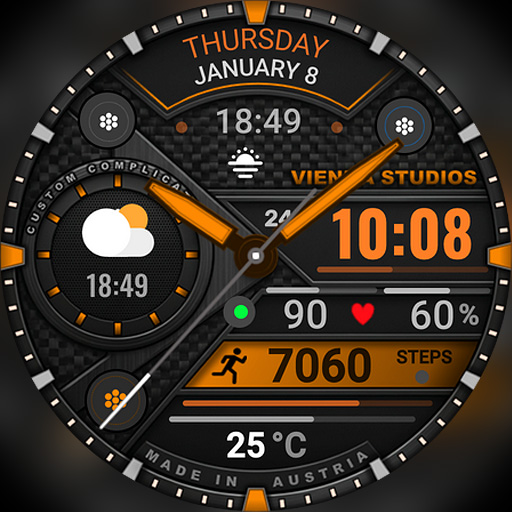
Bold, colorful and full of information! h1903 is a sporty digital watch face for Wear OS with a large, easy-to-read time, a mechanical gear-style design and a segmented battery bezel. Steps, heart rate, temperature, date and battery are all on one screen – plus two customizable complications, for example your next calendar event and sunset time. Designed and made in Austria by Vienna Studios.
⌚ Features
- Large digital time with seconds
- 12h / 24h format with AM/PM (follows your phone settings)
- Day of the week, month and date
- Daily step counter
- Heart rate (BPM) with an animated beating heart
- Current temperature
- Watch battery level (%) with a segmented battery bezel
- Steps, heart rate and temperature in round gauge design
- Subtle micro animations: beating heart and a gently moving accent below the info line
🧩 Complications & shortcuts
- 2 customizable complications:
– Center slot (default: sunrise / sunset)
– Wide text line (default: next calendar event)
- Possible data, e.g. next calendar event, sunrise / sunset, weather, date, world clock, alarm, timer, battery, steps or heart rate
- Available options depend on your watch model, software version and installed apps
- 2 app shortcuts – open your favorite apps with one tap
🎨 Customization
- 20+ color combinations, e.g. orange, yellow-green, rainbow, red, pink, purple, blue, cyan, green and silver
- Battery bezel colors: orange, blue, gray, white or a red-orange-green gradient
- Touch and hold the watch face, then tap "Customize"
🌦️ Temperature or weather not showing or not updating?
1. Make sure location is enabled on your phone and watch.
2. Open the Weather app on your watch and refresh it (e.g. tap "Last updated" or pull down).
3. Switch to another watch face for a few seconds, then switch back – this often refreshes the weather data.
4. Wait a few minutes for the data to sync.
❤️ Heart rate not showing?
Allow the "Sensors / Body sensors" permission when asked, and check that heart rate measuring is turned on in your health app (e.g. Samsung Health).
📅 Calendar event not showing?
Make sure your watch has a calendar app with synced events and allow the calendar permission when asked. You can also choose another complication for the text line.
📲 How to install
1. Make sure your watch is connected to your phone (Galaxy Wearable or Pixel Watch app) and uses the same Google account.
2. On your phone, open the Play Store, tap the arrow next to "Install" and select your watch.
3. Or open the Play Store directly on your watch and search for "h1903".
4. After installation, touch and hold your current watch face, swipe to the end, tap "+" and select h1903.
Tip: It can take a few minutes until the watch face appears on your watch.
⌚ Supported devices
Compatible with all Wear OS 5+ smartwatches (API level 34+), including:
- Samsung Galaxy Watch 4, 5, 6, 7, 8, Classic and Ultra series
- Google Pixel Watch 1, 2, 3 and 4
- Other Wear OS 5+ watches
Not compatible with Tizen (Galaxy Watch 3 or older) or Apple Watch.
💬 Support
Questions or problems? Please write to us before leaving a review – we are happy to help!
📩 [email protected]
🌐 www.viennastudios.com
💛 Thank you for choosing Happy Watch Faces by Vienna Studios!
We hope this design brightens your day and your wrist 😊
Bold, colorful and full of information! h1903 is a sporty digital watch face for Wear OS with a large, easy-to-read time, a mechanical gear-style design and a segmented battery bezel. Steps, heart rate, temperature, date and battery are all on one screen – plus two customizable complications, for example your next calendar event and sunset time. Designed and made in Austria by Vienna Studios.
⌚ Features
- Large digital time with seconds
- 12h / 24h format with AM/PM (follows your phone settings)
- Day of the week, month and date
- Daily step counter
- Heart rate (BPM) with an animated beating heart
- Current temperature
- Watch battery level (%) with a segmented battery bezel
- Steps, heart rate and temperature in round gauge design
- Subtle micro animations: beating heart and a gently moving accent below the info line
🧩 Complications & shortcuts
- 2 customizable complications:
– Center slot (default: sunrise / sunset)
– Wide text line (default: next calendar event)
- Possible data, e.g. next calendar event, sunrise / sunset, weather, date, world clock, alarm, timer, battery, steps or heart rate
- Available options depend on your watch model, software version and installed apps
- 2 app shortcuts – open your favorite apps with one tap
🎨 Customization
- 20+ color combinations, e.g. orange, yellow-green, rainbow, red, pink, purple, blue, cyan, green and silver
- Battery bezel colors: orange, blue, gray, white or a red-orange-green gradient
- Touch and hold the watch face, then tap "Customize"
🌦️ Temperature or weather not showing or not updating?
1. Make sure location is enabled on your phone and watch.
2. Open the Weather app on your watch and refresh it (e.g. tap "Last updated" or pull down).
3. Switch to another watch face for a few seconds, then switch back – this often refreshes the weather data.
4. Wait a few minutes for the data to sync.
❤️ Heart rate not showing?
Allow the "Sensors / Body sensors" permission when asked, and check that heart rate measuring is turned on in your health app (e.g. Samsung Health).
📅 Calendar event not showing?
Make sure your watch has a calendar app with synced events and allow the calendar permission when asked. You can also choose another complication for the text line.
📲 How to install
1. Make sure your watch is connected to your phone (Galaxy Wearable or Pixel Watch app) and uses the same Google account.
2. On your phone, open the Play Store, tap the arrow next to "Install" and select your watch.
3. Or open the Play Store directly on your watch and search for "h1903".
4. After installation, touch and hold your current watch face, swipe to the end, tap "+" and select h1903.
Tip: It can take a few minutes until the watch face appears on your watch.
⌚ Supported devices
Compatible with all Wear OS 5+ smartwatches (API level 34+), including:
- Samsung Galaxy Watch 4, 5, 6, 7, 8, Classic and Ultra series
- Google Pixel Watch 1, 2, 3 and 4
- Other Wear OS 5+ watches
Not compatible with Tizen (Galaxy Watch 3 or older) or Apple Watch.
💬 Support
Questions or problems? Please write to us before leaving a review – we are happy to help!
📩 [email protected]
🌐 www.viennastudios.com
💛 Thank you for choosing Happy Watch Faces by Vienna Studios!
We hope this design brightens your day and your wrist 😊
App-Infos
Version
Aktualisiert am
N/A
Größe
Erfordert Android
Paket-ID
com.AAA.h1903
Installationen
0
Kategorie
Personalization
App-Berechtigungen
-
Other
- control vibration
- Google Play license check

Mehr vom Entwickler

h1503 Cool Animated Watch Face
Happy Watch Faces
4.3

h601 Gradient Watch Face
Happy Watch Faces
3.9

h013 Butterfly Digital Watch
Happy Watch Faces
3.4
h1903 Vienna Digital Dashboard
Happy Watch Faces
0.0
h1902 Vienna Hybrid Dashboard
Happy Watch Faces
5.0

h1901 Sport Dashboard Face
Happy Watch Faces
5.0