

Chester Smart Grid
Personalization
0.0
153 Downloads
"Smart digital Wear OS watch face with weather, AOD and widgets."
Auf Google Play installieren
Kostenpflichtige App



Über diese App
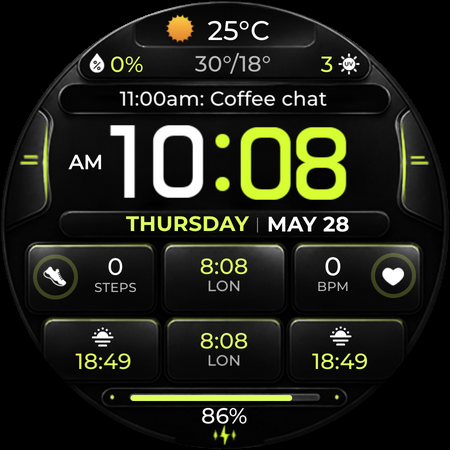
Chester Smart Grid is a premium digital watch face for Wear OS, created for users who want a modern, informative and fully customizable smartwatch screen.
This Wear OS watch face features a bold digital clock, detailed weather, fitness data and a clean smart grid layout. All essential information is easy to read at a glance, making it perfect for everyday use, workouts, travel and productivity.
Customize your smartwatch with **24 color themes** and choose the style that matches your mood, outfit or watch band. Chester Smart Grid also includes **4 Always-On Display styles**, designed to keep important information visible while staying battery-friendly.
With **5 custom complication zones**, you can choose the data that matters most: calendar events, second time zone, distance, air pressure, floors climbed and other Wear OS complications.
**Key features:**
* Premium digital Wear OS watch face
* Modern smart grid design
* Large readable digital clock
* 24 color themes
* 5 custom complication zones
* 4 AOD styles
* Detailed weather
* Current temperature, high / low forecast
* Rain chance and UV index
* Steps, heart rate and battery status
* Second time zone support
* Fully customizable layout
* Compatible with Wear OS 6+
Chester Smart Grid is designed for Samsung Galaxy Watch 5 Pro / 6 / 6 Classic / 7 / 8 / 8 Classic / 9, Galaxy Watch Ultra / Ultra 2, Pixel Watch 2 / 3 / 4 / 5 and other Wear OS smartwatches.
Upgrade your smartwatch with a modern, sporty and informative Wear OS watch face. Chester Smart Grid keeps your essential data visible and gives your watch a premium digital look.
App-Infos
Version
Aktualisiert am
Nov 05, 2026
Größe
Erfordert Android
Paket-ID
com.watchfacestudio.chestersmartgrid
Installationen
153
Kategorie
Personalization
Was gibt's Neues
Companion app. Wear OS 6+
App-Berechtigungen
-
Other
- full network access

Bewertungen
0.0
Gesamtbewertungen
5
4
3
2
1
C
Cullen Kau
Nov 04, 2026
Great looking watch face but I was dispointed that there was not a distance tile like in the sample photos shown below the steps tile. It even is listed as number 3 of the 5 custom complication zones. Am I missing how to change the complication zone?


