

Ava: Transcribe Voice to Text
Health & Fitness
4.1
61.7K+ Downloads
"Live captions: caption calls, live videos, podcasts, & more!"


Über diese App
Live captions for Deaf and hard-of-hearing people. Ava breaks down communication barriers between Deaf and hearing worlds with total access to real-time conversations, ensuring 24/7 accessibility.
Ava’s speech-to-text app provides 24/7 real-time audio transcription with 90% accuracy based on AI with up to 99% accuracy with Ava Scribe.
Use Ava to transcribe or live caption voice-to-text for classrooms, business meetings, doctor’s appointments, shopping, events, and more. Ava’s speech-to-text app makes transcribing any live communication easy for friends, family, and organizations to be inclusive, accessible, and ADA-compliant!
Why Ava?
• Live Captions, 24/7 🗯️ Ava uses your smartphone’s mic to transcribe voice-to-text so you have live captions, in your pocket – it’s always available, anytime, anywhere.
• Use voice to text 📣 Simply type what you want to say, and have Ava read it out loud for you.
• Works with any app 📱Never miss out on podcasts or live videos with the ability to have Ava’s captions overlay any app.
• No Wi-Fi? No Problem 🛜 Your captions are always available, with our without phone service or WiFi - Ava works on airplane mode.
• Available on Mobile & Desktop 💻 Paired with Ava for Web, you can use Ava on your phone or computer, which is perfect for online meetings or hybrid classes using any videoconferencing service including Zoom, Microsoft Teams, and Google Meet.
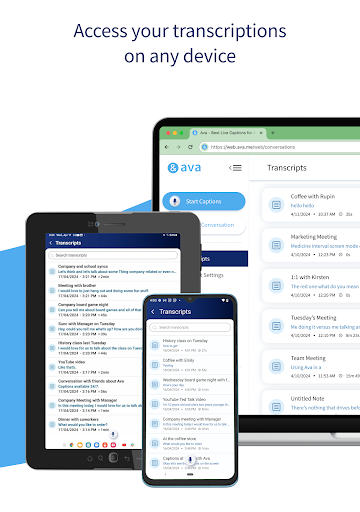
• Transcripts are saved in the cloud ☁️ Use this Ava mobile app along with Ava Web and Desktop App where all your transcriptions are available on any device.
How Ava works:
• Download Ava on your phone to instantly transcribe voice-to-text from up to a meter away.
• Teach Ava to improve and learn your vocabulary as it transcribes voice to text by tapping on words to correct them or adding your custom vocabulary.
• Need accessibility for people who are hard-of-hearing or Deaf in more complex situations? Use the ‘Discover’ menu to learn how to set up Ava to live caption voice-to-text in any situation!
Questions? Contact us!
Chat with our trusty customer support team through email at [email protected]!
Use Ava on the web at ava.me
ava.me/privacy
ava.me/terms
Ava’s speech-to-text app provides 24/7 real-time audio transcription with 90% accuracy based on AI with up to 99% accuracy with Ava Scribe.
Use Ava to transcribe or live caption voice-to-text for classrooms, business meetings, doctor’s appointments, shopping, events, and more. Ava’s speech-to-text app makes transcribing any live communication easy for friends, family, and organizations to be inclusive, accessible, and ADA-compliant!
Why Ava?
• Live Captions, 24/7 🗯️ Ava uses your smartphone’s mic to transcribe voice-to-text so you have live captions, in your pocket – it’s always available, anytime, anywhere.
• Use voice to text 📣 Simply type what you want to say, and have Ava read it out loud for you.
• Works with any app 📱Never miss out on podcasts or live videos with the ability to have Ava’s captions overlay any app.
• No Wi-Fi? No Problem 🛜 Your captions are always available, with our without phone service or WiFi - Ava works on airplane mode.
• Available on Mobile & Desktop 💻 Paired with Ava for Web, you can use Ava on your phone or computer, which is perfect for online meetings or hybrid classes using any videoconferencing service including Zoom, Microsoft Teams, and Google Meet.
• Transcripts are saved in the cloud ☁️ Use this Ava mobile app along with Ava Web and Desktop App where all your transcriptions are available on any device.
How Ava works:
• Download Ava on your phone to instantly transcribe voice-to-text from up to a meter away.
• Teach Ava to improve and learn your vocabulary as it transcribes voice to text by tapping on words to correct them or adding your custom vocabulary.
• Need accessibility for people who are hard-of-hearing or Deaf in more complex situations? Use the ‘Discover’ menu to learn how to set up Ava to live caption voice-to-text in any situation!
Questions? Contact us!
Chat with our trusty customer support team through email at [email protected]!
Use Ava on the web at ava.me
ava.me/privacy
ava.me/terms
App-Infos
Version
2.3.2
Aktualisiert am
Aug 31, 2026
Größe
Erfordert Android
9
Paket-ID
me.ava.android
Installationen
61.7K+
Kategorie
Health & Fitness
Was gibt's Neues
With this release, we fixed minor bugs and enhanced overall app performance so you can enjoy a better captioning experience!
App-Berechtigungen
-
Photos/Media/Files
- read the contents of your USB storage
- modify or delete the contents of your USB storage
-
Storage
- read the contents of your USB storage
- modify or delete the contents of your USB storage
-
Microphone
- record audio
-
Other
- receive data from Internet
- view network connections
- change network connectivity
- full network access
- change your audio settings
- run at startup
- control vibration
- prevent device from sleeping
- read Google service configuration


Bewertungen
4.1
Gesamtbewertungen
5
4
3
2
1
B
Bruce Armstrong
Sep 12, 2026
need an account.
M
Mel
Jul 04, 2026
interesting app with qua8ly voice recognition
s
samer halabi
Jun 24, 2026
add arabic language please
R
Ralph Malear
Jun 09, 2026
good
R
Rachel Hughes (Rae Rae)
Jun 01, 2026
it never gets my words right
G
Gary Schulte
May 07, 2026
Inaccurate transcribing. Not very helpful.