

ANIO watch
Parenting




About this app
Our specially developed Anio App is operated on our own, 100% data-secure and GDPR-compliant servers in Germany. It allows parents and other family members to locate the child/wearer's watch and communicate directly with them. The versatile functions of the Anio 6/Emporia Watch can be activated or deactivated according to age and desire to ensure the safety and privacy of your child.
Who should use the Anio App?
• Owners of an Anio Kids Smartwatch
• Owners of an Emporia Seniors Smartwatch
What can you do with the Anio App?
• With the Anio App, you can fully set up your Anio Kids Smartwatch or Emporia Seniors Smartwatch and adapt it to the wearer's needs.
• It allows you and your family to have safe and easy-to-use everyday communication within the family circle.
The most important functions of the Anio App:
Basic settings
Start your Anio/Emporia Smartwatch and adjust all the important settings needed for everyday use of the device.
Phonebook
Store contacts in your Anio or Emporia Smartwatches phonebook. The children's watch can only call the numbers you have stored and only these numbers can reach the watch as well – unknown callers are blocked for safety reasons.
Chat
Access the chat conveniently from the home screen of the Anio App. From there you can exchange text and voice messages as well as emojis with your child. This way, you can keep each other up to date when a call is not necessary.
Location/Geofences
The map view is the home screen of the Anio App. View the last location of your child/the wearer and request a new location if needed. With the geofence function, you can set up safe zones, such as your home or school area. Every time your child enters or leaves the geofence and a new location was detected, you will receive a push notification.
SOS Alarm
When your child presses the SOS button, the SOS number on file will automatically be called and receive a message with the last known GPS location of the smartwatch.
School/Rest mode
To avoid distraction in school or disturbing ringing during a concert, you can set individual times for the rest mode in the Anio App. During this time, the display of the watch is locked and incoming calls and messages are muted. You will still be able to read the clock, however other functions are put on hold.
School route times
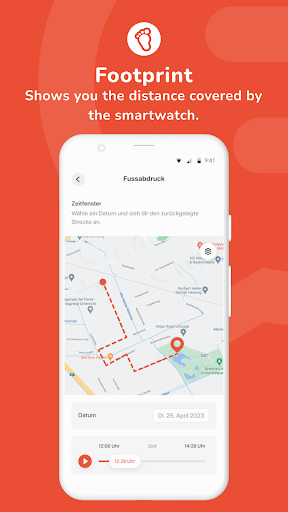
To be able to track the exact location history during the school route, you can set individual school route times in the Anio App. During these times, the watch locates itself as often as possible, so you can accurately track whether your child is taking the right way and arrives safely at school or soccer practice.
Download the ANIO Watch App now to discover these and many more features and get started with your smartwatch.
App Info
What's New
• New route button on the map: Send your child’s last known location to your maps app with a single tap and navigate straight there.
• More security: When signing in on a new device, you may now be asked for a confirmation code sent by email. Your login details are also stored even more securely.
• Plus fewer error messages, improved stability and more bug fixes.
Thanks for being with us!
App Permissions
-
Location
- approximate location (network-based)
- precise location (GPS and network-based)
-
Photos/Media/Files
- read the contents of your USB storage
- modify or delete the contents of your USB storage
-
Storage
- read the contents of your USB storage
- modify or delete the contents of your USB storage
-
Camera
- take pictures and videos
-
Microphone
- record audio
-
Other
- receive data from Internet
- view network connections
- full network access
- run at startup
- control vibration
- prevent device from sleeping
- Google Play license check


Ratings and Reviews
very slow tracking, weird control positioning, ut send you to the help articles when you click on the watch, very mediocre experience.
Absolute Trash app. Can't even add a clock to both parents accounts. That's very obvious functionality to add to the app. Not a fan of having to resort to password sharing, but don't even know if that would even work.
Terrible app. Footprint (location history) is hidden under the settings menu. theres no way to configure location period in minutes. just some predefined setting. watch claim to be able to count steps. it could send location when it detect movements and not when kid is sitting still in the class.
Be careful when traveling outside your country, watch can switch Service Providers. This could lead to braking the functionality of calls. Watch can be called, but can't call from watch itself. There are some other miner things.
If I'm in a different city, and trying to find my child, I will never find them because I've no clue where I AM atm, the map doesn't even show me my own location, that means I'd never even able to follow the road to my child if lost. To the team: Have you guys ever used any maps app before?? that beats the entire purpose of the map. it's REALLY NOT that hard to do. other features works really well and are super thought through.. I just wonder what they were thinking with the map.
Update ist nicht besser. SMS nicht mehr möglich, obwohl ich das oft verwendet hatte, wenn die Ihr mal wieder nicht reagiert, was oft vorkommt.