

Ruuvi Station
House & Home




About this app
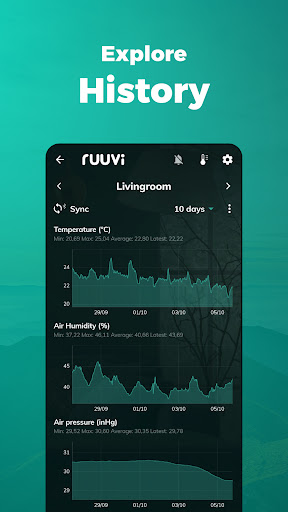
Ruuvi Station collects and visualises Ruuvi sensor data, such as temperature, relative air humidity, air pressure and movement from local Bluetooth Ruuvi sensors and Ruuvi Cloud. Additionally, Ruuvi Station allows you to manage your Ruuvi devices, set alerts, change background photos, and visualise the gathered sensor information through graphs.
How does it work?
Ruuvi sensors send tiny messages over Bluetooth, which can then be picked up by nearby mobile phones or specialised Ruuvi Gateway routers. Ruuvi Station mobile app enables you to collect and visualise this data on your mobile device. Ruuvi Gateway, on the other hand, routes the data over the internet not only to the mobile application but also to the browser application.
Ruuvi Gateway routes the sensor measurement data directly to the Ruuvi Cloud cloud service, which enables you to build a complete remote monitoring solution including remote alerts, sensor sharing and history in Ruuvi Cloud – all available within the Ruuvi Station app! Ruuvi Cloud users can view longer measurement history by using the browser application.
Use our customisable Ruuvi mobile widgets alongside the Ruuvi Station app when data is fetched from Ruuvi Cloud to view selected sensor data at a glance.
Above features are available to you if you are a Ruuvi Gateway owner or have received a shared sensor to your free Ruuvi Cloud account.
To use the app, get Ruuvi sensors from our official website: ruuvi.com
App Info
What's New
* Redesigned Sensor Settings for clearer, easier navigation
* Sensor notes available on Sensor Settings page
* Improved sensor sorting, including natural ordering of numbered sensor names
* Expanded manual alert ranges for CO₂ and PM measurements
* Improved alert reliability, cloud synchronization, firmware update information, and Bluetooth prompts
* Other minor bug fixes and improvements
App Permissions
-
Location
- approximate location (network-based)
- precise location (GPS and network-based)
-
Other
- receive data from Internet
- view network connections
- pair with Bluetooth devices
- access Bluetooth settings
- full network access
- control Near Field Communication
- run at startup
- control vibration
- prevent device from sleeping


Ratings and Reviews
RuuviTag Pro (2 in 1). BT range is max 10m. Useless because of this. Tested with two phones. Am I missing something??? Edit after response: This was outside, with a clear line of sight. I now managed to get 20m. But still this is far below what was promised.
Not even the sensor gives useful data, really bad product
Lightning fast onboarding experience! Kudos to the UX team!
on todella huono uudistus että viivaa ei piirretä kundataa puuttu..pitäisi olla ainakin mahdollisuus itse valita haluaako vai ei. luettavuus mennyt huonompaa suuntaa ->History readability improved when there are no recorded datapoints in chart
This app helps me monitor the humidity of my guitar cases easily. The app comes with a widget that I can use to check those humidities from my home screen, which is really nice.
Right.... before the "improvement" update I could see the whole situation of a sensor with 1 glimpse. Now info is shown only in multiscreen which is useless slide-thisway-thatway-and-then-restart-concoction. If you insist on doing questionable changes, please at least make them optional. ... and you still have not included the 'Read Data From ALL Sensors' button...