

Listen AI: Text to Speech
Productivity
4.4
7.1M+ Descargas
"Read Aloud Any Text, PDF or Doc. AI Text to Speech, Voice & Podcast Maker"



Acerca de esta app
✨ Listen AI: Text to Speech & Read Aloud
Join more than 12 million people who use Listen AI, the text to speech app that reads aloud any PDF, document, book, or article in a natural voice. Give your eyes a rest and let this text to speech reader turn anything you read into audio you can listen to anywhere. Searching for an app that can read to me, read for me, or read out loud? Listen AI is the text to speech and read aloud app that does it all.
🎧 Premium Natural Voices in 60+ Languages
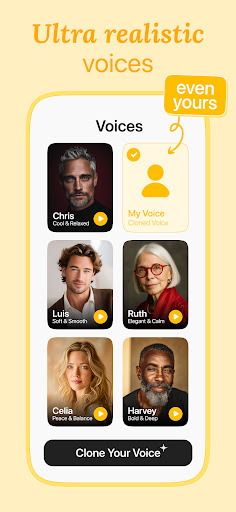
Listen AI uses premium text to speech technology for human-like narration that never sounds robotic. Choose from premium, high-quality natural voices and listen in more than 60 languages and accents. Use it as your everyday voice reader, text reader, and audiobook maker, and pick your favorite narrator voice for a realistic, natural reading experience.
🗣️ Voice Cloning: Make It Your Own Voice
Listen AI goes beyond standard text to speech and text to voice with voice cloning. Create your own AI voice and add it to your library, so you are never limited to a fixed set of voices. Have any text read aloud in a voice you choose. It is text to voice, your way.
🎙️ AI Podcast Generator
Turn anything into a podcast in seconds. Use the Listen AI podcast maker to transform study notes, articles, or a simple prompt into an engaging audio show. No mic and no editing. Our AI podcast generator does the rest.
📂 Read Aloud PDFs, Books & Documents
Listen AI is your all-in-one PDF reader and audio reader. Tap once and the app will read documents out loud so you review them hands-free:
- PDF files, eBooks and ePub
- Word documents and reports
- Academic papers and study notes
Upload a file and let Listen AI read your documents aloud instantly.
🌐 Read Web Pages & Articles Out Loud
The built-in web reader lets you read web pages out loud and read websites, news, and articles to you while you commute or multitask. Just paste a link and listen.
📸 Scan & Read Aloud
Use the camera scanner to capture printed books and pages. Our picture to speech feature digitizes the text so the app can read it aloud to you on the go.
📱 Read Aloud Widget
Add the Listen AI widget to your home screen and start listening in one tap. The widget keeps your text to speech reader and audio library right where you need them.
🌟 Read Aloud for Dyslexia & ADHD
Listen AI is a supportive read aloud app for dyslexia, ADHD, and low vision. Word highlighting and adjustable speed up to 3x help you follow along, reduce eye strain, and understand content more easily.
💾 Export & Listen Offline
Convert any text to an MP3 audio file and build your own audio library. Listen on flights or anywhere without internet.
Listen AI is perfect for:
- Students: listen to textbooks, academic papers, and study notes.
- Commuters: let the app read the news and articles to you on the train.
- Professionals: multitask while Listen AI reads reports and documents aloud.
- Creators: clone a voice and generate voiceovers and AI podcasts instantly.
- Accessibility: read aloud support for the low-vision and dyslexia community.
📲 Download Listen AI, the text to speech and read aloud app that reads to you!
Join more than 12 million people who use Listen AI, the text to speech app that reads aloud any PDF, document, book, or article in a natural voice. Give your eyes a rest and let this text to speech reader turn anything you read into audio you can listen to anywhere. Searching for an app that can read to me, read for me, or read out loud? Listen AI is the text to speech and read aloud app that does it all.
🎧 Premium Natural Voices in 60+ Languages
Listen AI uses premium text to speech technology for human-like narration that never sounds robotic. Choose from premium, high-quality natural voices and listen in more than 60 languages and accents. Use it as your everyday voice reader, text reader, and audiobook maker, and pick your favorite narrator voice for a realistic, natural reading experience.
🗣️ Voice Cloning: Make It Your Own Voice
Listen AI goes beyond standard text to speech and text to voice with voice cloning. Create your own AI voice and add it to your library, so you are never limited to a fixed set of voices. Have any text read aloud in a voice you choose. It is text to voice, your way.
🎙️ AI Podcast Generator
Turn anything into a podcast in seconds. Use the Listen AI podcast maker to transform study notes, articles, or a simple prompt into an engaging audio show. No mic and no editing. Our AI podcast generator does the rest.
📂 Read Aloud PDFs, Books & Documents
Listen AI is your all-in-one PDF reader and audio reader. Tap once and the app will read documents out loud so you review them hands-free:
- PDF files, eBooks and ePub
- Word documents and reports
- Academic papers and study notes
Upload a file and let Listen AI read your documents aloud instantly.
🌐 Read Web Pages & Articles Out Loud
The built-in web reader lets you read web pages out loud and read websites, news, and articles to you while you commute or multitask. Just paste a link and listen.
📸 Scan & Read Aloud
Use the camera scanner to capture printed books and pages. Our picture to speech feature digitizes the text so the app can read it aloud to you on the go.
📱 Read Aloud Widget
Add the Listen AI widget to your home screen and start listening in one tap. The widget keeps your text to speech reader and audio library right where you need them.
🌟 Read Aloud for Dyslexia & ADHD
Listen AI is a supportive read aloud app for dyslexia, ADHD, and low vision. Word highlighting and adjustable speed up to 3x help you follow along, reduce eye strain, and understand content more easily.
💾 Export & Listen Offline
Convert any text to an MP3 audio file and build your own audio library. Listen on flights or anywhere without internet.
Listen AI is perfect for:
- Students: listen to textbooks, academic papers, and study notes.
- Commuters: let the app read the news and articles to you on the train.
- Professionals: multitask while Listen AI reads reports and documents aloud.
- Creators: clone a voice and generate voiceovers and AI podcasts instantly.
- Accessibility: read aloud support for the low-vision and dyslexia community.
📲 Download Listen AI, the text to speech and read aloud app that reads to you!
Info de la App
Versión
2.6.0
Actualizado el
Oct 07, 2026
Tamaño
Requiere Android
7.0
ID del paquete
com.codespaceapps.listeningapp
Instalaciones
7.1M+
Categoría
Productivity
Novedades
Hi there!
In this update, we’ve fixed some bugs and enhanced the overall performance of the app.
We hope you enjoy using the Listen AI app!
In this update, we’ve fixed some bugs and enhanced the overall performance of the app.
We hope you enjoy using the Listen AI app!
Permisos de la aplicación
-
Photos/Media/Files
- read the contents of your USB storage
- modify or delete the contents of your USB storage
-
Storage
- read the contents of your USB storage
- modify or delete the contents of your USB storage
-
Camera
- take pictures and videos
-
Microphone
- record audio
-
Wi-Fi connection information
- view Wi-Fi connections
-
Other
- receive data from Internet
- view network connections
- full network access
- run at startup
- control vibration
- prevent device from sleeping
- Google Play license check
- read Google service configuration


Calificaciones y opiniones
4.4
Calificaciones totales
5
4
3
2
1
D
Diane
Oct 11, 2026
I'm learning to work this. So ai is working well. But the user error is on my part.
A
Ainomugisha Jolly
Oct 11, 2026
good
H
Hunter Deiderich
Oct 11, 2026
awesome really enjoyed it just take your time and let the AI tell you what to do and you may use another type of program to get it started but this is where you want to finish it for sure
k
kuukuwa ampah
Oct 10, 2026
I love it so far but I wish it included PowerPoint files as well
O
Owan Isaac
Oct 09, 2026
so good
C
Chance Demmon
Oct 08, 2026
when it works it works perfect and love it but it doesn't always work


