

IPEVO iDocCam
Education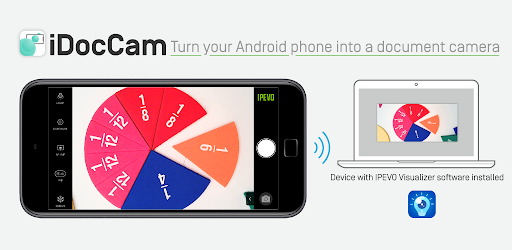


Acerca de esta app
To learn more about the features of IPEVO iDocCam App, please visit
https://www.ipevo.com/software/idoccam
There are 3 ways to use it:
1. Use iDocCam as a standalone app.
Use it as a standalone app to view and adjust live images captured by your phone's camera.
2. Using it with IPEVO Visualizer software
Install iDocCam on your phone. Next, install IPEVO Visualizer software on another device (Mac/PC/Chromebook/iOS & Android devices).
Then, connect your smartphone and your device to the same network and launch iDocCam and Visualizer respectively. After that, choose your smartphone as the camera source in Visualizer.
You’ll then be able to view the live images of your smartphone’s camera in Visualizer. You can then control and adjust the live images using Visualizer.
And if you connect your device to a projector, the live images will be projected onto a large screen, turning your smartphone into a document camera instantly.
3. Connecting it to an external display via HDMI/VGA, Chromecast, or Miracast
Before you start, please make sure your phone supports DisplayPort Alt Mode. Launch iDocCam on your Android phone.Then, connect your phone to an external display via HDMI/VGA (using a type-c to HDMI/VGA adapter). Alternatively, you can use Miracast, or Chromecast to connect your Android device to an external display wirelessly. Once connected, you can use the external display as an extended screen to project the live images of your phone’s camera.
#Basic
﹒Snapshot
﹒HDMI, VGA, Chromecast, and Miracast projection
﹒Full integration with IPEVO Visualizer & Virtual Camera
#Professional
All Features in Basic, plus
﹒High resolution video and image
﹒Customizable camera settings
﹒Reading filters
﹒Full screen controller
﹒Power save option
﹒On-Device video & Time-Lapse recording
﹒Voice control
﹒No watermark
# PRICE
Free Version - Free
Pro Version - $0.99/month or $9.99/year. Subscribe and get 1st month for free!"
Info de la App
Novedades
Permisos de la aplicación
-
Photos/Media/Files
- read the contents of your USB storage
- modify or delete the contents of your USB storage
-
Storage
- read the contents of your USB storage
- modify or delete the contents of your USB storage
-
Camera
- take pictures and videos
-
Microphone
- record audio
-
Wi-Fi connection information
- view Wi-Fi connections
-
Other
- receive data from Internet
- view network connections
- allow Wi-Fi Multicast reception
- full network access
- control vibration
- prevent device from sleeping


Calificaciones y opiniones
Low-Quality Camera Sharing. You have to pay to use a HD / Upgraded camera experience. Its better to start a Zoom call on each device and share the camera that way or use another software like OBS. Poor app UI, Lots of paid features. I do not recommend unless it is a last resort. * My device has a good camera and this app is the only one that it recieves issues. It clearly states in the app that unless you pay it will degrade your cameras quality. - Using a Galaxy S25 as a camera.
I didn't know I had subscribed, and am not sure if I've cancelled.
Too blurry to function well for me and my need.
You can't use the free version at all. Everything you attempt to do is for paid version. You should allow a trial before one decides whether to use it or not.
This is not a better than Iriun Webcam and that program is free. I love my Ipevo document cameras, but I'm not paying $10 a year for an inferior product though I might still buy the Ipevo phone stand.
Mavi


