

AirDroid Business Daemon
Business
4.4
92.4K+ Descargas
"AirDroid Business is an Android Mobile Device Management solution."



Acerca de esta app
AirDroid Business is an Android Mobile Device Management solution. It offers powerful capabilities of remote access and control, one-stop device and app management, data protection, device lockdown, device monitoring, location tracking, file management, user management, etc.
This app is not for standalone use and is a supporting application for AirDroid Business. You will need AirDroid Business Daemon installed on the device being managed.
More about AirDroid Business key features:
1. Encrypted Remote Access & Black Screen Mode
Securely remote access to attended and unattended devices and remotely control them. Simplify maintenance and allow using Black Screen Mode (a feature to make remote operation invisible and show a customized screen).
2. Centralized Management for Devices & Users
- Device group management
● Various options to deploy devices, such as Android Enterprise, auto-enrollment and KME.
● Enforce policies for batch configuration of devices.
- File management
- User management
- Reports for devices, data usage, apps, and user activities
3. Comprehensive App Management Services
Publish enterprise-owned apps handily based on the device group, type, location, and percentage. Directly managing and configuring apps from Google Play in the console is also available. More:
- Install/uninstall apps
- Auto/defer update
- Remote erase data and cache
4. Monitoring, Alerting & Automated Workflows
Monitor device conditions and receive in-time alerts. Set up self-running workflows to increase efficiency.
5. Kiosk Mode with Customizable Screen
Lockdown devices as kiosk-like machines. Limit user access to apps and websites with a branded layout.
- Single-app Kiosk Mode
- Multi-app Kiosk mode
- Kiosk Browser
6. Security
- Remote lock
- Remote wipe
- Policies for passwords, networks, external devices, and others
- Geo-tracking and alerts
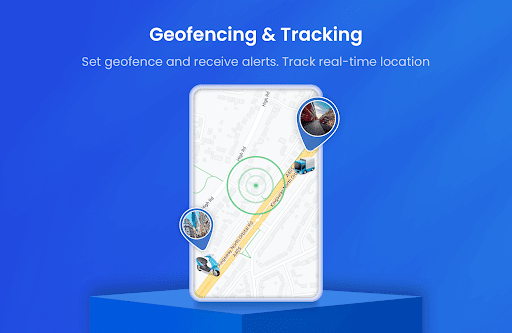
7. Geofencing & Tracking
Monitor and keep tracking device location. Set boundaries and get alert notifications.
How to use:
Using AirDroid Business for devices provisioned with Daemon, you need to log in to the admin console first. Please sign up for AirDroid Business to start.
1. Download AirDroid Business Daemon on managed devices.
2. Use AirDroid Business admin console to connect managed devices to your organization.
Installing this AirDroid Biz Daemon ,you will need to enable it through the Accessibility settings of your device.
By enabling this AirDroid Biz Daemon in the Accessibility settings, the following actions will be available:
- Enable the enterprise to remotely control your device
- Publish enterprise-owned apps to your device
You can visit the official website (https://www.airdroid.com/business/) and start a free trial.
Supported Devices: smartphones, tablets, smart TVs, kiosks, digital signage, POS, rugged devices, custom devices, and other devices that run Android OS.
Should you have any queries, please do not hesitate to contact AirDroid Business Team ([email protected]) or visit: https://www.airdroid.com/contact-us/.
Info de la App
Versión
1.5.6.0
Actualizado el
Nov 06, 2026
Tamaño
Requiere Android
7.0
ID del paquete
com.sand.airdroidbiz
Instalaciones
92.4K+
Categoría
Business
Novedades
1. Other minor improvements and bug fixes.
Permisos de la aplicación
-
Device & app history
- retrieve running apps
-
Identity
- find accounts on the device
- read your own contact card
-
Contacts
- find accounts on the device
- read your contacts
- modify your contacts
-
Location
- approximate location (network-based)
- precise location (GPS and network-based)
- access extra location provider commands
-
Phone
- directly call phone numbers
- reroute outgoing calls
- read call log
- read phone status and identity
-
Photos/Media/Files
- read the contents of your USB storage
- modify or delete the contents of your USB storage
-
Storage
- read the contents of your USB storage
- modify or delete the contents of your USB storage
-
Camera
- take pictures and videos
-
Microphone
- record audio
-
Wi-Fi connection information
- view Wi-Fi connections
-
Device ID & call information
- read phone status and identity
-
Other
- delete apps
- add or remove a device admin
- update component usage statistics
- close other apps
- set time
- modify secure system settings
- receive data from Internet
- view network connections
- read battery statistics
- pair with Bluetooth devices
- access Bluetooth settings
- change system display settings
- change network connectivity
- allow Wi-Fi Multicast reception
- connect and disconnect from Wi-Fi
- disable your screen lock
- expand/collapse status bar
- control flashlight
- measure app storage space
- full network access
- close other apps
- change your audio settings
- run at startup
- reorder running apps
- set time zone
- set wallpaper
- draw over other apps
- control vibration
- prevent device from sleeping
- modify system settings
- install shortcuts
- read Google service configuration


Calificaciones y opiniones
4.4
Calificaciones totales
5
4
3
2
1
S
Shirley
Jun 01, 2026
FRAUDULENT APP. DO NOT DOWNLOAD.
N
Nicole Sager
Apr 06, 2026
a plus
M
Mamun Rashid
Feb 06, 2026
This is harmfull for my device
G
Gabriela Burcea
Dec 17, 2025
app for financial scam! Be aware!!!!
S
Staci Smith
Nov 09, 2025
friend, Lesley helped me out n it worked great. but my Internet was messed up n didn't know it at time. still not right. as was the phone scheduled for new lines. but she was amazing regardless. truly a beautiful person she is
M
Maria Garmel
Sep 21, 2025
app for financial scams I don't understand how Google allows this to happen


