

Niagara Launcher ‧ Home Screen
Personalization




À propos de cette app
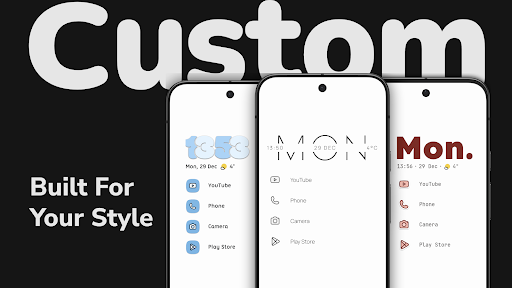
Niagara Launcher is a minimalist Android launcher designed to upgrade your phone by offering a clean, elegant, and customizable home screen. Focusing on productivity and easy customization, Niagara Launcher reduces clutter and allows you to effortlessly customize your home screen with themes, widgets, wallpapers, and icons, helping you make the most of your smartphone.
🏅 Awards
🏅 Among the Best Android Launchers in 2025 – Tom’s Guide
🏅 Among the Best Minimalist Launchers in 2025 – Geeky Gadgets
🏅 Among the Best Android Launchers to customize your phone in 2025 – Android Police
▌ Customization – Make your phone truly yours
🎨 Themes · Apply themes from our theme collection with just one tap.
🖌️ Custom App Icons · Discover a wide range of unique icon packs supporting all your apps.
🖼️ Built-In Wallpapers · Customize your home screen with our unique wallpaper collection.
🕰️ Clock Style · Choose from different clock styles to match your home screen theme.
📝 Custom Fonts · Customize your launcher experience with various fonts.
🎨 Material You · Dynamic theming adapts to your wallpaper on all Android versions.
🌓 Light & Dark Themes · Choose from different light and dark theme options.
▌ Productivity – Everything within reach
📄 Integrated Notifications · Read and reply directly from the home screen.
🌊 Wave Alphabet · Fast access to apps with intuitive one-handed operation.
📅 Calendar Widget · Stay organized with a clear and practical calendar widget.
🌤️ Weather Widget · Check the latest weather updates with the built-in weather widget.
📚 Widget Stack · Space-saving arrangement of up to four widgets.
📁 Pop-Up Folders · An efficient way to organize apps without cluttering your home screen.
🎮 Customizable Gestures · Navigate with gestures like double-tap to turn off the screen.
🔍 Advanced Search · Find contacts, search the web, and calculate instantly.
▌ Wellbeing – Reduce your screen time
⏳ Usage Breaker · Stay mindful of screen time with gentle reminders for apps you use too often.
🎯 Stay focused · Simplify and declutter your home screen for fewer distractions.
🔒 Hide Apps · Keep your app drawer clean by hiding apps you don’t need.
📩 Notification Summary · Bundle less important notifications for longer uninterrupted sessions.
⛔ Ad-Free · An undisturbed usage experience, even in the free version.
🔍 Discover More · Various other features await you in Niagara Launcher.
▌ Continuous Updates & Reliable Support
💻 Active Development · Constant improvements & new features for the launcher.
❤️ Helpful Support · Get quick and friendly assistance whenever you need it.
📲 Backup & Restore · Effortlessly transfer your home screen setup when switching phones.
▌ What Others Say
🏆 "Niagara Launcher for Android, which is, in theory, largely optimized for one-handed phone use but is also just a better, quieter way of organizing your home screen” - David Pierce, The Verge
🏆 „The Best Android Launcher for Big Phones“ - Joe Fedewa, How-To Geek
🏆 „A standout new Android launcher for ergonomic efficiency“ - JR Raphael
🏆 „Your best choice for a tall or folding phone“ - Ryne Hager, Android Police
Thank you for your interest in Niagara Launcher!
Download Niagara Launcher now and transform your phone!
---
📴 Why We Offer an Accessibility Service · Our accessibility service has the sole purpose of letting you quickly turn off your phone's screen with a gesture. The service is optional, disabled by default, and neither collects nor shares any data.
Info App
Nouveautés
Create your own themes with our new Theme Studio. Customize wallpapers, icons, clock styles, and text with a live preview, save multiple setups, and share them with friends or the community. This update also marks the beginning of our brand refresh and the launch of Mellowdrop Studio, our new independent software studio.
Autorisations de l'application
-
Calendar
- read calendar events plus confidential information
-
Contacts
- read your contacts
-
Location
- approximate location (network-based)
-
Photos/Media/Files
- read the contents of your USB storage
- modify or delete the contents of your USB storage
-
Storage
- read the contents of your USB storage
- modify or delete the contents of your USB storage
-
Other
- choose widgets
- update component usage statistics
- adjust your wallpaper size
- receive data from Internet
- view network connections
- pair with Bluetooth devices
- expand/collapse status bar
- full network access
- run at startup
- set wallpaper
- control vibration
- prevent device from sleeping
- set an alarm


Notes et avis
Loving enhancements and new features all the time. love the community as well.
Awsome appearance.
It suddenly stopped changing my wallpaper everyday. It used to work great with the wallpaper changer app to change the wallpaper twice a day, but now, it only renders the first wallpaper when I set a new live wallpaper from the settings. The wallpaper changes since I have widgets that use the colors of the new wallpaper, but Niagara just doesn't show the new wallpaper. There's no setting or anything I can do to fix it, it's just broken.
game changer for someone like me. I get overstimulated very easily and this has made opening my phone a relaxing experience
I have been using it for like a month so far , The UI is so clean and incredibly smooth, getting for the app I want is easier and faster than My official UI . I highly recommend trying it and once you try it you will make it the main UI
Best launcher I have seen, I have went through many