

AT&T
Productivity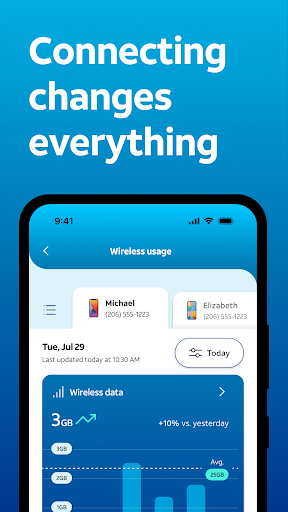


À propos de cette app
Shop our best deals, pay your bill, manage your account and connections, and get help when you need it. A powerful AI assistant is always available to answer questions, resolve issues, and guide you to the right plans, devices, and upgrades.
With clear visibility into your network, you can track data usage, locate a device, refresh your connection, manage downtime.
Manage your account
• Easily view and pay your AT&T bill.
• Manage your AT&T Wireless and Internet accounts all in one place.
• Get user-level access so everyone on your account sees what matters to them.
Get personalized offers and our best deals
• See personalized offers on the latest devices tailored to your needs. Upgrade seamlessly to the newest iPhone or Android.
• Shop and compare our top plans, including unlimited wireless and fiber internet.
• Enhance your account with features like early upgrades, international connectivity, device protection, and enhanced performance.
• Find an AT&T store near you.
Switch to AT&T
• Experience the power of AT&T’s fast, reliable, and secure 5G network.
• Try AT&T Wireless free for 30 days. Keep your current service and number while you test drive our network from your compatible iPhone. Terms apply.
Manage devices and usage
• Easily manage all your devices, from smartphones and smartwatches to home internet equipment like Wi-Fi extenders.
• Self-install eligible internet services with step-by-step guidance.
• Assign devices to profiles, manage content and internet access, and track locations for peace of mind.
• Track data usage across both wireless and internet services.
Stay secure and connected
• Block robocalls and spam with AT&T ActiveArmor®.
• Stay connected during outages with internet backup (for eligible customers).
• Monitor network-level security features from a single, easy-to-use dashboard.
• Run network health checks and speed tests anytime.
Get smarter help, powered by AI
• Get help from Andi, AT&T’s AI assistant, for support, troubleshooting, and account questions.
• Stay informed with timely updates, alerts, and account notifications.
Info App
Nouveautés
Autorisations de l'application
-
Identity
- find accounts on the device
-
Calendar
- read calendar events plus confidential information
- add or modify calendar events and send email to guests without owners' knowledge
-
Contacts
- find accounts on the device
- read your contacts
-
Location
- approximate location (network-based)
- precise location (GPS and network-based)
-
Phone
- read phone status and identity
-
Photos/Media/Files
- read the contents of your USB storage
- modify or delete the contents of your USB storage
-
Storage
- read the contents of your USB storage
- modify or delete the contents of your USB storage
-
Camera
- take pictures and videos
-
Microphone
- record audio
-
Wi-Fi connection information
- view Wi-Fi connections
-
Device ID & call information
- read phone status and identity
-
Other
- download files without notification
- receive data from Internet
- view network connections
- change network connectivity
- connect and disconnect from Wi-Fi
- full network access
- change your audio settings
- run at startup
- control vibration
- prevent device from sleeping


Notes et avis
What a dumpster fire after the update. I sign in then i get a screen that says i need to sign in to my business account. I click that tab, it loads then goes right back to the same screen. You suck! 10/17/26 and it's no better. in fact, it is worse!
the layout changes every six months. it's very confusing and frustrating.
new
This app just isn't working. I have a Google pixel and everytime I open the app it just takes me in circles. I already have an account but it keeps wanting me to create one? then it takes me to the sign in, I sign in the its right back to the create a account page. its frustrating.
app is broken. anything useful doesn't work. can't pay my bills, view them or log in to my account. app is truly a heap of broken features.
Feels good,first time using towards phine account


