

File Manager
Tools
4.6
3.6B+ Téléchargements
"Mi File Manager is a free, secure tool for easy and efficient file management."




À propos de cette app
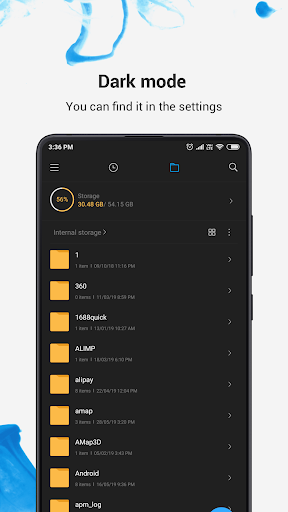
Mi File Manager is a free, secure tool that helps you find file faster, manage files easily, and share them offline with others. It supports tons of cool features: quick search, moving, deleting, opening, and sharing files, as well as renaming, unzipping, and copy-paste. Mi File Manager also recognizes multiple file formats, including music, videos, images, documents, APKs, and zip-files. We update our app regularly to bring you the best experience. With Mi File Manager’s crisp and clear UI, file management becomes easier than ever before!
Key features
Recent: View the files you worked with recently without looking for them.
Categories: Files are organized into categories by their formats. From there, you can access to frequently used apps quickly.
Storage: View your storage stats and manage all folders on your device.
Cleaner: Free up storage space on your device by deleting cache and junk files.
Mi Drop: Share files with friends who are nearby without connecting to the Internet.
Global search: Enter keywords to find files.
Multiple file formats support: Open videos, music, documents, APKs, and compressed files with one tap.
File compression: Compress and decompress ZIP/RAR archives.
Manage multiple files: Select multiple files for the same operation.
Multiple languages supported: Bahasa Indonesia, Bengali, Chinese, English, Español, Português, ру́сский язы́к, українська мова, Tiếng Việt
Key features
Recent: View the files you worked with recently without looking for them.
Categories: Files are organized into categories by their formats. From there, you can access to frequently used apps quickly.
Storage: View your storage stats and manage all folders on your device.
Cleaner: Free up storage space on your device by deleting cache and junk files.
Mi Drop: Share files with friends who are nearby without connecting to the Internet.
Global search: Enter keywords to find files.
Multiple file formats support: Open videos, music, documents, APKs, and compressed files with one tap.
File compression: Compress and decompress ZIP/RAR archives.
Manage multiple files: Select multiple files for the same operation.
Multiple languages supported: Bahasa Indonesia, Bengali, Chinese, English, Español, Português, ру́сский язы́к, українська мова, Tiếng Việt
Info App
Version
V1-210601
Mis à jour le
May 13, 2024
Taille
Nécessite Android
5.0
ID du paquet
com.mi.android.globalFileexplorer
Installations
3.6B+
Catégorie
Tools
Nouveautés
Thank you for using File Manager. Here's what we've done in the new version:
1. Fixed some known bugs.
2. Boosted overall performance.
1. Fixed some known bugs.
2. Boosted overall performance.
Autorisations de l'application
-
Device & app history
- retrieve running apps
-
Identity
- add or remove accounts
-
Photos/Media/Files
- access USB storage filesystem
- read the contents of your USB storage
- modify or delete the contents of your USB storage
-
Storage
- read the contents of your USB storage
- modify or delete the contents of your USB storage
-
Wi-Fi connection information
- view Wi-Fi connections
-
Other
- access external storage of all users
- Access keyguard secure storage
- delete other apps' caches
- interact across users
- manage users
- modify/delete internal media storage contents
- modify secure system settings
- read Home settings and shortcuts
- write Home settings and shortcuts
- read Home settings and shortcuts
- write Home settings and shortcuts
- receive data from Internet
- view network connections
- connect and disconnect from Wi-Fi
- measure app storage space
- full network access
- run at startup
- set preferred apps
- use accounts on the device
- control vibration
- prevent device from sleeping
- modify system settings
- install shortcuts
- uninstall shortcuts


Notes et avis
4.6
Notes totales
5
4
3
2
1
M
Mizan Sk
Oct 12, 2026
App installed problem 😟
S
Sonu Kumar
Oct 12, 2026
super Mario
C
Clifford Gallenero
Oct 11, 2026
good
V
Vikash Modanwal
Oct 11, 2026
good
m
mayank verma
Oct 11, 2026
nice
P
Partha malick
Oct 11, 2026
good


