

Philips HomeRun Robot App
House & Home




על אפליקציה זו
With the Philips HomeRun Robot app you can:
● Start, pause or stop cleaning and mowing remotely
● Make a precise map of your home to clean each room in no time
● Control where your robot cleans and mows
● Choose a cleaning mode per room and mowing mode per lawn
● Set up once, enjoy spotless floors and lawns daily
● Custom clean and mow for specific situations
● Get step-by-step guidance to set up easily
● Receive progress updates on each clean and mow
● Keep your data secure
Start, pause or stop your robot remotely
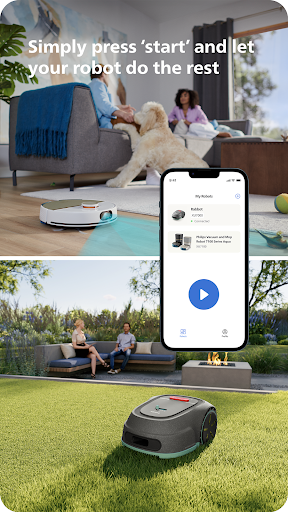
Come home to clean floors and a perfect-looking garden every day by using your Philips HomeRun vacuum, mop, and lawn mowing robot in combination with the app. Set it up once—to clean each room and mow your lawn just the way you like it—touch ‘Start’, anytime, anywhere, and let your robot do the rest.
On its first run, your robot will map your floor plan and garden. Now you have an interactive map of your home that you can use to tell your robot how and when to clean each room or to monitor how your lawn is mowed. The robot vacuum cleaner can store up to five maps.
Control where your robot vacuum cleaner cleans
Only want your robot to clean the kitchen, bathroom, living room? With the app, you can tell your robot which rooms you want cleaned, and in what order. If there are areas or things you’d like it to avoid—like precious items or a rug in an area you want to mop—you can tell it where not to go, or not to mop, as well.
Choose a cleaning mode for each room and mowing mode for each lawn
Give each room unique attention with one of the cleaning modes and mowing modes for your lawn. Use Dry mode to vacuum the bedroom and Wet & Dry mode to vacuum and mop hard floors. Put your robot on Quiet mode if, say, you have a meeting, or give the kitchen an extra thorough clean by using Intensive mode. Choose a mowing mode for your lawn to get the perfect looking garden.
Set up once. Enjoy spotless floors and lawns every day
Once you’ve created a cleaning and mowing plan, clean floors and perfectly mowed lawns are always a tap away. Tap ‘Start’ when you want your robot to begin - every day if you like, and at a time that suits your schedule.
Custom clean for specific situations
Had friends over and need an extra thorough clean? Or maybe the dog left paw prints in your hallway. Again. Schedule a custom clean and mow that targets specific rooms, areas.
Get step-by-step guidance to setup easily
From connecting to Wi-Fi to the first clean and mow, we’ll guide you through every step of getting started. You’ll find easy-to-follow instructions and how-to-videos as well.
Always have support at your fingertips
Have extra questions about the HomeRun app and robot? You’ll find a user manual in the app, answers to FAQs and easy access to Customer Care if need be.
Receive progress updates
As your robot cleans and mows, you’ll receive in-app updates. See where your robot currently is in your home and what the robot mowing progress is in your garden. Check on its battery levels and, most importantly, get notified as soon as the cleaning run or mowing is done
Maintain high performance
Get the best performance from your robot by replacing parts on time. Our app lets you know when it’s time to replace parts like filters, mops, and blades, and makes it easy to order them.
Keep your data secure
Philips adheres to a strict privacy policy. We recommend creating an account to ensure you can save your preferences. If you prefer, you can use the app as a guest.
WiFi
Philips HomeRun robot vacuum cleaners have dual band Wi-Fi so they are easy to connect to your home Wi-Fi, whether it's to 2.4 or 5.0GHz. Robot lawn mowers only connect to your 2.4GHz home Wi-Fi.
Need help?
Visit www.Philips.com to find answers to our most frequently asked questions, or get in touch with our Consumer Care team.
מידע על האפליקציה
מה חדש
הרשאות אפליקציה
-
Location
- approximate location (network-based)
- precise location (GPS and network-based)
-
Photos/Media/Files
- read the contents of your USB storage
- modify or delete the contents of your USB storage
-
Storage
- read the contents of your USB storage
- modify or delete the contents of your USB storage
-
Camera
- take pictures and videos
-
Microphone
- record audio
-
Wi-Fi connection information
- view Wi-Fi connections
-
Other
- receive data from Internet
- view network connections
- pair with Bluetooth devices
- access Bluetooth settings
- change network connectivity
- allow Wi-Fi Multicast reception
- connect and disconnect from Wi-Fi
- full network access
- change your audio settings
- run at startup
- reorder running apps
- set wallpaper
- control vibration
- prevent device from sleeping
- install shortcuts
- Google Play license check


דירוגים וביקורות
After creating the map, naming the rooms and setting no-go zones, it only worked properly 2 times. The third time it changed the layout of the rooms, rotated 2 of them and found some new walls (my apartment didn't change), so it's no longer cleaning the rooms as it should. Of course, it cannot pin a map and make it unchangeable (again, my apartment layout doesn't change, so the map should stay unchanged as well until I manually ask for a re-map when something changes) It cleans OK, when it works
settings set right but robot doing it's by other ways.
great app but have problem with the maps :(
Thing doesn't want to pair anymore. EDIT: The reason it didn't pair is because IPv6 was turned off on the router/modem. I am not improving my rating past 3 stars. As I had to figure this out by myself. The support is AI-agent that regurgitates the same responses and there is no real person for cases that don't fit the pre-existing mold.
Absolute joke of an app. Literally unusable if VPN or Private DNS is switched on. Also almost always removes the damned vacuum from my account. Does the vacuum magically belong to someone else when I'm not using the app? Apparently user security is nothing compared to the ability to run a goddamned vacuum.
map issues every single time

