

SmartThings
Lifestyle
4.6
1.2B+ הורדות
"Control your Samsung Smart TVs, appliances, and SmartThings-compatible devices"


על אפליקציה זו
Quickly and easily connect and control your smart home devices through SmartThings.
SmartThings is compatible with 100s of smart home brands. So, you can control all of your smart home gadgets in one place, including your Samsung Smart TV and smart home appliances.
With SmartThings, you can connect, monitor and control multiple smart home devices quicker and easier. Connect your Samsung smart TVs, smart appliances, smart speakers and brands like Ring, Nest and Philips Hue - all from one app.
Then control your smart devices using voice assistants including Alexa, Bixby and Google Assistant
[Key Features]
- Control and check in on your home from wherever you are
- Build routines that are set on time, weather, and device status, so your home runs smoothly in the background
- Allow shared control by giving access to other users
- Receive status updates about your devices with automated notifications
※ SmartThings is optimized for Samsung smartphones. Some features may be limited when used with other vendors' smartphones.
※ Some features may not be available in all countries.
※ You can also install SmartThings on Wear OS-based watches.
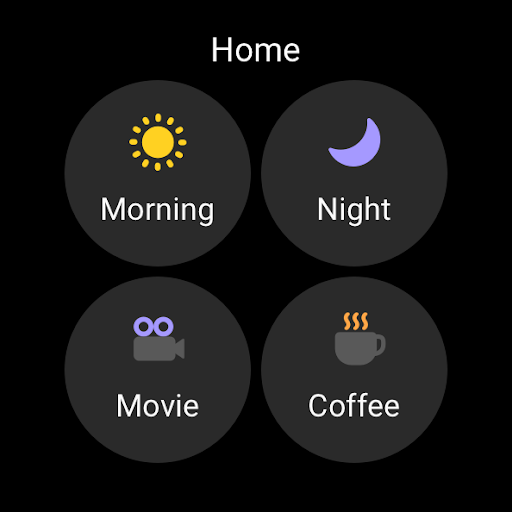
※ SmartThings for Wear OS is only available when the watch is connected to a mobile phone. You can get a quick access to routine run and device control by adding SmartThings tile on your watch. We provide SmartThings complications that allow you to enter SmartThings app service directly from watchface.
[App requirements]
Some mobile devices may not be supported.
- Memory size : 3GB over
※ App permissions
The following permissions are required for the app. You can use the app without optional permissions, but some functions may be limited.
[Optional access permissions]
• Location : Used to locate your devices, create routines based on your location, and scan for nearby devices using Wi-Fi
• Nearby devices : (Android 12 ↑) Used to scan for nearby devices using Bluetooth Low Energy (BLE)
• Notifications : (Android 13 ↑) Used to provide notifications about SmartThings devices and features
• Camera : Used to scan QR codes so you can easily add members and devices to SmartThings
• Microphone : Used to add certain devices to SmartThings using high-frequency sounds
• Files and media : (Android 12) Used to save data and share content
• Photos and videos : (Android 13 ↑) Used to play photos and videos on SmartThings devices
• Music and audio : (Android 13 ↑) Used to play sound and video on SmartThings devices
• Phone : (Android 12 ↑) Used to make calls on smart speakers
• Contacts : (Android 12 ↑) Used to get phone numbers of your contacts to send text message notifications
• Physical activity : (Android 12 ↑) Used to detect when you start pet walks
[Wear OS Optional access permissions]
• Nearby devices : (Wear OS 3.5 ↑) Used to scan for nearby devices using Bluetooth Low Energy (BLE)
• Notifications : (Wear OS 4.0 ↑) Used to provide notifications about SmartThings devices and features
• Microphone: Communicate with nearby devices using a microphone and speaker
SmartThings is compatible with 100s of smart home brands. So, you can control all of your smart home gadgets in one place, including your Samsung Smart TV and smart home appliances.
With SmartThings, you can connect, monitor and control multiple smart home devices quicker and easier. Connect your Samsung smart TVs, smart appliances, smart speakers and brands like Ring, Nest and Philips Hue - all from one app.
Then control your smart devices using voice assistants including Alexa, Bixby and Google Assistant
[Key Features]
- Control and check in on your home from wherever you are
- Build routines that are set on time, weather, and device status, so your home runs smoothly in the background
- Allow shared control by giving access to other users
- Receive status updates about your devices with automated notifications
※ SmartThings is optimized for Samsung smartphones. Some features may be limited when used with other vendors' smartphones.
※ Some features may not be available in all countries.
※ You can also install SmartThings on Wear OS-based watches.
※ SmartThings for Wear OS is only available when the watch is connected to a mobile phone. You can get a quick access to routine run and device control by adding SmartThings tile on your watch. We provide SmartThings complications that allow you to enter SmartThings app service directly from watchface.
[App requirements]
Some mobile devices may not be supported.
- Memory size : 3GB over
※ App permissions
The following permissions are required for the app. You can use the app without optional permissions, but some functions may be limited.
[Optional access permissions]
• Location : Used to locate your devices, create routines based on your location, and scan for nearby devices using Wi-Fi
• Nearby devices : (Android 12 ↑) Used to scan for nearby devices using Bluetooth Low Energy (BLE)
• Notifications : (Android 13 ↑) Used to provide notifications about SmartThings devices and features
• Camera : Used to scan QR codes so you can easily add members and devices to SmartThings
• Microphone : Used to add certain devices to SmartThings using high-frequency sounds
• Files and media : (Android 12) Used to save data and share content
• Photos and videos : (Android 13 ↑) Used to play photos and videos on SmartThings devices
• Music and audio : (Android 13 ↑) Used to play sound and video on SmartThings devices
• Phone : (Android 12 ↑) Used to make calls on smart speakers
• Contacts : (Android 12 ↑) Used to get phone numbers of your contacts to send text message notifications
• Physical activity : (Android 12 ↑) Used to detect when you start pet walks
[Wear OS Optional access permissions]
• Nearby devices : (Wear OS 3.5 ↑) Used to scan for nearby devices using Bluetooth Low Energy (BLE)
• Notifications : (Wear OS 4.0 ↑) Used to provide notifications about SmartThings devices and features
• Microphone: Communicate with nearby devices using a microphone and speaker
מידע על האפליקציה
גרסה
עודכן בתאריך
Oct 02, 2026
גודל
דורש אנדרואיד
מזהה חבילה
com.samsung.android.oneconnect
התקנות
1.2B+
קטגוריה
Lifestyle
מה חדש
SmartThings is getting even better.
- Redesigned Home tab: Access your most-used features and key info right from the Home screen.
- Faster hub-connected device control: Devices connected to your hub respond faster when your phone and hub are on the same Wi-Fi.
- Offline device diagnostics: Check and recover offline devices from one dedicated screen.
- Routine Insights: See your top 3 most-used Routines and recent activity.
- Redesigned Home tab: Access your most-used features and key info right from the Home screen.
- Faster hub-connected device control: Devices connected to your hub respond faster when your phone and hub are on the same Wi-Fi.
- Offline device diagnostics: Check and recover offline devices from one dedicated screen.
- Routine Insights: See your top 3 most-used Routines and recent activity.
הרשאות אפליקציה
-
Identity
- find accounts on the device
- read your own contact card
-
Contacts
- find accounts on the device
- read your contacts
-
Location
- approximate location (network-based)
- precise location (GPS and network-based)
-
Phone
- directly call phone numbers
- modify phone state
- read phone status and identity
-
Photos/Media/Files
- read the contents of your USB storage
- modify or delete the contents of your USB storage
-
Storage
- read the contents of your USB storage
- modify or delete the contents of your USB storage
-
Camera
- take pictures and videos
-
Microphone
- record audio
-
Wi-Fi connection information
- view Wi-Fi connections
-
Device ID & call information
- read phone status and identity
-
Other
- Access download manager.
- allow Bluetooth pairing by Application
- enable or disable app components
- configure Wifi displays
- provide an in-call user experience
- Control displaying and hiding keyguard
- power device on or off
- interact across users
- full license to interact across users
- manage users
- control media playback and metadata access
- Audio Routing
- read frame buffer
- retrieve running apps
- force device reboot
- disable or modify status bar
- prevent app switches
- modify/delete internal media storage contents
- modify secure system settings
- Whitelist bluetooth device access.
- receive data from Internet
- view network connections
- pair with Bluetooth devices
- access Bluetooth settings
- change network connectivity
- allow Wi-Fi Multicast reception
- connect and disconnect from Wi-Fi
- expand/collapse status bar
- full network access
- change your audio settings
- run at startup
- limit number of running processes
- draw over other apps
- control vibration
- prevent device from sleeping
- modify system settings
- install shortcuts


דירוגים וביקורות
4.6
סך הכל דירוגים
5
4
3
2
1
S
Stan Strassburg
Oct 08, 2026
ooooooooo?fg
S
Sahane Ibrahim
Oct 08, 2026
Nice
D
Dera osman Rashid
Oct 08, 2026
good
M
Michelle Suffian-Chilton
Oct 08, 2026
Phone may be over loaded. but, not connecting to app.
N
NERYVETTE SANTIAGO-CRUZADO
Oct 08, 2026
great 👍
R
Robert
Oct 08, 2026
good app to track everything and do everything


