

Oogly Illuminator
Personalization
5.0
406 Unduhan
"Rediscover the golden era of digital watches, now for Wear OS"
Instal di Google Play
Aplikasi Berbayar




Tentang aplikasi ini
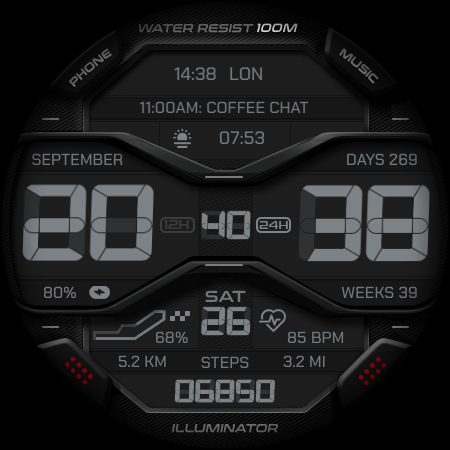
Rediscover the golden era of digital watches with a modern twist.
Inspired by iconic illuminated LCD timepieces, Oogly Illuminator combines timeless retro styling with the power and flexibility of Wear OS. Bold digital numerals, layered instrument-inspired panels, and vibrant illuminated accents create a distinctive watch face that stands out while remaining clean, functional, and easy to read. Whether you're drawn to vintage digital aesthetics or modern smartwatch functionality, Oogly Illuminator delivers the best of both worlds.
Features
• 12/24-hour time format support
• Retro-inspired illuminated LCD design
• 2 digital time layout styles
• Circuit-Style Step Goal Indicator
• Multiple color themes and customization options
• Custom app shortcuts
• Custom complications
• Always-On Display support
Light up your wrist with the perfect fusion of retro style and modern innovation.. Designed for WEAR OS API 34+
After few minutes, find the watch face on the watch. It is not automatically shown on the main list. Open the watch face list (tap and hold current active watch face) then scroll to the far right. Tap add watch face and find it there.
If you still have problem, contact us at :
[email protected]
or on our official telegram @OoglyWatchfaceCommunity
Inspired by iconic illuminated LCD timepieces, Oogly Illuminator combines timeless retro styling with the power and flexibility of Wear OS. Bold digital numerals, layered instrument-inspired panels, and vibrant illuminated accents create a distinctive watch face that stands out while remaining clean, functional, and easy to read. Whether you're drawn to vintage digital aesthetics or modern smartwatch functionality, Oogly Illuminator delivers the best of both worlds.
Features
• 12/24-hour time format support
• Retro-inspired illuminated LCD design
• 2 digital time layout styles
• Circuit-Style Step Goal Indicator
• Multiple color themes and customization options
• Custom app shortcuts
• Custom complications
• Always-On Display support
Light up your wrist with the perfect fusion of retro style and modern innovation.. Designed for WEAR OS API 34+
After few minutes, find the watch face on the watch. It is not automatically shown on the main list. Open the watch face list (tap and hold current active watch face) then scroll to the far right. Tap add watch face and find it there.
If you still have problem, contact us at :
[email protected]
or on our official telegram @OoglyWatchfaceCommunity
Info Aplikasi
Versi
Diperbarui pada
Jun 30, 2026
Ukuran
Membutuhkan Android
ID Paket
com.watchfacestudio.ooglyilluminator
Instalasi
406
Kategori
Personalization
Apa yang Baru
- Companion app to help you install the watch face on your Wear OS device
- Simple and easy installation process
- Once installation on your smartwatch is complete, the companion app can be safely removed
- Simple and easy installation process
- Once installation on your smartwatch is complete, the companion app can be safely removed
Rating dan Ulasan
5.0
Total rating
5
4
3
2
1
k
kartis the
Jul 26, 2026
great design
E
Etienne Willemse
Jul 14, 2026
Top class design. Thank you Oogly. Love this face
E
Eriq Olin
Jul 13, 2026
supernice!! ⭐
A
Alexander Chamé
Jul 12, 2026
Thank you for this incredible watchface. I think this is the most beautiful one I have ever had. Thanks, boss.
A
Avijit Singh Minhas
Jul 11, 2026
The watchface to aod transition stucks sometime and when I lift my hand it takes very long time to go from aod to screen/watcface. Everything else is great, hopefully you will fix that.
R
Roni Sudarmo
Jul 11, 2026
Great design 🔥👍👍


