



Tentang aplikasi ini
Key Features
Add new devices with a few easy steps
Control your device wherever you are
Get the status of your devices in real time
Share your devices with friends and family members
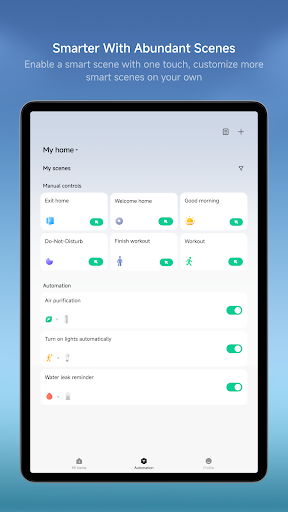
Set up and perform intelligent tasks
App Permission Guide
This application may request the following access permissions depending on the connected device model and the specific features you use.
Required Permissions
Permissions essential for this application. If you decline to grant any of the following permissions, you will be unable to use the basic features of this application.
None
Optional Permissions
These permissions are required for additional features of this application. You may decline to grant the following permissions. Your refusal will not affect your continued use of other features and services of this application. However, the use of certain features that require such permissions may be restricted.
Local Network
Used to discover compatible devices on the local network for device setup and control.
Used to support device network configuration, AP direct connection, and local device control.
Bluetooth
Used to scan, discover, connect to, and control Bluetooth devices for pairing, operation, and firmware updates.
Camera
Used to scan QR codes for device setup and login, and to handle feedback, floor plan uploads, and plugin or camera features.
Microphone
Used to support video intercom on smart devices and capture audio for voice commands.
Location
Used to identify region for localized environment info, scan Wi-Fi networks, and record exercise routes with improved accuracy.
Photos
Used to select and upload local photos or videos for feedback, floor plans, and plugin or camera features.
Notifications
Used to provide users with notifications regarding device status and related information.
HomeKit
Used to support the synchronization, pairing, and control of HomeKit devices within Xiaomi Home.
Key devices (availability may vary by model and region)
Camera: Live view, quick snapshots and video clips, plus easy access to recent events and history playback.
Printers: Printing-oriented templates and workflows, with built-in media selection and pre-checks to help meet printing requirements; supports richer creation flows (e.g., collage-style layouts and mixed media selection when needed) for a smoother end-to-end experience.
Lights:Support remote on/off control, brightness and color temperature adjustment, scene automation, and scheduling for a more comfortable smart lighting experience.
Air Conditioners: Support remote power control, temperature adjustment, mode switching, and smart automations to help users manage indoor comfort anytime, anywhere.
Fans:Support remote speed control, oscillation settings, scheduling, and integration with other smart devices for automated operation.
Switches: Support remote control of household lighting and electrical appliances, with automation capabilities that enable a more convenient smart home experience.
Smart Plugs & Power Strips: Support remote power control, scheduled operations, energy usage statistics (on supported devices), and smart automations to improve device management efficiency.
Notes
Xiaomi Home app obtained the Kitemark™ Certification for Secure Digital Applications: https://trust.mi.com/security
Device support may vary by region—please refer to the product manual or official website.
Info Aplikasi
Apa yang Baru
• The scenario-based security module now supports multi-camera, split-screen editing, allowing you to customize the page layout and video feed positions.
• A new Energy module has been added to the Mi Home 3D Control mode, allowing you to view the power consumption of supported smart devices in your home.
Izin Aplikasi
-
Identity
- find accounts on the device
-
Contacts
- find accounts on the device
-
Location
- approximate location (network-based)
- precise location (GPS and network-based)
-
Phone
- read phone status and identity
-
Photos/Media/Files
- read the contents of your USB storage
- modify or delete the contents of your USB storage
-
Storage
- read the contents of your USB storage
- modify or delete the contents of your USB storage
-
Camera
- take pictures and videos
-
Microphone
- record audio
-
Wi-Fi connection information
- view Wi-Fi connections
-
Device ID & call information
- read phone status and identity
-
Other
- display unauthorized windows
- status bar
- transmit infrared
- receive data from Internet
- view network connections
- create accounts and set passwords
- pair with Bluetooth devices
- access Bluetooth settings
- send sticky broadcast
- change network connectivity
- allow Wi-Fi Multicast reception
- connect and disconnect from Wi-Fi
- disable your screen lock
- full network access
- change your audio settings
- control Near Field Communication
- reorder running apps
- draw over other apps
- use accounts on the device
- control vibration
- prevent device from sleeping
- set an alarm
- install shortcuts
- uninstall shortcuts


Rating dan Ulasan
its an a good app but i would add like a bigger sittings panel its one of the best apps
this device is not good. I've been doing the instructions many times but still it won't work, I should've listened to the person who commented here that this is not a good device I regret buying this & it's expensive
Waiting for new update adding the new mi 360 home security 1080p camera
Good App
Unable to view consolidated view of my own cameras and cameras shared with me suddenly after update. Need to toggle between accounts now to check each cctv n it's so troublesome. Pls troubleshoot and remove this annoyance pls
nice

