

OBD Fusion (Car Diagnostics)
Communication
4.7
118.7K+ Download
"Read OBD2 data and DTCs Create custom dashboards Enhanced diagnostics available"
Installa su Google Play
App a pagamento




Info su questa app
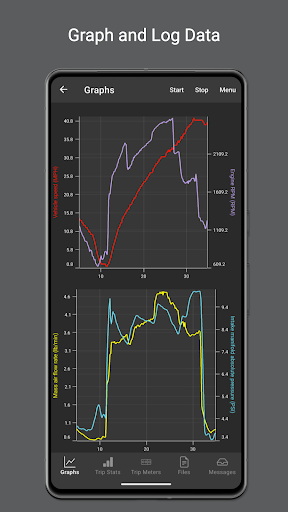
OBD Fusion is an app that allows you to read OBD2 vehicle data directly from your Android phone or tablet. You can clear your check engine light, read diagnostic trouble codes, estimate fuel economy and much more! OBD Fusion has a ton of features that are used by professional car mechanics, do-it-yourselfers, and users who want to monitor car data during day to day driving. Some of the features include customizable dashboards, real-time graphing of vehicle sensors, emission readiness status, data logging and exporting, oxygen sensor tests, Boost readout, and a full diagnostic report.
Is your check engine light on? Do you want to monitor fuel economy and usage in your vehicle? Do you want cool looking gauges on your Android phone or tablet? If so, then OBD Fusion is the app for you!
OBD Fusion is a vehicle diagnostics tool that connects to OBD-II and EOBD vehicles. Not sure if your vehicle is OBD-2, EOBD or JOBD compliant? See this page for more information: https://www.obdsoftware.net/support/knowledge-base/how-do-i-know-whether-my-vehicle-is-obd-ii-compliant/. OBD Fusion works with some JOBD compliant vehicles and in some cases requires modifications to the connection settings in the app. Please contact us for more information.
You must have a compatible scan tool to use this software. For recommended scan tools, see our website https://www.obdsoftware.net/software/obdfusion. Please note that cheap ELM clone adapters can be unreliable. OBD Fusion can connect to any ELM 327 compatible adapter, but the cheap clone adapters tend to have slow refresh rates and might disconnect randomly.
OBD Fusion for Android is brought to you by OCTech, LLC, the developers of TouchScan and OBDwiz for Windows and OBDLink for Android. Now you can get the same great features for your phone or tablet.
OBD Fusion has the following features:
• Android Auto support. Note that Android Auto does not support dashboard gauges.
• Read and clear diagnostic trouble codes and your Check Engine Light (MIL/CEL)
• Real-time dashboard display
• Real-time graphing
• Fuel economy MPG, MPG (UK), l/100km or km/l calculation
• Create custom enhanced PIDs
• Includes some built-in enhanced PIDs for GM vehicles including engine misfires, transmission temp, and oil temp.
• Multiple trip meters for tracking fuel economy, fuel usage, EV energy economy, and distance
• Customizable dashboards with fast dashboard switching
• Log data to CSV format and export for viewing in any spreadsheet application
• Display battery voltage
• Display Engine Torque, Engine Power, Turbo Boost pressure, and air-to-fuel (A/F) ratio (vehicle must support the required PIDs)
• Read freeze frame data
• English, Imperial, and Metric units that are fully customizable
• Over 250 supported PIDs
• Displays vehicle information including VIN number and calibration ID
• Emissions readiness for each US state
• Oxygen Sensor Results (Mode $05)
• On-board Monitoring Tests (Mode $06)
• In-performance Tracking Counters (Mode $09)
• Full diagnostic report that can be stored and emailed
• Option to select the connected ECU
• Built-in database of fault code definitions
• Bluetooth, Bluetooth LE*, USB**, and Wi-Fi*** scan tool support
• Available in English, Spanish, French, Italian, German, Czech, Greek, Chinese, and Portuguese
* Your Android device must have Bluetooth LE support.
** You must have a tablet with USB host support to connect using a USB device. Only FTDI USB devices are supported.
*** Your Android device must support ad-hoc Wi-Fi connections to use a Wi-Fi adapter.
OBD Fusion is a trademark of OCTech, LLC registered in the U.S.
Is your check engine light on? Do you want to monitor fuel economy and usage in your vehicle? Do you want cool looking gauges on your Android phone or tablet? If so, then OBD Fusion is the app for you!
OBD Fusion is a vehicle diagnostics tool that connects to OBD-II and EOBD vehicles. Not sure if your vehicle is OBD-2, EOBD or JOBD compliant? See this page for more information: https://www.obdsoftware.net/support/knowledge-base/how-do-i-know-whether-my-vehicle-is-obd-ii-compliant/. OBD Fusion works with some JOBD compliant vehicles and in some cases requires modifications to the connection settings in the app. Please contact us for more information.
You must have a compatible scan tool to use this software. For recommended scan tools, see our website https://www.obdsoftware.net/software/obdfusion. Please note that cheap ELM clone adapters can be unreliable. OBD Fusion can connect to any ELM 327 compatible adapter, but the cheap clone adapters tend to have slow refresh rates and might disconnect randomly.
OBD Fusion for Android is brought to you by OCTech, LLC, the developers of TouchScan and OBDwiz for Windows and OBDLink for Android. Now you can get the same great features for your phone or tablet.
OBD Fusion has the following features:
• Android Auto support. Note that Android Auto does not support dashboard gauges.
• Read and clear diagnostic trouble codes and your Check Engine Light (MIL/CEL)
• Real-time dashboard display
• Real-time graphing
• Fuel economy MPG, MPG (UK), l/100km or km/l calculation
• Create custom enhanced PIDs
• Includes some built-in enhanced PIDs for GM vehicles including engine misfires, transmission temp, and oil temp.
• Multiple trip meters for tracking fuel economy, fuel usage, EV energy economy, and distance
• Customizable dashboards with fast dashboard switching
• Log data to CSV format and export for viewing in any spreadsheet application
• Display battery voltage
• Display Engine Torque, Engine Power, Turbo Boost pressure, and air-to-fuel (A/F) ratio (vehicle must support the required PIDs)
• Read freeze frame data
• English, Imperial, and Metric units that are fully customizable
• Over 250 supported PIDs
• Displays vehicle information including VIN number and calibration ID
• Emissions readiness for each US state
• Oxygen Sensor Results (Mode $05)
• On-board Monitoring Tests (Mode $06)
• In-performance Tracking Counters (Mode $09)
• Full diagnostic report that can be stored and emailed
• Option to select the connected ECU
• Built-in database of fault code definitions
• Bluetooth, Bluetooth LE*, USB**, and Wi-Fi*** scan tool support
• Available in English, Spanish, French, Italian, German, Czech, Greek, Chinese, and Portuguese
* Your Android device must have Bluetooth LE support.
** You must have a tablet with USB host support to connect using a USB device. Only FTDI USB devices are supported.
*** Your Android device must support ad-hoc Wi-Fi connections to use a Wi-Fi adapter.
OBD Fusion is a trademark of OCTech, LLC registered in the U.S.
Info App
Versione
7.4.0
Aggiornato il
Oct 28, 2026
Dimensione
Richiede Android
7.0
ID pacchetto
OCTech.Mobile.Applications.TouchScan
Installazioni
118.7K+
Categoria
Communication
Novità
- Added enhanced diagnostics for 2026 Ford vehicles. Use the vehicle editor to check support for your vehicle.
- Added some additional Manufacturer PIDs for GM vehicles.
- Made improvements to the Trip Statistics page.
- Multiple bug fixes and improvements.
- Added some additional Manufacturer PIDs for GM vehicles.
- Made improvements to the Trip Statistics page.
- Multiple bug fixes and improvements.
Autorizzazioni app
-
Location
- approximate location (network-based)
- precise location (GPS and network-based)
-
Photos/Media/Files
- read the contents of your USB storage
- modify or delete the contents of your USB storage
-
Storage
- read the contents of your USB storage
- modify or delete the contents of your USB storage
-
Wi-Fi connection information
- view Wi-Fi connections
-
Other
- view network connections
- pair with Bluetooth devices
- access Bluetooth settings
- full network access
- control vibration
- prevent device from sleeping
- modify system settings
- Google Play license check
- read Google service configuration


Valutazioni e recensioni
4.7
Valutazioni totali
5
4
3
2
1
M
Mike Baugh
Nov 06, 2026
Such a great app. I tried many, and ended up buying this one because it was the best. I paid for advanced and love it.
s
shane greer
Nov 01, 2026
great for cars who have only dummy lights and want to create real time access to your vehicles gauges. ultimately avoiding those big ticket repairs
J
James Owens
Oct 29, 2026
unnecessary to download for obdmax
J
Jason Norman
Oct 26, 2026
A+
P
Peter Mills
Oct 14, 2026
works great 👍 👌
n
nathan b
Oct 08, 2026
want a refund doesn't work with my obd2 scanner