

Video Converter : MP4 to MP3
Tools
4.2
459.7K+ Download
"Convert video to MP3 & more — compress, trim, merge. 20 tools for video & audio"




Info su questa app
Video Converter 2.0 — completely redesigned. Convert, compress, trim and edit your video, audio and image files with 20 fast tools in one clean, modern app. Works fully offline — your files never leave your device.
🎬 VIDEO TOOLS
🎵 Video → Audio — extract MP3, M4A, WAV, FLAC & more from any video, with bitrate, sample rate and volume control
🔄 Video → Video — re-encode to MP4 with H.264 or space-saving HEVC
🗜 Compress — shrink big videos to 75% / 50% / 25% of the original size
✂️ Trim — cut video or audio losslessly on keyframes, or remove a middle section
🎚 Quality & Scale — fine-tune quality (CRF), frame rate and resolution
🔁 Loop — repeat a clip 2–10 times
↩️ Rotate & Flip — 90° steps plus horizontal / vertical mirror
⏩ Speed — 0.125× to 8×, audio kept at normal pitch
💧 Watermark — overlay your text in any of 9 positions
🔇 Mute — strip the audio track instantly, without re-encoding
🖇 Merge videos — join clips into one file
📸 Extract frame — save any moment as a JPEG photo
🎞 Video → GIF — turn moments into animated GIFs
♫ AUDIO TOOLS
🎧 Audio → Audio — convert between MP3, M4A, WAV, FLAC, OGG, AIFF, AU & CAF
🎼 Audio quality — re-encode with new bitrate, sample rate, channels and volume
🎶 Merge audio — join songs and voice notes into one continuous track
🖼 IMAGE TOOLS
🌈 Image converter — JPEG, PNG and WebP (HEIC input supported)
📉 Image compress — shrink photo file size with a quality slider
🎥 Image → Video — build a photo slideshow with your own music
🌠 Photos → GIF — animate a set of pictures
✨ NEW IN 2.0
⚡ Rebuilt from scratch — faster, cleaner Material Design 3
🌙 Light & dark themes with 5 accent colors
🌍 57 languages
📤 Share files straight into the app from your gallery
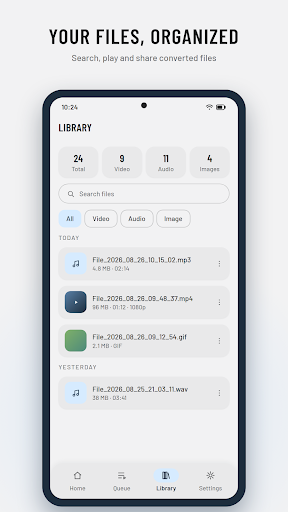
🗂 Library — search, play, rename and share everything you converted
⏱ Live progress with size estimates before you convert
⭐ PREMIUM
🚫 No ads anywhere
🔄 Convert in the background and queue up to 10 files at once
🖥 Full-resolution exports above 1080p
🎨 All five accent themes and an alternate home layout
Every tool stays usable on the free plan — cancel Premium anytime in Google Play.
📁 SUPPORTED FORMATS
• Video in: MP4, MKV, AVI, MOV, FLV, WEBM, MPEG, 3GP
• Video out: MP4 (H.264 / HEVC) and GIF
• Audio: MP3, M4A/AAC, WAV, FLAC, OGG, AIFF, AU, CAF
• Images: JPEG, PNG, WebP (+ HEIC input)
Converted files are saved to your Movies, Music and Pictures folders (DigitGroveMediaConverter).
🎬 VIDEO TOOLS
🎵 Video → Audio — extract MP3, M4A, WAV, FLAC & more from any video, with bitrate, sample rate and volume control
🔄 Video → Video — re-encode to MP4 with H.264 or space-saving HEVC
🗜 Compress — shrink big videos to 75% / 50% / 25% of the original size
✂️ Trim — cut video or audio losslessly on keyframes, or remove a middle section
🎚 Quality & Scale — fine-tune quality (CRF), frame rate and resolution
🔁 Loop — repeat a clip 2–10 times
↩️ Rotate & Flip — 90° steps plus horizontal / vertical mirror
⏩ Speed — 0.125× to 8×, audio kept at normal pitch
💧 Watermark — overlay your text in any of 9 positions
🔇 Mute — strip the audio track instantly, without re-encoding
🖇 Merge videos — join clips into one file
📸 Extract frame — save any moment as a JPEG photo
🎞 Video → GIF — turn moments into animated GIFs
♫ AUDIO TOOLS
🎧 Audio → Audio — convert between MP3, M4A, WAV, FLAC, OGG, AIFF, AU & CAF
🎼 Audio quality — re-encode with new bitrate, sample rate, channels and volume
🎶 Merge audio — join songs and voice notes into one continuous track
🖼 IMAGE TOOLS
🌈 Image converter — JPEG, PNG and WebP (HEIC input supported)
📉 Image compress — shrink photo file size with a quality slider
🎥 Image → Video — build a photo slideshow with your own music
🌠 Photos → GIF — animate a set of pictures
✨ NEW IN 2.0
⚡ Rebuilt from scratch — faster, cleaner Material Design 3
🌙 Light & dark themes with 5 accent colors
🌍 57 languages
📤 Share files straight into the app from your gallery
🗂 Library — search, play, rename and share everything you converted
⏱ Live progress with size estimates before you convert
⭐ PREMIUM
🚫 No ads anywhere
🔄 Convert in the background and queue up to 10 files at once
🖥 Full-resolution exports above 1080p
🎨 All five accent themes and an alternate home layout
Every tool stays usable on the free plan — cancel Premium anytime in Google Play.
📁 SUPPORTED FORMATS
• Video in: MP4, MKV, AVI, MOV, FLV, WEBM, MPEG, 3GP
• Video out: MP4 (H.264 / HEVC) and GIF
• Audio: MP3, M4A/AAC, WAV, FLAC, OGG, AIFF, AU, CAF
• Images: JPEG, PNG, WebP (+ HEIC input)
Converted files are saved to your Movies, Music and Pictures folders (DigitGroveMediaConverter).
Info App
Versione
2.0.12
Aggiornato il
Nov 12, 2026
Dimensione
Richiede Android
8.0
ID pacchetto
com.digitgrove.mediaconverter
Installazioni
459.7K+
Categoria
Tools
Novità
• Video conversions now retry automatically with a backup decoder instead of failing
• Convert CAF, AIFF and AU audio files, including ones made with this app
• Photos to Video is lighter and more reliable on low-memory phones
• Clearer messages when a file can't be opened or read
• Convert CAF, AIFF and AU audio files, including ones made with this app
• Photos to Video is lighter and more reliable on low-memory phones
• Clearer messages when a file can't be opened or read
Autorizzazioni app
-
Photos/Media/Files
- read the contents of your USB storage
- modify or delete the contents of your USB storage
-
Storage
- read the contents of your USB storage
- modify or delete the contents of your USB storage
-
Other
- view network connections
- full network access
- prevent device from sleeping


Valutazioni e recensioni
4.2
Valutazioni totali
5
4
3
2
1
I
Imran Ismail
Nov 11, 2026
One of my projects was processed very beautiful.
A
Ashif
Nov 10, 2026
ok
S
SHAIKH MEHEDI HASAN
Nov 06, 2026
so good to use
s
subro das
Nov 03, 2026
very good
R
Raj Muthusamy
Nov 02, 2026
Very easy to extract audio from video quickly. Other features not used yet. But useful app
P
Patel Sanjay
Nov 01, 2026
🌹🌹🌹


