

Gear Sync Watch Face SAM-41
Personalization
0.0
2 Download
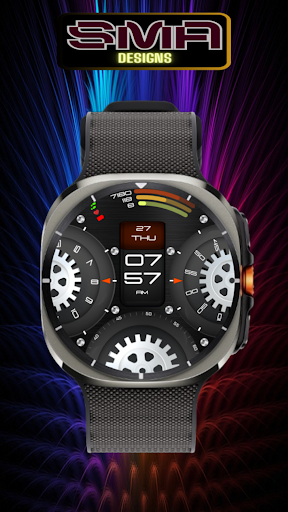
"Futuristic Wear OS watch face with rotating gears,sleek digital time,health stat"
Installa su Google Play
App a pagamento




Info su questa app
This futuristic and mechanical-themed watch face features a dynamic gear animation, giving it an industrial and steampunk-inspired look. The central digital display clearly shows the time in bold, modern numerals, while additional dials and rotating gears enhance the overall aesthetic. The top section includes essential health stats such as steps, heart rate, and energy levels, making it not just visually appealing but also highly functional. The background has a rugged metal texture, further emphasizing the mechanical theme. Perfect for tech enthusiasts and watch lovers who appreciate intricate, animated designs.
Works seamlessly with all major smartwatch brands and models with WEAR OS.
Easy synchronization with fitness tracking apps and health monitoring services.
User-Friendly:
Simple, intuitive setup process.
Regular updates to ensure compatibility and add new features.
Transform your smartwatch into a sophisticated health and fitness companion with our expertly designed watch face. Download now and experience the perfect blend of style, functionality, and innovation.
Why Choose Us:
Innovative Design: Our team of designers and engineers are committed to providing you with the latest in smartwatch technology and aesthetics.
Reliable Performance: Enjoy a watch face that not only looks great but performs flawlessly, keeping you updated with the most accurate information.
Upgrade your smartwatch experience today with our watch face app. Stay connected, stay informed, and stay stylish.
Download Now and take the first step towards a smarter, more elegant watch face experience.
★ FAQ
Q: Do your watch faces support Samsung Active 4 and Samsung Active 4 Classic?
A: Yes, our watch faces support WearOS smartwatches.
Q: How to install the watch face?
A: Follow these steps:
1. Open the Google Play Store app on your watch
2. Search for the watch face
3. Press the install button
Q: I bought the app on my phone, do I have to buy it again for my watch?
A: You should not have to buy it again. Sometimes the Play Store takes a bit longer to figure out that you already bought the app. Any additional order will automatically be refunded by Google, you will receive the money back.
Q: Why I can not see steps or activity data in a built-in complication?
A: Some of our watch faces come with Built-in steps and Google Fit steps. If you select built-in steps, ensure that you grant activity recognition permission. If you select Google Fit steps complication, please use the watch face companion app where you can grant permission on Google Fit to log your data.
Note also that Google Fit sometimes won’t show your real-time data due to its caching sync issues. We are also working to implement Samsung Health for Samsung phone devices.
Works seamlessly with all major smartwatch brands and models with WEAR OS.
Easy synchronization with fitness tracking apps and health monitoring services.
User-Friendly:
Simple, intuitive setup process.
Regular updates to ensure compatibility and add new features.
Transform your smartwatch into a sophisticated health and fitness companion with our expertly designed watch face. Download now and experience the perfect blend of style, functionality, and innovation.
Why Choose Us:
Innovative Design: Our team of designers and engineers are committed to providing you with the latest in smartwatch technology and aesthetics.
Reliable Performance: Enjoy a watch face that not only looks great but performs flawlessly, keeping you updated with the most accurate information.
Upgrade your smartwatch experience today with our watch face app. Stay connected, stay informed, and stay stylish.
Download Now and take the first step towards a smarter, more elegant watch face experience.
★ FAQ
Q: Do your watch faces support Samsung Active 4 and Samsung Active 4 Classic?
A: Yes, our watch faces support WearOS smartwatches.
Q: How to install the watch face?
A: Follow these steps:
1. Open the Google Play Store app on your watch
2. Search for the watch face
3. Press the install button
Q: I bought the app on my phone, do I have to buy it again for my watch?
A: You should not have to buy it again. Sometimes the Play Store takes a bit longer to figure out that you already bought the app. Any additional order will automatically be refunded by Google, you will receive the money back.
Q: Why I can not see steps or activity data in a built-in complication?
A: Some of our watch faces come with Built-in steps and Google Fit steps. If you select built-in steps, ensure that you grant activity recognition permission. If you select Google Fit steps complication, please use the watch face companion app where you can grant permission on Google Fit to log your data.
Note also that Google Fit sometimes won’t show your real-time data due to its caching sync issues. We are also working to implement Samsung Health for Samsung phone devices.
Info App
Versione
Aggiornato il
N/A
Dimensione
Richiede Android
ID pacchetto
com.smadesign.GearSync
Installazioni
2
Categoria
Personalization
Autorizzazioni app
-
Wearable sensors/Activity data
- body sensors (like heart rate monitors)
-
Other
- reorder running apps
- control vibration
- prevent device from sleeping
- Google Play license check


App simili

Dream 153 Digital Watch Face
Monkey's Dream
4.9

OMG 443 - Digital Watch Face
OMG Watch Faces™
0.0

Nixie Watch V3
MikichBlaz
4.4

W-Design WOS032 - Watch Face
Cem Erman
0.0

Hybrid GIIS WS02 Watch face
COLIBRI Studio
0.0

【Customize】Turntable Clock
ZKin
0.0
Altro dallo sviluppatore

Neo Tech SMA Watch Face-43
SMA Design Watch Faces
0.0

Bold Horizon SMA Watch Face-42
SMA Design Watch Faces
0.0
Gear Sync Watch Face SAM-41
SMA Design Watch Faces
0.0

Focus360 WearOS Watch Face-40
SMA Design Watch Faces
0.0

Square Sync Watch Face SAM- 39
SMA Design Watch Faces
0.0

Christmas Watch Face SAM - 38
SMA Design Watch Faces
0.0