

S4U Bastogne Field watch face
Personalization




Info su questa app
━━━━━━━━━━━━━━━━━━
⚠️ IMPORTANT: Compatibility & Installation
This app is optimized for the new Watch Face Format regarding Wear OS 5 (API 34+). Compatible devices include:
- Samsung Galaxy Watch 8, Ultra, 7, 6 , 5, 4 (Wear OS 5 update required)
- Google Pixel Watch Series
- Other Wear OS 5+ smartwatches
(Note: Only devices running Wear OS 5 or higher are supported!)
If you experience any issues with installation or downloading:
1. Ensure your watch is updated to the latest Wear OS version.
2. Open the companion app provided with your purchase.
3. Follow the steps in the Install/Issues section.
Still need help? Email me at [email protected].
━━━━━━━━━━━━━━━━━━
✨ Key Features:
- Realistic Design: Analog field watch face design.
- Switch between classic and chronograph designs with a tap.
- Color Customization: Personalize your watch with multiple dial color choices.
- 2 Editable Values: Display user-defined data (e.g., weather, battery, heart rate).
- 5 Shortcuts: Quickly access your favorite widgets/apps.
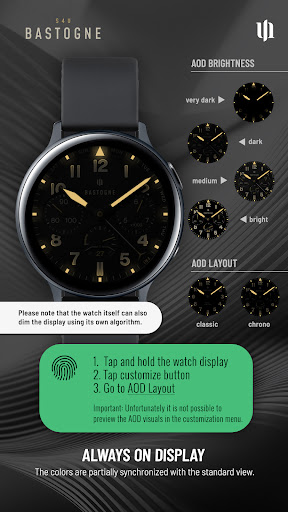
- Always-On Display: Choose from 4 different brighness settings for optimal AOD functionality.
━━━━━━━━━━━━━━━━━━
🎨 CUSTOMIZATION
Personalize your S4U Bastogne in just a few steps:
1. Press and hold the center of the watch display.
2. Tap the customize button.
3. Swipe left or right to navigate through the customizable elements.
4. Swipe up or down to change colors or options for each item.
Available Options:
- Background Color: 10
- Background Stripe: off + 2 options
- Weekend hand: off + 2 options
- Background shadow: off, 5 options
- AOD brightness: 4 (dark, low, mid, bright)
- AOD Layout: 2 (classic, chronograph)
Complications:
- 2 Editable Complications
- 5 App Shortcuts
****
━━━━━━━━━━━━━━━━━━
🌙 Always-On Display (AOD)
The watch face features an Always-On Display for continuous timekeeping. Colors automatically adapt to your chosen design with a pure black background.
4 AOD Brightness options:
- dark, low, mid, bright
4 AOD Layout options:
- classic, chronograph
Note:
- Using AOD will reduce battery life, depending on your smartwatch's settings.
- Some smartwatches may automatically dim the AOD display based on ambient light conditions.
- The AOD background uses a deep black background to keep the On Pixel Ratio (OPR) as low as possible.
━━━━━━━━━━━━━━━━━━
⚙️ SHORTCUTS & COMPLICATIONS
- App Shortcuts: Link to your favorite apps for quick access.
- Editable Complications/Values: Display exactly the data you need.
How to Set Up:
1. Press and hold the watch display.
2. Tap the customize button.
3. Swipe right to left until you reach the "complications" section.
4. Tap on any of the 5 editable shortcuts or 2 editable complications to configure your preferred settings.
With these options, you can tailor your watch face to perfectly suit your daily needs!
━━━━━━━━━━━━━━━━━━
📬 Stay Connected
Enjoying the design? Check out my other creations! I’m constantly crafting new watch faces for Wear OS.
🌐 https://www.s4u-watches.com
Feedback & Support
I’d love to hear your thoughts! Suggestions and feedback help me improve.
📧 Email: [email protected]
💬 Please leave a review on the Play Store!
Follow Me
📸 Instagram: https://www.instagram.com/matze_styles4you/
👍 Facebook: https://www.facebook.com/styles4you
▶️ YouTube: https://www.youtube.com/c/styles4you-watches
🐦 X: https://x.com/MStyles4you
Info App
Novità
Minor fixes.
Autorizzazioni app
-
Other
- view network connections
- full network access
- Google Play license check

Valutazioni e recensioni
Great looking and functioning watch face. Low battery usage as well. If you update it at all could you please place an option to always show the small dials? Thanks
I am using Galaxy Watch 8, Shortcuts are nit visible on dial.
Face doesn't look what it advertised
The day can be selected as Mon–Sun or Sat–Fri, and two selections are sufficient. The watch face style should be in the settings instead of activated by pressing the middle of the watch face.
looks really great on my galaxy watch 8 classic
best watch face, however, I don't like the fully color filled AOD hands, also wish there was an option to change the heartbeat complication and have something else there.


