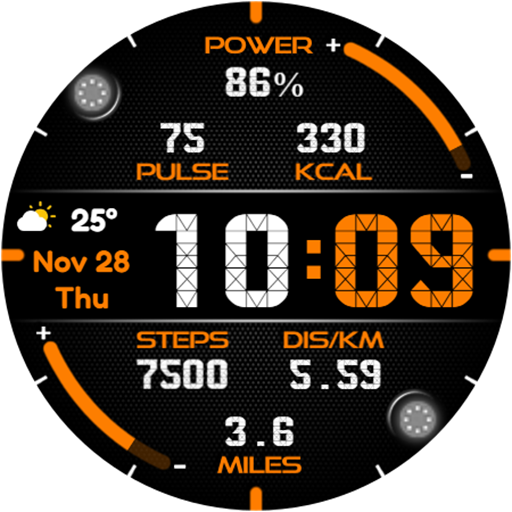
VF03 Digital Watch Face
Personalization
0.0
166 Download
"Urban grunge digital watch face for Wear OS with rich customization."
Installa su Google Play
App a pagamento


Info su questa app
VF03 Digital Watch Face — urban grunge style with bold digital design
VF03 Digital Watch Face is a modern digital watch face for Wear OS that combines a distinctive urban grunge design, API 34+ support, and extensive customization options.
Designed for users who want more than just a clock, it delivers large, easy-to-read time, essential daily information, activity information, and convenient access to the features that matter most.
With customizable colors, backgrounds, complications, shortcuts, and display options, VF03 Digital Watch Face adapts to your personal style while keeping important information available at a glance.
🔹 Features
Essential Information
✅ Time, date, battery level
✅ Steps, distance (KM/MI), calories
✅ Heart rate with status indicator
✅ Segmented battery level indicator with dynamic colors
✅ Option to hide the leading zero in 12-hour format
✅ Option to display seconds or moon phases
Activity Information
✅ Steps, distance (KM/MI), calories
✅ Heart rate with status display (Low / Normal / High)
✅ Segmented battery level indicator with dynamic colors
🎨 Personalization
• 6 backgrounds, including a pure black option
• 25 color themes
• 4 Always On Display (AOD) styles
• Option to hide the leading zero in 12-hour format
• Option to display seconds or moon phases
• 4 customizable complications
• 3 customizable app shortcuts, including 1 hidden shortcut
🔗 Hidden Shortcuts
• Alarm shortcut — tap the minute digits
• Calendar shortcut — tap the date
• Custom shortcut — tap the hour digits
🚶♀ Distance (KM/MI)
Distance is estimated from your step count:
• 1 km ≈ 1312 steps
• 1 mile ≈ 2100 steps
Choose KM or MI in the watch face settings.
🔥 Calories
Calories are estimated from your step count and may vary from values reported by fitness and health applications.
🕒 Time format
12/24-hour mode is synchronized automatically with your phone settings.
• Leading zero in 12-hour mode is enabled by default and can be disabled in watch face settings
• Display seconds or moon phases according to your preference
• Moon phases automatically replace seconds when they are turned off
🔧 Customization & Setup
This watch face supports full customization using complications and styles.
How to customize:
• Touch and hold the watch face
• Tap Customize
• Swipe left/right between settings
• Select a complication area to assign apps or data
Complication Areas
Available complication areas are shown in the Tap Zones & Activities diagram.
You can assign:
• apps
• weather
• fitness data
• and other widgets
Important
• Complication appearance may vary depending on device and installed apps
• Some areas may appear empty if no data is assigned
• Available features may vary between Samsung Galaxy Watch and Pixel Watch devices
📥 Installation Notes
Please make sure your watch is connected to your phone and both devices use the same Google account.
The watch face may take a few minutes to appear after installation.
To find the installed watch face:
• Touch and hold the current watch face
• Swipe right and tap “Add watch face”
• Open the Downloaded section
Samsung users can also customize the watch face using:
Galaxy Wearable → Watch faces → Downloaded
All my watch faces include a companion app with an “Open on watch” button to help simplify installation.
⚠ Requires Wear OS, API 34+
🚫 Not compatible with rectangular watches
🙏 Thank you for choosing my watch face!
✉ Have questions? Contact me at [email protected] — I’ll be happy to help!
➡ Follow me for exclusive updates and new releases!
• Facebook - https://www.facebook.com/veselka.watchface/
• Telegram - https://t.me/VeselkaFace
• YouTube - https://www.youtube.com/@VeselkaFace
Info App
Versione
Aggiornato il
N/A
Dimensione
Richiede Android
ID pacchetto
com.watchfacestudio.vf03digitalwatchface
Installazioni
166
Categoria
Personalization
Valutazioni e recensioni
0.0
Valutazioni totali
5
4
3
2
1
M
Marc Allen
Jul 27, 2026
Sporty look and polished graphics!
D
D H (WrathDh)
Jul 22, 2026
Great layout on this design! Love the background textures and color options! Super informative and easy to read. Excellent craftsmanship!!!