

Mobi PDF・Editor・Scanner・Reader
Productivity
4.5
21.5M+ ダウンロード
"Read, scan, edit & sign PDFs, OCR, convert PDF to Word, annotate & merge PDFs"




このアプリについて
MobiPDF Editor and Scanner gives you a powerful collection of expert tools to quickly and easily view, review, edit, create, and secure PDFs on your phone, wherever you are.
📃 AI-Powered Scan to PDF
Experience AI-powered scanning with enhanced edge detection and capture clear scans of your paper documents to convert them into editable PDF files. From receipts and contracts to invoices, notes, certificates, reports, IDs, and passports, MobiPDF delivers fast and reliable scanning.
👁️ Recognize text (OCR)
Utilize OCR technology to recognize text from scans and images and easily share the recognized text by email, messaging apps, or upload it to the cloud.
✏️ Edit PDF files
Access one of the most advanced mobile PDF editors on the market and edit PDFs, create blank PDFs, and insert, remove, or modify various document aspects including text, pictures, signatures, comments, drawings, certificates, and more.
✒️ Fill and Sign
Fill out and share forms and sign documents on the go with advanced support for fillable PDFs, enabling you to draw your signature directly on documents or reuse saved electronic signatures while making all the changes you need.
🖨️ Print PDFs
Print PDF documents wirelessly straight from your phone.
➕ Convert PDFs
Convert PDFs to Word, Excel, PowerPoint, or ePub formats while preserving the original layout and formatting, and save Word, Excel, PowerPoint, and ePub files as PDFs for easy sharing. Enjoy reliable conversion of PNG and JPEG images into editable PDF files or use the free PNG and JPEG converter within MobiPDF to easily turn PDF documents into images.
🔐 Protect PDFs
Protect your sensitive documents with passwords to lock, encrypt, and restrict user access and utilize digital certificates for authenticity validation.
☁️ Back-up your scans and PDFs
Log into your account to access 5GB of free cloud storage on MobiDrive. Upgrade to MobiPDF Premium for an additional 50GB of storage.
🗨️ View and Comment
Enhance your reading experience with MobiPDF's advanced PDF viewer and easily switch different page modes or enable Read More for distraction-free reading. Easily add comments, use drawing tools, highlight and markup text, insert stamps, or attach files to your PDF.
📚 Organize pages in PDFs
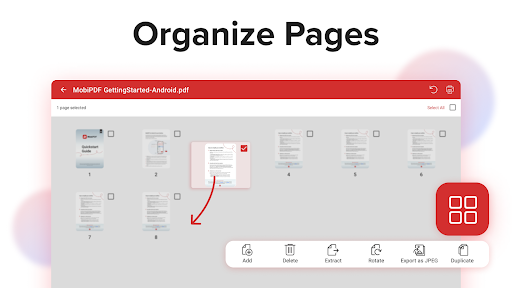
Enjoy full control over your PDF documents: view, rearrange, insert, delete, extract, duplicate, and rotate pages or merge PDFs into one to create your perfectly organized PDF layout.
Use In-App Purchases to unlock the best mobile scanner and editor experience. Please note:
• All payments are charged by Google Play Store after you confirm the purchase.
• Unless you cancel at least 24 hours before the end of the current period, your account will be automatically charged for renewal.
• You can manage your subscriptions by going to your Google Play Account Settings.
Need more? Check out our free MobiPDF version for Windows desktop - https://mobisystems.com/en-us/mobipdf
Help Center: https://support.mobisystems.com/hc/en-us/sections/20794400214045-Android
Privacy Policy: https://mobisystems.com/en-us/privacy-policy
Terms of Use: https://mobisystems.com/en-us/terms-of-use
📃 AI-Powered Scan to PDF
Experience AI-powered scanning with enhanced edge detection and capture clear scans of your paper documents to convert them into editable PDF files. From receipts and contracts to invoices, notes, certificates, reports, IDs, and passports, MobiPDF delivers fast and reliable scanning.
👁️ Recognize text (OCR)
Utilize OCR technology to recognize text from scans and images and easily share the recognized text by email, messaging apps, or upload it to the cloud.
✏️ Edit PDF files
Access one of the most advanced mobile PDF editors on the market and edit PDFs, create blank PDFs, and insert, remove, or modify various document aspects including text, pictures, signatures, comments, drawings, certificates, and more.
✒️ Fill and Sign
Fill out and share forms and sign documents on the go with advanced support for fillable PDFs, enabling you to draw your signature directly on documents or reuse saved electronic signatures while making all the changes you need.
🖨️ Print PDFs
Print PDF documents wirelessly straight from your phone.
➕ Convert PDFs
Convert PDFs to Word, Excel, PowerPoint, or ePub formats while preserving the original layout and formatting, and save Word, Excel, PowerPoint, and ePub files as PDFs for easy sharing. Enjoy reliable conversion of PNG and JPEG images into editable PDF files or use the free PNG and JPEG converter within MobiPDF to easily turn PDF documents into images.
🔐 Protect PDFs
Protect your sensitive documents with passwords to lock, encrypt, and restrict user access and utilize digital certificates for authenticity validation.
☁️ Back-up your scans and PDFs
Log into your account to access 5GB of free cloud storage on MobiDrive. Upgrade to MobiPDF Premium for an additional 50GB of storage.
🗨️ View and Comment
Enhance your reading experience with MobiPDF's advanced PDF viewer and easily switch different page modes or enable Read More for distraction-free reading. Easily add comments, use drawing tools, highlight and markup text, insert stamps, or attach files to your PDF.
📚 Organize pages in PDFs
Enjoy full control over your PDF documents: view, rearrange, insert, delete, extract, duplicate, and rotate pages or merge PDFs into one to create your perfectly organized PDF layout.
Use In-App Purchases to unlock the best mobile scanner and editor experience. Please note:
• All payments are charged by Google Play Store after you confirm the purchase.
• Unless you cancel at least 24 hours before the end of the current period, your account will be automatically charged for renewal.
• You can manage your subscriptions by going to your Google Play Account Settings.
Need more? Check out our free MobiPDF version for Windows desktop - https://mobisystems.com/en-us/mobipdf
Help Center: https://support.mobisystems.com/hc/en-us/sections/20794400214045-Android
Privacy Policy: https://mobisystems.com/en-us/privacy-policy
Terms of Use: https://mobisystems.com/en-us/terms-of-use
アプリ情報
バージョン
11.17.270885
更新日
Sep 16, 2026
サイズ
Android要件
8.0
パッケージID
com.mobisystems.mobiscanner
インストール数
21.5M+
カテゴリ
Productivity
新機能
Thank you for using MobiPDF!
• Тhis month's focus was on bug fixing and making MobiPDF more polished and easy to use.
Enjoying MobiPDF? Remember to leave us a review.
• Тhis month's focus was on bug fixing and making MobiPDF more polished and easy to use.
Enjoying MobiPDF? Remember to leave us a review.
アプリの権限
-
Identity
- find accounts on the device
- add or remove accounts
-
Contacts
- find accounts on the device
-
Photos/Media/Files
- read the contents of your USB storage
- modify or delete the contents of your USB storage
-
Storage
- read the contents of your USB storage
- modify or delete the contents of your USB storage
-
Camera
- take pictures and videos
-
Wi-Fi connection information
- view Wi-Fi connections
-
Other
- Access email provider data
- receive data from Internet
- view network connections
- create accounts and set passwords
- change network connectivity
- full network access
- run at startup
- reorder running apps
- use accounts on the device
- control vibration
- prevent device from sleeping
- add words to user-defined dictionary
- Google Play license check
- read Google service configuration


評価とレビュー
4.5
総評価数
5
4
3
2
1
O
Omed Omed
Oct 08, 2026
am
H
Halidu Abdul-Rashid
Oct 08, 2026
Very nice
E
Emmanuel
Oct 08, 2026
very nice app
V
VENKATESH G
Oct 08, 2026
too many ads
R
Richard Briggs
Oct 07, 2026
This is probably a well designed really good app , but it's always locked behind a monthly subscription. i can't give one star because of that , so this is worth giving free
W
Wilma Brooks
Oct 07, 2026
easy to use


