

Challenger: Hybrid Watch Face
Personalization





このアプリについて
Whether you want a bold military watch face or an informative fitness tracker, Challenger transforms your wrist into the ultimate utility tool.
Perfect for Samsung Galaxy Watch (including Galaxy Watch 7/Ultra), Google Pixel Watch 3, OnePlus Watch, Xiaomi Watch, TicWatch, and all other Wear OS 6+ smartwatches.
★ Hybrid Analog + Digital Watchface
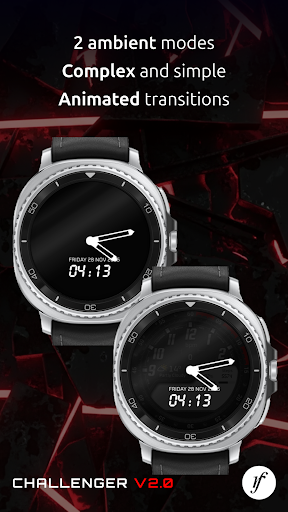
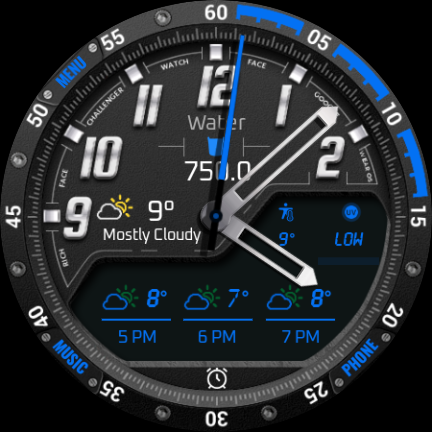
Enjoy a modern combination of an elegant analog clock and a fully featured digital watch face layout. Easily read the time at a glance while keeping important tracking information always visible.
★ Live Weather Forecast & Temperature
Stay informed on the go with integrated weather watch face features:
• Current local weather & temperature
• Hourly weather forecast
• Daily forecast updates
• Real-time weather conditions
★ Health & Fitness Tracking
Track your daily activity seamlessly with built-in fitness watch face monitors:
• Heart rate monitor (BPM tracking)
• Step counter & step goal progress
• Activity progress tracking
Perfect for gym workouts, fitness, walking, hiking, running, and tactical outdoor use.
★ Dual Battery Indicators
Monitor power levels effortlessly for both of your connected devices:
• Smartwatch battery level
• Phone battery percentage (via companion app)
Never get caught with a low battery again.
★ Fully Customizable Styles
Personalize your custom watch face to match your unique style:
• Multiple premium accent colors (tactical green, stealth black, vibrant orange, and more)
• Custom complications placeholders
• Multiple information layouts (switch from minimalist watch face to a data-rich setup)
★ Advanced Wear OS Complications
Supports standard and custom complications so you can view what matters most:
• Calendar events & agendas
• Weather conditions & temperature
• Live heart rate & steps count
• Watch & phone battery status
• Financial trackers (Stocks & Crypto prices)
• Astronomy info (Sunrise, sunset, moon phase)
• Any supported Wear OS system complication!
★ Instant App Shortcuts
Launch your favorite applications directly from your smart watch face:
• Phone & Messaging apps
• Music player control
• Alarms & Timers
• Google Maps & Google Wallet shortcuts
• Any system or third-party Wear OS shortcut
Why Choose Challenger?
✔ Rugged military watch face & tactical aesthetic
✔ Hybrid analog digital clock design
✔ Real-time weather forecast complication
✔ Heart rate monitoring & fitness tracking
✔ Dual battery indicators (Watch & Phone)
✔ Highly customizable watch face layouts and colors
✔ Fast, lightweight, and battery-efficient performance
✔ Fully optimized for the latest Wear OS 6+ devices
Give your smartwatch a powerful, rugged tactical look with advanced customization and useful everyday features. Download the Challenger Watch Face today!
アプリ情報
アプリの権限
-
Other
- receive data from Internet
- view network connections
- full network access
- prevent device from sleeping

評価とレビュー
this used to be 5 stars. I paid for this watch face. recently had to reset the watch, and now when I try to install this watch face it says it's not compatible
excellent
temp but no date!
can't change anything other than colour on free version to see if i like the layout possibilities.
I have the upgraded one but when my watch updated it didnt work no more. i been trying to get it to work but nothing.
The footsteps icon against the steps count as percentage is not showing. Instead of this showing the same like the count.


