


이 앱 정보
📱 Screen Recorder Pro - Capture Your Screen with Ease
Record your Android screen in stunning quality with our powerful, easy-to-use screen recorder. Whether you're creating tutorials, capturing gameplay, recording video calls, or documenting app issues, Screen Recorder Pro has everything you need.
🎬 PROFESSIONAL RECORDING FEATURES
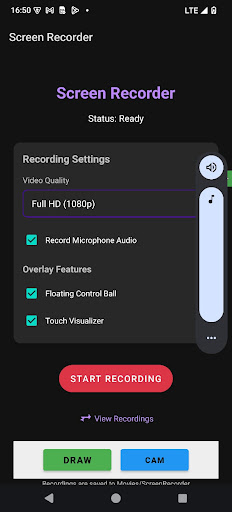
• Multiple Quality Options - Choose from HD (720p), Full HD (1080p), or Ultra HD (4K) recording to match your needs
• Audio Recording - Capture microphone audio alongside your screen recording for voiceovers and commentary
• Flexible Controls - Start, pause, resume, and stop recordings with intuitive on-screen controls
• No Time Limits - Record as long as you need without arbitrary restrictions
• No Watermarks - Your recordings are clean and professional
🎨 POWERFUL OVERLAY FEATURES
• Floating Control Ball - Access recording controls from anywhere on screen with our draggable floating button. Easily pause, resume, or stop recording without returning to the app
• Touch Visualizer - Show touch interactions on screen, perfect for tutorials and demonstrations
• Screen Drawing - Draw and annotate directly on your screen while recording to highlight important areas
• Facecam Overlay - Add a front camera overlay to your recordings for reaction videos, commentary, or personal touch
✂️ BUILT-IN VIDEO EDITOR
• Trim & Cut - Remove unwanted parts from the beginning or end of your recordings
• Preview Changes - See your edits before saving
• Quick Export - Save edited videos in seconds
📁 ORGANIZED GALLERY
• Built-in Gallery - Browse all your recordings in one place without leaving the app
• Video Playback - Watch your recordings with our integrated video player featuring seek controls
• Easy Sharing - Share recordings directly to social media, messaging apps, or cloud storage
• Quick Delete - Remove unwanted recordings with a single tap
⚡ OPTIMIZED PERFORMANCE
• Minimal Battery Impact - Efficient recording engine designed to preserve battery life
• Low Memory Usage - Optimized to run smoothly even on older devices
• Background Recording - Continue recording while using other apps
• Auto-Save - Recordings are automatically saved to your Movies folder
🔒 PRIVACY FOCUSED
• No Account Required - Start recording immediately without sign-up
• Offline Operation - Works completely offline, no internet connection needed
• Local Storage Only - All recordings stay on your device
• No Data Collection - We don't collect or share any personal data
📋 PERFECT FOR:
✓ Creating tutorials and how-to videos
✓ Recording mobile gameplay and walkthroughs
✓ Capturing video calls and meetings
✓ Documenting bugs and app issues
✓ Making product demos and presentations
✓ Creating content for social media
✓ Recording online classes and webinars
✓ Saving streaming content for offline viewing
🛠️ EASY TO USE
Open the app and adjust your settings
Tap "Start Recording" and grant screen capture permission
Record your screen - use the floating controls for quick access
Stop recording when finished
View, edit, and share from the built-in gallery
📱 DEVICE COMPATIBILITY
Works on Android 7.0 (Nougat) and above. Optimized for the latest Android versions including Android 14 and Android 15 with full edge-to-edge display support.
💡 TIPS FOR BEST RESULTS
• Close unnecessary apps before recording to ensure smooth performance
• Use headphones when recording audio to avoid echo
• Enable Do Not Disturb mode to prevent notification interruptions
• Choose lower resolution for longer recordings to save storage space
Download Screen Recorder Pro today and start creating amazing screen recordings!
Record your Android screen in stunning quality with our powerful, easy-to-use screen recorder. Whether you're creating tutorials, capturing gameplay, recording video calls, or documenting app issues, Screen Recorder Pro has everything you need.
🎬 PROFESSIONAL RECORDING FEATURES
• Multiple Quality Options - Choose from HD (720p), Full HD (1080p), or Ultra HD (4K) recording to match your needs
• Audio Recording - Capture microphone audio alongside your screen recording for voiceovers and commentary
• Flexible Controls - Start, pause, resume, and stop recordings with intuitive on-screen controls
• No Time Limits - Record as long as you need without arbitrary restrictions
• No Watermarks - Your recordings are clean and professional
🎨 POWERFUL OVERLAY FEATURES
• Floating Control Ball - Access recording controls from anywhere on screen with our draggable floating button. Easily pause, resume, or stop recording without returning to the app
• Touch Visualizer - Show touch interactions on screen, perfect for tutorials and demonstrations
• Screen Drawing - Draw and annotate directly on your screen while recording to highlight important areas
• Facecam Overlay - Add a front camera overlay to your recordings for reaction videos, commentary, or personal touch
✂️ BUILT-IN VIDEO EDITOR
• Trim & Cut - Remove unwanted parts from the beginning or end of your recordings
• Preview Changes - See your edits before saving
• Quick Export - Save edited videos in seconds
📁 ORGANIZED GALLERY
• Built-in Gallery - Browse all your recordings in one place without leaving the app
• Video Playback - Watch your recordings with our integrated video player featuring seek controls
• Easy Sharing - Share recordings directly to social media, messaging apps, or cloud storage
• Quick Delete - Remove unwanted recordings with a single tap
⚡ OPTIMIZED PERFORMANCE
• Minimal Battery Impact - Efficient recording engine designed to preserve battery life
• Low Memory Usage - Optimized to run smoothly even on older devices
• Background Recording - Continue recording while using other apps
• Auto-Save - Recordings are automatically saved to your Movies folder
🔒 PRIVACY FOCUSED
• No Account Required - Start recording immediately without sign-up
• Offline Operation - Works completely offline, no internet connection needed
• Local Storage Only - All recordings stay on your device
• No Data Collection - We don't collect or share any personal data
📋 PERFECT FOR:
✓ Creating tutorials and how-to videos
✓ Recording mobile gameplay and walkthroughs
✓ Capturing video calls and meetings
✓ Documenting bugs and app issues
✓ Making product demos and presentations
✓ Creating content for social media
✓ Recording online classes and webinars
✓ Saving streaming content for offline viewing
🛠️ EASY TO USE
Open the app and adjust your settings
Tap "Start Recording" and grant screen capture permission
Record your screen - use the floating controls for quick access
Stop recording when finished
View, edit, and share from the built-in gallery
📱 DEVICE COMPATIBILITY
Works on Android 7.0 (Nougat) and above. Optimized for the latest Android versions including Android 14 and Android 15 with full edge-to-edge display support.
💡 TIPS FOR BEST RESULTS
• Close unnecessary apps before recording to ensure smooth performance
• Use headphones when recording audio to avoid echo
• Enable Do Not Disturb mode to prevent notification interruptions
• Choose lower resolution for longer recordings to save storage space
Download Screen Recorder Pro today and start creating amazing screen recordings!
앱 정보
앱 권한
-
Photos/Media/Files
- read the contents of your USB storage
- modify or delete the contents of your USB storage
-
Storage
- read the contents of your USB storage
- modify or delete the contents of your USB storage
-
Camera
- take pictures and videos
-
Microphone
- record audio
-
Other
- draw over other apps
- prevent device from sleeping
- Google Play license check


