




이 앱 정보
Discover VLLO, the ultimate video editor featuring AI auto editing. Create stunning videos effortlessly with smart AI tools!
VLLO is a powerful video editor trusted by 40 million creators worldwide - perfect for both beginners and pros! Whether you're making your first vlog or creating content for YouTube, Instagram, or TikTok, VLLO's intuitive interface makes video editing feel natural and fun.
Beginners love how super simple it is to trim videos, add text, apply transitions, use templates, and add music with just a few taps. And when you're ready to dive deeper, advanced features like auto caption, PIP, AI tracking, and professional keyframe animations are waiting for you.
Why Creators Love VLLO:
NO WATERMARK
• Create unlimited videos without any watermarks
• No payment required
POWERFUL AI TOOLS
• Auto Caption: Generate perfectly synced captions in one tap, available in multiple languages
• Auto Tracking: Make stickers, texts and blur to follow moving objects
• AI Background Remove: Remove background instantly
TRENDY TEMPLATES & GRAPHICS
• Decorate your videos with regularly updated trending templates
• Create and share your own templates
• Stickers, Frames, and Text Labels: Stylize your video with aesthetic, high quality assets
FILTERS, EFFECTS & TRANSITIONS
• Filters & Color Grading: Enjoy plenty of cinematic filters and professional color grading options
• Effects: Instantly elevate your videos with effects like glitch, retro, and zoom
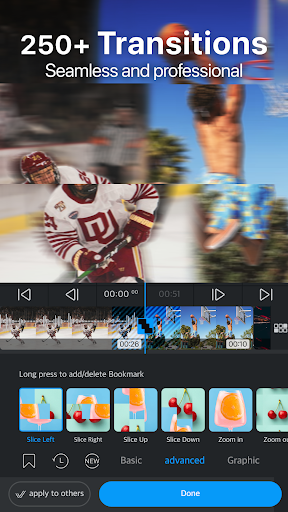
• Transitions: Create smooth flows from classic slides and rotates to trendy graphic animations
MUSIC & AUDIO
• Massive audio library : 1800+ copyright-free musics and sound effects, and you may also import your own music
• Audio Effects: Enhance your sound with fade, pitch control, voice changing effects
• Voice Over: Record instantly with a single tap
• Audio Extract: Extract audio and musics from videos
ADVANCED VISUAL EFFECTS
• Chroma-key: Remove specific colors from video easily
• Blur & Mosaic: Create stylish blur effects
• Text Styling: Customize color, shadows, and outline for individual characters
• Multi-track Editing: Layer videos, images and GIFs (PIP) and arrange them easily
ADVANCED MOTION CONTROL
• Keyframe: Create custom motion effects for all media
• Speed Control: Adjust video with speed and reverse
• Animation: Animate videos with various effects and duration
EASY & INTUITIVE EDITING:
• Convenient editing with automatic saving and unlimited redo/undo
• Precise editing with smart grid and magnetic settings
• Multiple video ratios for all platforms
• Easy-to-follow tutorials to get you started
HIGH QUALITY EXPORT & QUICK SHARE
• Export videos in stunning 4K resolution
• Share directly to Youtube, Instagram, TikTok, WhatsApp, etc
Download VLLO now and experience next-level editing on your iPhone and iPad!
VLLO Terms of Use : https://www.vllo.io/vllo-terms-of-use
Questions or suggestions?
Contact us: [email protected]
앱 정보
새로운 기능
UI Improvements
Bug fixes
Thanks for using VLLO.
If you have any questions or suggestions, please feel free to contact us at '[email protected]'.
앱 권한
-
Photos/Media/Files
- read the contents of your USB storage
- modify or delete the contents of your USB storage
-
Storage
- read the contents of your USB storage
- modify or delete the contents of your USB storage
-
Camera
- take pictures and videos
-
Microphone
- record audio
-
Wi-Fi connection information
- view Wi-Fi connections
-
Other
- receive data from Internet
- view network connections
- connect and disconnect from Wi-Fi
- full network access
- control vibration
- prevent device from sleeping
- Google Play license check


평가 및 리뷰
everything is fine but cannot attach .aux file on video
you can't save and share the video you need to pay for this
This will be a great video editor if you can add background remover for android. will keep this at 3 stars until then. - Nov2026 this has been the best purchase. removing my 3 stars since it has all the features except for AI video generation of course. but all in all, this is already a good mid range video editor. great work dev team.
Best App ever!
Amazing app. My friend #Kaytrell suggested this app. Very easy to use and I had to recommend it to my friends already.
I LOVE THIS APP. I use it all the time to post content on YouTube and TikTok. It is perfect. their new AI additions are really helpful when meeting my uploading deadlines. Thanks to Villo for helping me reach 10k followers!