

TKS 39 Recon Watch Face
Personalization
0.0
16 다운로드
"A Bold digital watch face with stylized numerals and analog edge indicators"
Google Play에서 설치
유료 앱




이 앱 정보
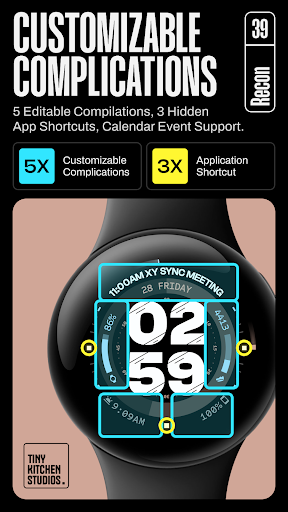
Recon: A hybrid/digital Wear OS watch face built around bold patterned digital numerals and stylized analog indicators positioned along the outer edge of the dial. Featuring 30 color palettes, 5 customizable complications, and 3 app shortcuts.
Key Features:
- 30 color palettes, all featuring a black background
- Stylized digital clock with optional clean mode
- Stylized analog hour and minute indicators that can be turned off for a pure digital mode
- Center seconds progress indicator
- 2 AOD modes: default and minimal
- 12/24-hour time format support
- 5 customizable complications
- Supports calendar and long text complications
- 3 hidden app shortcuts
How to Install and Apply the Watch Face:
1.Ensure your smartwatch is selected during purchase.
2.Install the optional companion app on your phone, if desired.
3.Long press your watch display.
4.Swipe through available watch faces.
5.Tap “+” and select “TKS 39 Recon Watch Face".
Ran into any issues or need a hand? We're happy to help! Just send us an email at [email protected]
Key Features:
- 30 color palettes, all featuring a black background
- Stylized digital clock with optional clean mode
- Stylized analog hour and minute indicators that can be turned off for a pure digital mode
- Center seconds progress indicator
- 2 AOD modes: default and minimal
- 12/24-hour time format support
- 5 customizable complications
- Supports calendar and long text complications
- 3 hidden app shortcuts
How to Install and Apply the Watch Face:
1.Ensure your smartwatch is selected during purchase.
2.Install the optional companion app on your phone, if desired.
3.Long press your watch display.
4.Swipe through available watch faces.
5.Tap “+” and select “TKS 39 Recon Watch Face".
Ran into any issues or need a hand? We're happy to help! Just send us an email at [email protected]
앱 정보
평가 및 리뷰
0.0
총 평가
5
4
3
2
1
S
SuperMan Bat
Sep 23, 2026
excellent work 👏


