






About this app
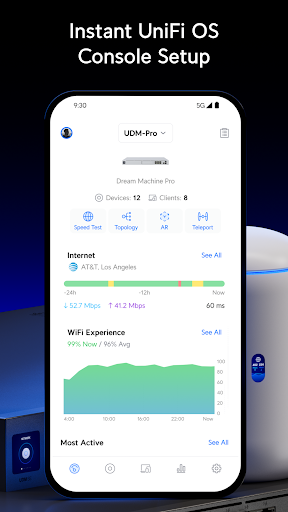
The UniFi app simplifies home and business IT by providing a central management interface where you can easily scale, monitor, and optimize every aspect of your network.
UniFi offers:
* Simple WiFi setup and configuration
* Intuitive traffic routing
* Secure, single-tap VPN access
* Detailed client and network analytics
UniFi offers:
* Simple WiFi setup and configuration
* Intuitive traffic routing
* Secure, single-tap VPN access
* Detailed client and network analytics
App Info
Version
11.1.2
Updated on
Oct 15, 2026
Size
Requires Android
9
Package ID
com.ubnt.easyunifi
Installs
4.2M+
Category
Tools
What's New
UniFi Android 11.1.2 adds AI-powered client icon generation from photos, replaces WiFi Experience with uplink speed in the Devices list, and aligns Firewall Policy application categories with the web interface.
- Added an option to generate client icons from photos using AI.
- Replaced WiFi Experience with uplink speed in the Devices list.
- Aligned application categories in Firewall Policy settings with the web interface.
- And more fixes.
- Added an option to generate client icons from photos using AI.
- Replaced WiFi Experience with uplink speed in the Devices list.
- Aligned application categories in Firewall Policy settings with the web interface.
- And more fixes.
App Permissions
-
Location
- approximate location (network-based)
- precise location (GPS and network-based)
-
Photos/Media/Files
- read the contents of your USB storage
- modify or delete the contents of your USB storage
-
Storage
- read the contents of your USB storage
- modify or delete the contents of your USB storage
-
Camera
- take pictures and videos
-
Wi-Fi connection information
- view Wi-Fi connections
-
Other
- receive data from Internet
- view network connections
- pair with Bluetooth devices
- access Bluetooth settings
- change network connectivity
- allow Wi-Fi Multicast reception
- connect and disconnect from Wi-Fi
- full network access
- control vibration
- prevent device from sleeping
- read Google service configuration


Ratings and Reviews
4.8
Total ratings
5
4
3
2
1
J
John M
Nov 01, 2026
can't turn lights off G6 cameras no settings to do so
A
Allan Connery
Oct 30, 2026
Just... amazing
M
Mason Feltoe
Oct 29, 2026
love it
J
Jim Bennett
Oct 29, 2026
Simple views, intuitive metrics, great insights over the health and integrity of my network estate
D
Deadly Frog
Oct 29, 2026
The best!
M
Micro Max00
Oct 27, 2026
it works


