

h1901 Sport Dashboard Face
Personalization
5.0
22 Downloads
"Modern Wear OS digital watch face with health data, weather, and color themes."
Installeren via Google Play
Paid App


Over deze app
🏃 h1901 Sport Dashboard Watch Face
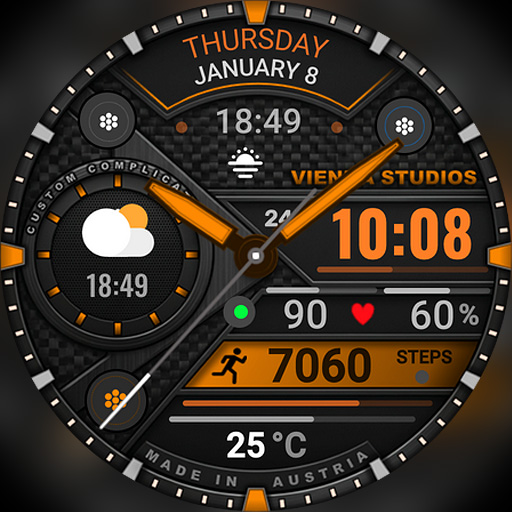
Made for active days! h1901 is a modern, sporty digital watch face for Wear OS with a bold geometric dashboard design. Check your time, date, steps, heart rate and battery at a glance – and add weather or sunrise / sunset with complications. Choose from many vibrant color themes to match your sport outfit or style.
⌚ Features
- Prominent digital time with AM/PM indicator
- 12h / 24h format (follows your phone settings)
- Day of the week and date
- Daily step counter
- Heart rate (BPM)
- Watch battery level (%) with visual gauge arc
- Sporty, geometric high-density layout
🎨 Customization
- Many color themes, e.g. green, blue, red, orange, purple and silver / white
- Complications – e.g. current temperature / weather or sunrise / sunset
- Touch and hold the watch face, then tap "Customize"
🌦️ Weather not showing or not updating?
1. Make sure location is enabled on your phone and watch.
2. Open the Weather app on your watch and refresh it (e.g. tap "Last updated" or pull down).
3. Switch to another watch face for a few seconds, then switch back – this often refreshes the weather data.
4. Wait a few minutes for the data to sync.
❤️ Heart rate not showing?
Allow the "Sensors / Body sensors" permission when asked, and check that heart rate measuring is turned on in your health app (e.g. Samsung Health).
📲 How to install
1. Make sure your watch is connected to your phone (Galaxy Wearable or Pixel Watch app) and uses the same Google account.
2. On your phone, open the Play Store, tap the arrow next to "Install" and select your watch.
3. Or open the Play Store directly on your watch and search for "h1901".
4. After installation, touch and hold your current watch face, swipe to the end, tap "+" and select h1901.
Tip: It can take a few minutes until the watch face appears on your watch.
⌚ Supported devices
Compatible with all Wear OS 5+ smartwatches (API level 34+), including:
- Samsung Galaxy Watch 4, 5, 6, 7, 8, Classic and Ultra series
- Google Pixel Watch 1, 2, 3 and 4
- Other Wear OS 5+ watches
Not compatible with Tizen (Galaxy Watch 3 or older) or Apple Watch.
💬 Support
Questions or problems? Please write to us before leaving a review – we are happy to help!
📩 [email protected]
🌐 www.viennastudios.com
💛 Thank you for choosing Happy Watch Faces by Vienna Studios!
We hope this design brightens your day and your wrist 😊
Made for active days! h1901 is a modern, sporty digital watch face for Wear OS with a bold geometric dashboard design. Check your time, date, steps, heart rate and battery at a glance – and add weather or sunrise / sunset with complications. Choose from many vibrant color themes to match your sport outfit or style.
⌚ Features
- Prominent digital time with AM/PM indicator
- 12h / 24h format (follows your phone settings)
- Day of the week and date
- Daily step counter
- Heart rate (BPM)
- Watch battery level (%) with visual gauge arc
- Sporty, geometric high-density layout
🎨 Customization
- Many color themes, e.g. green, blue, red, orange, purple and silver / white
- Complications – e.g. current temperature / weather or sunrise / sunset
- Touch and hold the watch face, then tap "Customize"
🌦️ Weather not showing or not updating?
1. Make sure location is enabled on your phone and watch.
2. Open the Weather app on your watch and refresh it (e.g. tap "Last updated" or pull down).
3. Switch to another watch face for a few seconds, then switch back – this often refreshes the weather data.
4. Wait a few minutes for the data to sync.
❤️ Heart rate not showing?
Allow the "Sensors / Body sensors" permission when asked, and check that heart rate measuring is turned on in your health app (e.g. Samsung Health).
📲 How to install
1. Make sure your watch is connected to your phone (Galaxy Wearable or Pixel Watch app) and uses the same Google account.
2. On your phone, open the Play Store, tap the arrow next to "Install" and select your watch.
3. Or open the Play Store directly on your watch and search for "h1901".
4. After installation, touch and hold your current watch face, swipe to the end, tap "+" and select h1901.
Tip: It can take a few minutes until the watch face appears on your watch.
⌚ Supported devices
Compatible with all Wear OS 5+ smartwatches (API level 34+), including:
- Samsung Galaxy Watch 4, 5, 6, 7, 8, Classic and Ultra series
- Google Pixel Watch 1, 2, 3 and 4
- Other Wear OS 5+ watches
Not compatible with Tizen (Galaxy Watch 3 or older) or Apple Watch.
💬 Support
Questions or problems? Please write to us before leaving a review – we are happy to help!
📩 [email protected]
🌐 www.viennastudios.com
💛 Thank you for choosing Happy Watch Faces by Vienna Studios!
We hope this design brightens your day and your wrist 😊
App-info
Versie
Bijgewerkt op
N/A
Grootte
Vereist Android
Pakket-ID
com.AAA.h1901
Installaties
22
Categorie
Personalization
App-machtigingen
-
Other
- control vibration
- Google Play license check

Beoordelingen en recensies
5.0
Totaal aantal beoordelingen
5
4
3
2
1
M
Mike Gio
Oct 01, 2026
awesome
N
Neil George
Sep 30, 2026
awesome watchface. looks beautiful on an Ultra 2. did a good job on the face. fonts are easy to read. love it
M
Moises Concha
Sep 27, 2026
Looks Great! Love it!
G
G. Himmel
Sep 25, 2026
😎
B
Black Metro
Sep 25, 2026
Awesome Watchface just amazing
a
ayad iraqi
Sep 25, 2026
Nice and stylish watch ⌚ face.
Meer van ontwikkelaar

h1602 Multi Classic Watch Face
Happy Watch Faces
0.0

h013 Butterfly Digital Watch
Happy Watch Faces
3.4
h1902 Vienna Hybrid Dashboard
Happy Watch Faces
0.0
h1901 Sport Dashboard Face
Happy Watch Faces
5.0

h1803 Dashboard Watch Face
Happy Watch Faces
0.0

h1802 Tactical Watch Face
Happy Watch Faces
0.0