




O tej aplikacji
SCHLAGE ENCODE PLUS SMART WIFI DEADBOLT, SCHLAGE ENCODE SMART WIFI DEADBOLT AND LEVER, SCHLAGE ENCODE PLUS SMART WIFI DEADBOLT AND SCHLAGE ARRIVE SMART WIFI DEADBOLT
These locks feature built-in WiFi, so you don’t need to purchase additional hubs or accessories for remote access. When your lock is paired to your smartphone and connected to your home’s WiFi network, conveniently use the Schlage Home app to:
- Lock/unlock; Check your lock’s status from anywhere
- Manage up to 250 unique access codes per lock (up to 100 codes for Schlage Encode Plus)
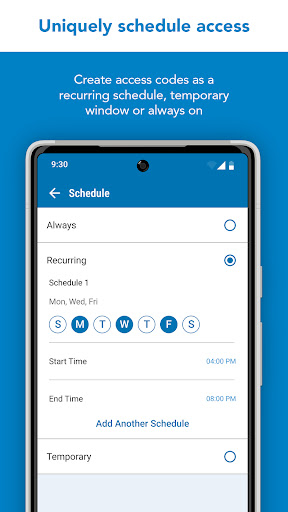
- Schedule access codes as always-on, recurring at specific times/days, or temporary with a specific start and end date/time
- Share virtual keys for full administrative access or guest lock/unlock only access
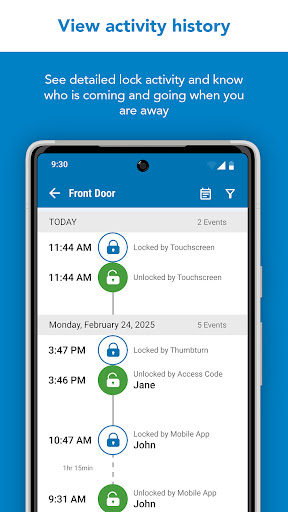
- View lock history log
- Customize push notifications to be alerted if specific access codes are used and when your door is locked/unlocked
- Select time delay for auto-locking
- Receive low battery advance warnings
- Set built-in alarm warnings (excluding Schlage Arrive)
- Pair with leading smart home speakers and ecosystems
SCHLAGE SENSE SMART DEADBOLT
The Schlage Sense deadbolt features Bluetooth technology, allowing you to easily use your smartphone with the Schlage Home app to, within Bluetooth range:
- Lock/unlock and check your lock’s status
- Manage up to 30 unique access codes per lock
- Schedule access codes as always-on or recurring at specific times/days
- Share virtual keys for full administrative access or guest lock/unlock only access
- View lock history log
- Select time delay for auto-locking
- Set built-in alarm warnings based on the type of disturbance detected
You must pair with a Schlage Sense WiFi Adapter and your home WiFi network to:
- Control and monitor your lock remotely
- Pair with leading smart home speakers and ecosystems
- Receive push notifications when specific access codes are used or when your door is locked/unlocked
The Schlage Connect Smart Deadbolt is not supported by the Schlage Home app. Visit Schlage’s website for more information on compatible home hubs and apps for the Schlage Connect Smart Deadbolt.
Works best in Google and Samsung flagship phones
Informacje o aplikacji
Co nowego
Uprawnienia aplikacji
-
Location
- approximate location (network-based)
- precise location (GPS and network-based)
-
Camera
- take pictures and videos
-
Wi-Fi connection information
- view Wi-Fi connections
-
Other
- receive data from Internet
- view network connections
- pair with Bluetooth devices
- access Bluetooth settings
- change network connectivity
- allow Wi-Fi Multicast reception
- connect and disconnect from Wi-Fi
- full network access
- run at startup
- prevent device from sleeping


Oceny i opinie
this app does what it says and much more.
It works.
it's fine
Awful, batteries didn't work. Pairing the lock very slow. Lock didn't work.
I honestly wish I did not have to have a lock screen to use this app. I hate the lock screen. Allow us to not use a lock screen but to severely recommend using one. *lately it doesn't update to say it's locked so it just shows unlocked
Once the locks are paired it works as it should. Took a few times to get the locks to pair.
Więcej od dewelopera
Schlage Home

Gatewise Multifamily Access

Allegion Optimize™

Zentra Access

Schlage Utility Software - SUS
