




O tej aplikacji
Android device automation made easy. Let Automate perform your daily routine automatically:
📂 Manage files on device and remote storage
☁️ Backup apps and files
✉️ Send and receive messages
📞 Control phone calls
🌐 Access online content
📷 Take pictures, record audio and video
🎛️ Configure device settings
🧩 Integrate other apps
⏰ Start tasks manually, on a schedule, when reaching a location, starting a physical activity and much more
SIMPLE, YET POWERFUL
Create your automated tasks by drawing flowcharts, simply add and connect blocks, novices can then configure them with predefined options, while experienced users may use expressions, variables and functions.
ALL-INCLUSIVE
Almost every feature on your Android smartphone or tablet can be accessed using the more than 410 building blocks that’s included:
https://llamalab.com/automate/doc/block/
SHARE YOUR WORK
Save time by downloading complete automation “flows” that other users already made and shared through the in-app community section:
https://llamalab.com/automate/community/
CONTEXT AWARE
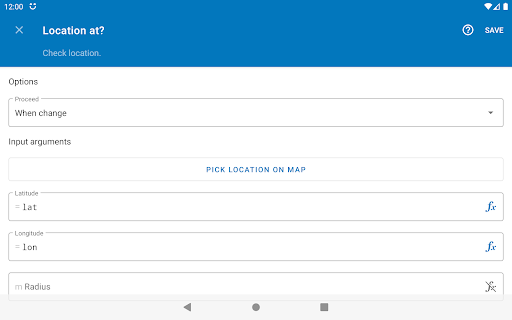
Perform recurring tasks based on the time of day, your location (geofencing), events in your calendar, app currently open, connected Wi-Fi network, remaining battery, physical activity, heart rate, steps taken, and hundreds of other conditions and triggers.
TOTAL CONTROL
Not everything needs to be automatic, manually start complex tasks by clicking home screen widgets & shortcuts, Quick Settings tiles, notifications, floating on-screen buttons, media buttons on your Bluetooth headset, volume & other hardware buttons, by scanning NFC tags and more.
FILE MANAGEMENT
Delete, copy, move and rename files on your device, SD card and external USB drive. Extract and compress zip archives. Process text files, CSV, XML and other documents.
DAILY BACKUPS
Backup your apps and files to removable SD card and remote storage.
FILE TRANSFER
Upload and download files stored on Google Drive, Microsoft OneDrive, FTP server, and online when accessible through HTTP.
COMMUNICATIONS
Send SMS, MMS, e-mail, Gmail, and other data through the built-in cloud messaging service. Manage incoming phone calls, perform call screening. Accept incoming HTTP requests using a built-in web server.
CAMERA, SOUND, ACTION
Quickly take photos using the camera, take screenshots, record video, audio and speech recognition. Playback audio and text-to-speech. Bulk process images, crop, scale and rotate them then save as JPEG or PNG. Read text in images using OCR. Generate QR codes and scan barcodes.
DEVICE CONFIGURATION
Change most system settings, adjust audio volume, lower screen brightness, control Do Not Disturb, switch mobile network (3G/4G/5G), toggle Wi-Fi, hotspot/tethering, airplane mode, power save mode and much more.
CUSTOM EVERYTHING
Create advanced home screen widgets, wallpapers and screensavers with custom layout designs.
APP INTEGRATION
Easily integrate apps supporting the Locale/Tasker plug-in API. Otherwise, use every Android capability to do so, start app activities & services, send & receive broadcasts, access content providers, or as a last resort, execute shell commands, do screen scraping, and simulate user inputs.
EXTENSIVE DOCUMENTATION
The full documentation is readily available within the app:
https://llamalab.com/automate/doc/
SUPPORT & FEEDBACK
Please don’t report problems or ask for support through Google Play store review comment, use the Help & feedback menu or the links below:
• Reddit: https://www.reddit.com/r/AutomateUser/
• Forum: https://groups.google.com/g/automate-user
• E-mail: [email protected]
This app uses the Accessibility API to provide features that interact with the UI, intercept key presses, take screenshots, read “toast” messages, determine foreground app and capture fingerprint gestures.
This app uses the Device Administrator permission to provide features that check for failed login attempts and engage screen lock.
📂 Manage files on device and remote storage
☁️ Backup apps and files
✉️ Send and receive messages
📞 Control phone calls
🌐 Access online content
📷 Take pictures, record audio and video
🎛️ Configure device settings
🧩 Integrate other apps
⏰ Start tasks manually, on a schedule, when reaching a location, starting a physical activity and much more
SIMPLE, YET POWERFUL
Create your automated tasks by drawing flowcharts, simply add and connect blocks, novices can then configure them with predefined options, while experienced users may use expressions, variables and functions.
ALL-INCLUSIVE
Almost every feature on your Android smartphone or tablet can be accessed using the more than 410 building blocks that’s included:
https://llamalab.com/automate/doc/block/
SHARE YOUR WORK
Save time by downloading complete automation “flows” that other users already made and shared through the in-app community section:
https://llamalab.com/automate/community/
CONTEXT AWARE
Perform recurring tasks based on the time of day, your location (geofencing), events in your calendar, app currently open, connected Wi-Fi network, remaining battery, physical activity, heart rate, steps taken, and hundreds of other conditions and triggers.
TOTAL CONTROL
Not everything needs to be automatic, manually start complex tasks by clicking home screen widgets & shortcuts, Quick Settings tiles, notifications, floating on-screen buttons, media buttons on your Bluetooth headset, volume & other hardware buttons, by scanning NFC tags and more.
FILE MANAGEMENT
Delete, copy, move and rename files on your device, SD card and external USB drive. Extract and compress zip archives. Process text files, CSV, XML and other documents.
DAILY BACKUPS
Backup your apps and files to removable SD card and remote storage.
FILE TRANSFER
Upload and download files stored on Google Drive, Microsoft OneDrive, FTP server, and online when accessible through HTTP.
COMMUNICATIONS
Send SMS, MMS, e-mail, Gmail, and other data through the built-in cloud messaging service. Manage incoming phone calls, perform call screening. Accept incoming HTTP requests using a built-in web server.
CAMERA, SOUND, ACTION
Quickly take photos using the camera, take screenshots, record video, audio and speech recognition. Playback audio and text-to-speech. Bulk process images, crop, scale and rotate them then save as JPEG or PNG. Read text in images using OCR. Generate QR codes and scan barcodes.
DEVICE CONFIGURATION
Change most system settings, adjust audio volume, lower screen brightness, control Do Not Disturb, switch mobile network (3G/4G/5G), toggle Wi-Fi, hotspot/tethering, airplane mode, power save mode and much more.
CUSTOM EVERYTHING
Create advanced home screen widgets, wallpapers and screensavers with custom layout designs.
APP INTEGRATION
Easily integrate apps supporting the Locale/Tasker plug-in API. Otherwise, use every Android capability to do so, start app activities & services, send & receive broadcasts, access content providers, or as a last resort, execute shell commands, do screen scraping, and simulate user inputs.
EXTENSIVE DOCUMENTATION
The full documentation is readily available within the app:
https://llamalab.com/automate/doc/
SUPPORT & FEEDBACK
Please don’t report problems or ask for support through Google Play store review comment, use the Help & feedback menu or the links below:
• Reddit: https://www.reddit.com/r/AutomateUser/
• Forum: https://groups.google.com/g/automate-user
• E-mail: [email protected]
This app uses the Accessibility API to provide features that interact with the UI, intercept key presses, take screenshots, read “toast” messages, determine foreground app and capture fingerprint gestures.
This app uses the Device Administrator permission to provide features that check for failed login attempts and engage screen lock.
Informacje o aplikacji
Wersja
1.53.2
Zaktualizowano w dniu
Aug 12, 2026
Rozmiar
Wymaga Androida
4.0
ID pakietu
com.llamalab.automate
Instalacje
5.8M+
Kategoria
Tools
Co nowego
• Target Android 16
• Updated to Google Play billing version 8
• Heart rate block requires Health Connect permission on Android 16+
• Fixed Bluetooth device connect block to work on Android 16+ using privileged service
• Fixed Flashlight set state and Flashlight enabled blocks to not require camera permission on Android 6+
• Fixed help search failure on Android 6
• Updated to Google Play billing version 8
• Heart rate block requires Health Connect permission on Android 16+
• Fixed Bluetooth device connect block to work on Android 16+ using privileged service
• Fixed Flashlight set state and Flashlight enabled blocks to not require camera permission on Android 6+
• Fixed help search failure on Android 6
Uprawnienia aplikacji
-
Device & app history
- retrieve system internal state
- retrieve running apps
- read sensitive log data
-
Identity
- find accounts on the device
-
Calendar
- read calendar events plus confidential information
- add or modify calendar events and send email to guests without owners' knowledge
-
Contacts
- find accounts on the device
- read your contacts
- modify your contacts
-
Location
- approximate location (network-based)
- precise location (GPS and network-based)
-
SMS
- read your text messages (SMS or MMS)
- receive text messages (SMS)
- send SMS messages
-
Phone
- directly call phone numbers
- reroute outgoing calls
- read call log
- read phone status and identity
- write call log
-
Photos/Media/Files
- read the contents of your USB storage
- modify or delete the contents of your USB storage
-
Storage
- read the contents of your USB storage
- modify or delete the contents of your USB storage
-
Camera
- take pictures and videos
-
Microphone
- record audio
-
Wi-Fi connection information
- view Wi-Fi connections
-
Device ID & call information
- read phone status and identity
-
Wearable sensors/Activity data
- body sensors (like heart rate monitors)
-
Other
- interact across users
- update component usage statistics
- transmit infrared
- modify secure system settings
- receive data from Internet
- mock location sources for testing
- view network connections
- create accounts and set passwords
- pair with Bluetooth devices
- access Bluetooth settings
- change system display settings
- change network connectivity
- connect and disconnect from Wi-Fi
- disable your screen lock
- control flashlight
- measure app storage space
- full network access
- close other apps
- change your audio settings
- control Near Field Communication
- read sync settings
- run at startup
- limit number of running processes
- set time zone
- set wallpaper
- draw over other apps
- use accounts on the device
- control vibration
- prevent device from sleeping
- modify system settings
- toggle sync on and off
- set an alarm
- install shortcuts
- read Google service configuration


Oceny i opinie
4.6
Ogólne oceny
5
4
3
2
1
m
mentenanta cluj
Oct 26, 2026
best, easy to use
A
Ariane Moreau-Lepage
Oct 26, 2026
Love it!!
A
Agyao Baclas
Oct 23, 2026
legit
I
Ictos Blue
Oct 22, 2026
Easy to use
C
C6lr !
Oct 22, 2026
great app, especially for limiting my friends from turning the volume to 100% on a 300w speaker
O
ObjectiveAuto93
Oct 21, 2026
ok, it actually made my device smarter. If it wasn't for how difficult it works on un-rooted devices.