Net Optimizer: Optimize Ping
Tools
4.5
13.8M+ Downloads
"Connect to fastest DNS Server with speed test. Optimize the internet speed."




Sobre este app
What is the benefit of Net Optimizer?
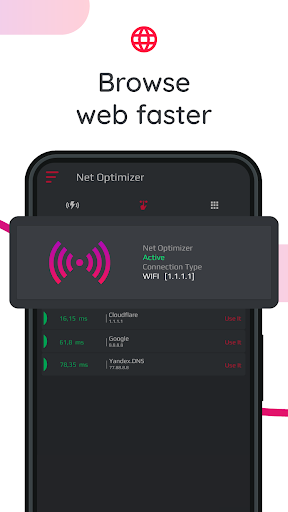
-Find & Connect the fastest DNS server based on your location & network.
-Improve web surfing speed with faster response time.
-Fix lag and reduce latency (ping time) on online games for better gaming experience.
Features
-Just one touch to find & connect fastest DNS server to optimize your connection.
-Automatically detect connection changes and optimize the network.
-Scan manually all DNS servers with one touch to see all details yourself.
-Works for both mobile data (3G/4G/5G) and WiFi connection
-Supported DNS Servers: Cloudflare, Level3, Verisign, Google, DNS Watch, Comodo Secure, OpenDNS, SafeDNS, OpenNIC, SmartViper, Dyn, FreeDNS, Alternate DNS, Yandex DNS, UncensoredDNS, puntCAT
How it works?
If you have a high-speed Internet connection but notice that your web browsing speed isn’t all that it’s cracked up to be, then your problem may lie in the DNS. By optimizing your device's DNS records, you can find the fastest routes for your data packets to take when traveling the Internet. It won’t boost to your download/upload speed, but in some cases it can result in quite a noticeable improvement in web browsing time.
At times, you may experience slow hiccups while trying to use the internet from your device. Sometimes, these problems can be attributed to your provider's DNS settings because your ISP may not always have the best DNS server speeds.
Your default DNS server directly affects how fast you’ll be able to connect to a website. So choosing the fastest server according to your location will help speed up browsing.
With Net Optimizer, you can find the fastest DNS server and connect to it with just one touch!
So your browsing speed and gaming experience (ping and latency) can be improved. (But you should remember that DNS settings will not affect your internet download / upload speed but response time)
Results
Test results showed a 132.1 percent improvement from using Google's DNS servers over using the stock DNS servers, but in real world usage, it might not be exactly that much faster. Still, this one tweak might get you finally feeling like you have a blazing connection to the internet!
Required Permissions And Privacy Notes
Overlay Permission: To show Auto Optimize pop-up, we ask for display over other apps permission.
VPNService: Net Optimizer uses VPNService base class to create DNS connection. When your Android device connects to the Internet from a specific network, your address on the Internet (the location of your Android device in the virtual network) is called the IP address. And the IP address is a code system consisting of encrypted numbers. Net Optimizer processes these numbers as site addresses by using DNS servers, and the address can be reached when searched in this way.
-Find & Connect the fastest DNS server based on your location & network.
-Improve web surfing speed with faster response time.
-Fix lag and reduce latency (ping time) on online games for better gaming experience.
Features
-Just one touch to find & connect fastest DNS server to optimize your connection.
-Automatically detect connection changes and optimize the network.
-Scan manually all DNS servers with one touch to see all details yourself.
-Works for both mobile data (3G/4G/5G) and WiFi connection
-Supported DNS Servers: Cloudflare, Level3, Verisign, Google, DNS Watch, Comodo Secure, OpenDNS, SafeDNS, OpenNIC, SmartViper, Dyn, FreeDNS, Alternate DNS, Yandex DNS, UncensoredDNS, puntCAT
How it works?
If you have a high-speed Internet connection but notice that your web browsing speed isn’t all that it’s cracked up to be, then your problem may lie in the DNS. By optimizing your device's DNS records, you can find the fastest routes for your data packets to take when traveling the Internet. It won’t boost to your download/upload speed, but in some cases it can result in quite a noticeable improvement in web browsing time.
At times, you may experience slow hiccups while trying to use the internet from your device. Sometimes, these problems can be attributed to your provider's DNS settings because your ISP may not always have the best DNS server speeds.
Your default DNS server directly affects how fast you’ll be able to connect to a website. So choosing the fastest server according to your location will help speed up browsing.
With Net Optimizer, you can find the fastest DNS server and connect to it with just one touch!
So your browsing speed and gaming experience (ping and latency) can be improved. (But you should remember that DNS settings will not affect your internet download / upload speed but response time)
Results
Test results showed a 132.1 percent improvement from using Google's DNS servers over using the stock DNS servers, but in real world usage, it might not be exactly that much faster. Still, this one tweak might get you finally feeling like you have a blazing connection to the internet!
Required Permissions And Privacy Notes
Overlay Permission: To show Auto Optimize pop-up, we ask for display over other apps permission.
VPNService: Net Optimizer uses VPNService base class to create DNS connection. When your Android device connects to the Internet from a specific network, your address on the Internet (the location of your Android device in the virtual network) is called the IP address. And the IP address is a code system consisting of encrypted numbers. Net Optimizer processes these numbers as site addresses by using DNS servers, and the address can be reached when searched in this way.
Info do App
Versão
1393-2r
Atualizado em
Sep 08, 2026
Tamanho
Requer Android
6.0
ID do pacote
com.burakgon.netoptimizer
Instalações
13.8M+
Categoria
Tools
O que há de novo
We are working hard to provide you a seamless experience.
Permissões do aplicativo
-
Wi-Fi connection information
- view Wi-Fi connections
-
Other
- run the application's scheduled background work
- receive data from Internet
- view network connections
- full network access
- run at startup
- prevent device from sleeping
- Google Play license check


Avaliações e resenhas
4.5
Total de avaliações
5
4
3
2
1
K
Kyle Lawson
Nov 19, 2026
it is good and working best I recommend this app
a
ahmed saleh
Nov 18, 2026
Full
J
Jaheim Hubbard
Nov 17, 2026
it's Soo free barley even any adds perfect app
D
Dillon Badley
Nov 17, 2026
great 👍
R
Rivaldo Nyathi
Nov 14, 2026
Its amazing and cause I love playing free fire it helps alot
C
Collins Murithi
Nov 13, 2026
Sometimes I don't feel the difference with this VPN on and off improve on that and also improve connectivity on gaming specialize on that