Ridgeline Pro: Topo Watch Face
Personalization
0.0
13 Downloads
"Topographic Wear OS watch face: your daily steps grow a contour map."
Instalar no Google Play
App pago


Sobre este app
Your day, drawn as terrain.
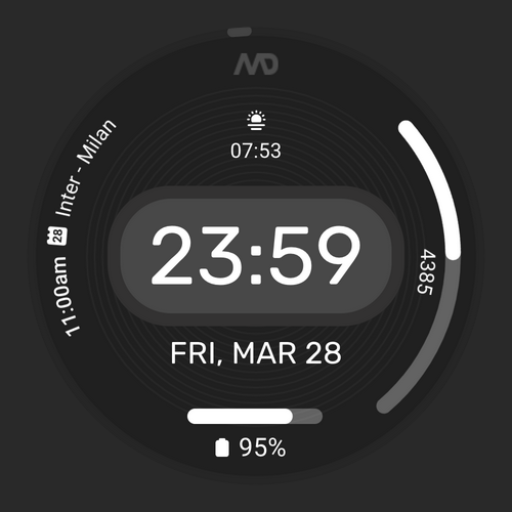
Ridgeline Pro is a digital watch face for Wear OS that turns your step count into a topographic map. As you walk toward your daily step goal, more contour lines appear and the terrain widens. Every fifth line is drawn heavier, like the index contours on a survey map.
MAKE IT YOURS
• Three dial styles for round screens: Classic, Map (contour lines across the whole dial) and Relief (the terrain in shaded layers)
• Elevation colors: the rings shade from the summit down to the foothills
• Terrain from steps, heart rate or battery
• Five palettes: Mono, Sand, Forest, Ice and Signal
• Three complication slots for any provider: heart rate, weather, next event and more
• Seconds arc and hour marks around the edge of round screens
• Three text sizes
• 12-hour, 24-hour or the watch's own time format
• Battery as a gauge, a percentage or hidden
• Optional slow terrain drift
ALWAYS-ON DISPLAY
A quiet contour layout made for the dim screen, with the time, date and today's steps. Prefer less? Switch to time only.
Large, condensed numerals keep the time readable at a glance. Tap the time to open alarms; tap a complication to open its app. Long-press the face and choose Edit to change palettes, display options and complications.
TRY IT FIRST
Every palette, setting and the always-on display run live in your browser at tickmark.devrives.com.
COMPATIBILITY
Works on watches running Wear OS 5 or later, such as Galaxy Watch and Pixel Watch. This is a watch face for your watch, not a phone app. If your watch does not switch to it after installing, long-press your current watch face and pick Ridgeline Pro from the list. Complication types and refresh rates depend on your watch and installed apps. The terrain visualizes your watch's step count and step goal; it is not a GPS map.
Info do App
Versão
1.3.0
Atualizado em
Nov 17, 2026
Tamanho
Requer Android
ID do pacote
com.devrives.watchface.ridgeline
Instalações
13
Categoria
Personalization
O que há de novo
Two new dial styles for round watches join Classic, the look you have now. Map draws the terrain as contour lines across the whole dial, and Relief stacks it in shaded layers. In both, the terrain still grows out to the edge with your steps, or with heart rate or battery if you chose one. To switch, long-press the face, tap Edit (Customize on Galaxy watches) and pick one under Dial style. Classic stays the default.