

blockit | stop phone addiction
Productivity



Sobre este app
— Sam Beckman
🎨 "Sure, there are other apps out there that do the same thing, but this one has by far the best design."
— HowToMen
📵 "This is a great app if you are really addicted to your phone."
— Sillycorns
_______
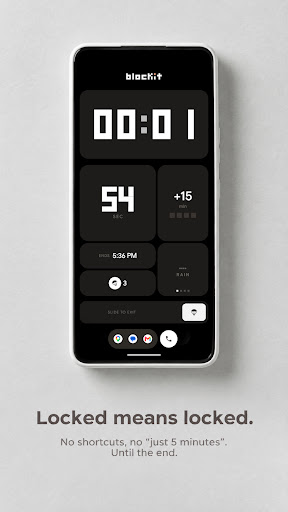
blockit completely blocks your phone for the time you choose. No shortcuts, no "just five minutes": once the session starts, your phone stays locked until the time is up.
STUDY, WORK, SLEEP
Pick the duration with the wheel, start the session, and your phone steps aside. If you try to open an app during a block, blockit brings you right back to the session screen.
THE SUITCASE
Before you start, pack the apps you truly need (maps, music, emergency messages): only those stay usable during the block.
THE PARACHUTE
The only way out before the end is to use a parachute. You get one to start with: spend it wisely, or get more from the app.
THE TOWER
Every day of focus builds a floor of your tower. Stay consistent and watch it grow, week after week.
AUTOMATIC ROUTINES
Schedule recurring sessions (for example every evening to sleep better): they start on their own, at the time you choose.
AND MORE
• Statistics of your focus time
• Home screen widget to start a session instantly
• Nothing Phone Glyph integration
• Cloud backup of your sessions with your Google account
――――――――――――――――――――――――――――
USE OF THE ACCESSIBILITY SERVICE (AccessibilityService API)
blockit uses Android's AccessibilityService API for one single purpose, the core of the app: keeping the block in place during a session. The "blockit · Session block" service detects which app is brought to the foreground while a session is active and, if it isn't one of the apps you packed in your suitcase, it brings you back to the block screen.
The service does NOT read your screen content and does NOT collect, store, or share any personal or sensitive data. The only information used is the package name of the foreground app, processed on-device only and only while a session is active. The service does nothing when no session is running.
Enabling it is optional and requires your explicit consent in the system settings, but without it blockit cannot prevent the use of other apps during a block.
Info do App
O que há de novo
• Faster, simpler Google sign-in
• Screen off? Your block now rests and saves battery, ending right on time
• Finished your first session? blockit can remind you tomorrow for the second brick
• Smoother animations everywhere: profile, suitcase, onboarding, tower
• Clearer, more readable text and consistent buttons
• Fixes for reboots during a block, restores and purchases
Permissões do aplicativo
-
Other
- update component usage statistics
- view network connections
- full network access
- run at startup
- draw over other apps
- control vibration
- prevent device from sleeping
- Google Play license check
- read Google service configuration

Avaliações e resenhas
Hi, I love the app, but I've hit 3 issues : 1) I packed my bag with the apps I needed and slid to start the timer. When I opened one of them, a Play Store popup appeared at the bottom. The app treated it as the Play Store, which isn't in my list, and kept closing my app the whole time, even after I tapped "No thanks." 2)I can't switch to mobile data, because Wi-Fi settings are restricted and the mobile data toggle is in the same panel. 3) I also can't feel the haptics. Could you please check it.
The app works now 👍
Please add a feature that automatically locks my phone once a specific screen time limit is reached.
Great app! I'm a Premium user on v2.2.9 and want to assign different Suitcase app bundles to each Automatic Routine (Routine 1–3) for different time slots. Right now I only see one shared Suitcase and no bag selector on the Routines tab. Is per-routine Suitcase selection available, and where can I find it?
best
great


