

S4U Bastogne Field watch face
Personalization




Sobre este app
━━━━━━━━━━━━━━━━━━
⚠️ IMPORTANT: Compatibility & Installation
This app is optimized for the new Watch Face Format regarding Wear OS 5 (API 34+). Compatible devices include:
- Samsung Galaxy Watch 8, Ultra, 7, 6 , 5, 4 (Wear OS 5 update required)
- Google Pixel Watch Series
- Other Wear OS 5+ smartwatches
(Note: Only devices running Wear OS 5 or higher are supported!)
If you experience any issues with installation or downloading:
1. Ensure your watch is updated to the latest Wear OS version.
2. Open the companion app provided with your purchase.
3. Follow the steps in the Install/Issues section.
Still need help? Email me at [email protected].
━━━━━━━━━━━━━━━━━━
✨ Key Features:
- Realistic Design: Analog field watch face design.
- Switch between classic and chronograph designs with a tap.
- Color Customization: Personalize your watch with multiple dial color choices.
- 2 Editable Values: Display user-defined data (e.g., weather, battery, heart rate).
- 5 Shortcuts: Quickly access your favorite widgets/apps.
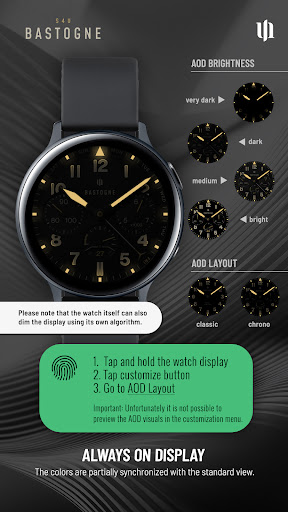
- Always-On Display: Choose from 4 different brighness settings for optimal AOD functionality.
━━━━━━━━━━━━━━━━━━
🎨 CUSTOMIZATION
Personalize your S4U Bastogne in just a few steps:
1. Press and hold the center of the watch display.
2. Tap the customize button.
3. Swipe left or right to navigate through the customizable elements.
4. Swipe up or down to change colors or options for each item.
Available Options:
- Background Color: 10
- Background Stripe: off + 2 options
- Weekend hand: off + 2 options
- Background shadow: off, 5 options
- AOD brightness: 4 (dark, low, mid, bright)
- AOD Layout: 2 (classic, chronograph)
Complications:
- 2 Editable Complications
- 5 App Shortcuts
****
━━━━━━━━━━━━━━━━━━
🌙 Always-On Display (AOD)
The watch face features an Always-On Display for continuous timekeeping. Colors automatically adapt to your chosen design with a pure black background.
4 AOD Brightness options:
- dark, low, mid, bright
4 AOD Layout options:
- classic, chronograph
Note:
- Using AOD will reduce battery life, depending on your smartwatch's settings.
- Some smartwatches may automatically dim the AOD display based on ambient light conditions.
- The AOD background uses a deep black background to keep the On Pixel Ratio (OPR) as low as possible.
━━━━━━━━━━━━━━━━━━
⚙️ SHORTCUTS & COMPLICATIONS
- App Shortcuts: Link to your favorite apps for quick access.
- Editable Complications/Values: Display exactly the data you need.
How to Set Up:
1. Press and hold the watch display.
2. Tap the customize button.
3. Swipe right to left until you reach the "complications" section.
4. Tap on any of the 5 editable shortcuts or 2 editable complications to configure your preferred settings.
With these options, you can tailor your watch face to perfectly suit your daily needs!
━━━━━━━━━━━━━━━━━━
📬 Stay Connected
Enjoying the design? Check out my other creations! I’m constantly crafting new watch faces for Wear OS.
🌐 https://www.s4u-watches.com
Feedback & Support
I’d love to hear your thoughts! Suggestions and feedback help me improve.
📧 Email: [email protected]
💬 Please leave a review on the Play Store!
Follow Me
📸 Instagram: https://www.instagram.com/matze_styles4you/
👍 Facebook: https://www.facebook.com/styles4you
▶️ YouTube: https://www.youtube.com/c/styles4you-watches
🐦 X: https://x.com/MStyles4you
Info do App
O que há de novo
Update to comply with the new Google policy for the Target SDK 36.
Permissões do aplicativo
-
Other
- view network connections
- full network access
- Google Play license check

Avaliações e resenhas
This is the best watch face I have purchased - either on the Play Store or Facer. It has classic military styling with a lot of color variations and complications. My only complaint is that the days of the week around the outside of the watch make it difficult to see the precise time where the days are listed. I would be grateful if the developer would either add the ability to turn off the days of the week or create a new version that just has the minute indices around the whole dial.
The complications are confusing and don't reflect the options I choose. They show irrelevant dials. Furthermore, they do not show the data at a glance, rather requiring a click on it to see the information and cover over the clock numbers. Graphics are also not as crisp as in the ad.
Nice looking Field Watch with low battery usage. Overall a smart looking watch face. Two feature requests for an update if possible. A slightly larger font for screen apps to better read temperature & events along with an icon for the number of phone calls instead of just showing a digit.
Be very careful if you purchase by mistake as customer service is non existent. You will not get a refund. Google and PayPal both refuse to assist with a genuine mistake.
Beautiful and elegant watch face that can be customized for any type of occasion. S4U watch faces are a part of my regular rotation and this one is no different. Always efficient with battery and performs flawlessly on my 8C.
One of S4U's most configurable watch faces. One suggestion is to add MFD overlay on top of the chronograph dials, or more dial options.


