

AnyDesk Remote Desktop
Business
2.8
106.5M+ Downloads
"Remote access from anywhere. Fast and secure. All operating systems and devices"



Sobre este app
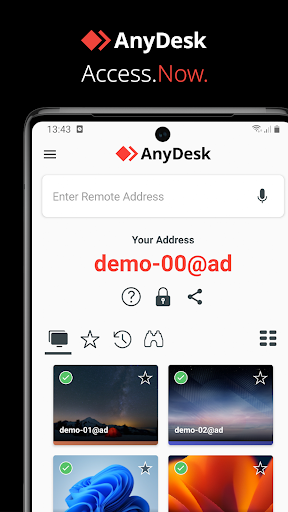
Powerful Remote Assistance Software. Whether you're in the office next door or on the other side of the world, remote access via AnyDesk makes the connection possible. Secure and reliable, for IT professionals as well as private users.
AnyDesk is ad-free and free for personal use. For commercial use visit: https://anydesk.com/en/order
Whether you're in IT support, working from home, or a student studying remotely, AnyDesk's remote desktop software has a solution for you, allowing you to connect to remote devices securely and seamlessly.
AnyDesk offers a wide range of remote desktop functions such as:
• File Transfer
• Remote Printing
• Wake-On-LAN
• Connection via VPN
and much more
The AnyDesk VPN feature allows the creation of a private network between local connecting and remote clients, providing additional security to users. It is important to note that it is not possible to access devices on the remote client's local network or vice versa. Nevertheless, after successfully connected over VPN, the following programs can be used over VPN:
• SSH – Ability to access the Remote Device over SSH
• Gaming – Ability to access a LAN-Multiplayer Game over the Internet.
For an overview of the features, visit: https://anydesk.com/en/features
If you are interested in more information, head to our Help Center by visiting: https://support.anydesk.com/knowledge/features
Why AnyDesk?
• Outstanding performance
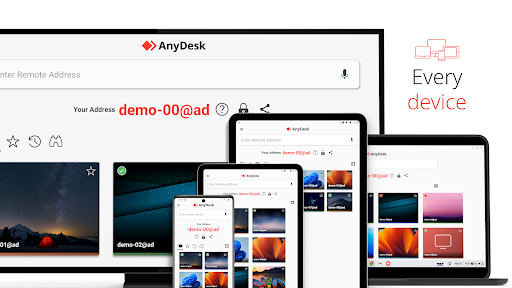
• Every operating system, every device
• Banking-standard encryption
• High frame rates, low latency
• In the Cloud or On-Premises
Every operating system, every device. Download the latest AnyDesk version for all platforms here: https://anydesk.com/en/downloads
Quick Start Guide
1. Install and launch AnyDesk on both devices.
2. Enter the AnyDesk-ID that is displayed on the remote device.
3. Confirm the access request on the remote device.
4. Done. You can now control the remote device remotely.
To verify the integrity of your AnyDesk software visit https://help.anydesk.com/en/anydesk-validation
Do you have any questions? Contact us! https://anydesk.com/en/contact
AnyDesk is ad-free and free for personal use. For commercial use visit: https://anydesk.com/en/order
Whether you're in IT support, working from home, or a student studying remotely, AnyDesk's remote desktop software has a solution for you, allowing you to connect to remote devices securely and seamlessly.
AnyDesk offers a wide range of remote desktop functions such as:
• File Transfer
• Remote Printing
• Wake-On-LAN
• Connection via VPN
and much more
The AnyDesk VPN feature allows the creation of a private network between local connecting and remote clients, providing additional security to users. It is important to note that it is not possible to access devices on the remote client's local network or vice versa. Nevertheless, after successfully connected over VPN, the following programs can be used over VPN:
• SSH – Ability to access the Remote Device over SSH
• Gaming – Ability to access a LAN-Multiplayer Game over the Internet.
For an overview of the features, visit: https://anydesk.com/en/features
If you are interested in more information, head to our Help Center by visiting: https://support.anydesk.com/knowledge/features
Why AnyDesk?
• Outstanding performance
• Every operating system, every device
• Banking-standard encryption
• High frame rates, low latency
• In the Cloud or On-Premises
Every operating system, every device. Download the latest AnyDesk version for all platforms here: https://anydesk.com/en/downloads
Quick Start Guide
1. Install and launch AnyDesk on both devices.
2. Enter the AnyDesk-ID that is displayed on the remote device.
3. Confirm the access request on the remote device.
4. Done. You can now control the remote device remotely.
To verify the integrity of your AnyDesk software visit https://help.anydesk.com/en/anydesk-validation
Do you have any questions? Contact us! https://anydesk.com/en/contact
Info do App
Versão
9.0.2
Atualizado em
Nov 09, 2026
Tamanho
Requer Android
5.0
ID do pacote
com.anydesk.anydeskandroid
Instalações
106.5M+
Categoria
Business
O que há de novo
Fixed Bugs
* Fixed a bug that the own AnyDesk ID was not shown in some scenarios.
* Fixed some settings not being reachable on Android TV via TV remote.
* Fixed a deadlock when relay state changed.
* Fixed race condition in network info panel that could lead to a crash.
* Fixed a bug that the own AnyDesk ID was not shown in some scenarios.
* Fixed some settings not being reachable on Android TV via TV remote.
* Fixed a deadlock when relay state changed.
* Fixed race condition in network info panel that could lead to a crash.
Permissões do aplicativo
-
Photos/Media/Files
- read the contents of your USB storage
- modify or delete the contents of your USB storage
-
Storage
- read the contents of your USB storage
- modify or delete the contents of your USB storage
-
Camera
- take pictures and videos
-
Microphone
- record audio
-
Other
- press keys and control buttons
- view network connections
- full network access
- run at startup
- draw over other apps
- control vibration
- prevent device from sleeping
- install shortcuts


Avaliações e resenhas
2.8
Total de avaliações
5
4
3
2
1
F
Falcon Titan
Nov 13, 2026
completely great and useful
A
Aditya Kadali
Nov 13, 2026
difficult to use
W
Willo Dallo
Nov 13, 2026
A perfect match help's alot... but reduce hanging out for some device
K
Kuldep Saharan
Nov 13, 2026
❤️🥰
J
Jigar Mehta
Nov 12, 2026
Once I disconnected I was not able to reconnect it until I force stop app and reopen it and reconnect it.
A
Ajay Kumar
Nov 11, 2026
exilan wark
Apps semelhantes

ScreenStream
Dmytro Kryvoruchko
4.4

Kodi
Kodi Foundation
3.7

TeamViewer Remote Control
TeamViewer
4.4

Remote Mouse
Remote Mouse
4.2

LocalSend: Transfer Files
Tien Nam Do
4.5

TiviMate IPTV Player
Armobsoft FZE
4.0
Mais do desenvolvedor
AnyDesk Remote Desktop
AnyDesk Software GmbH
2.8
AnyDesk plugin ad1
AnyDesk Software GmbH
2.6

AnyDesk plugin savortex1
AnyDesk Software GmbH
4.1

AnyDesk plugin formulergtv1
AnyDesk Software GmbH
4.4

AnyDesk plugin philips_24BDL..
AnyDesk Software GmbH
4.3

AnyDesk plugin pointmobile1
AnyDesk Software GmbH
4.0