

Tiny Scanner - PDF Scanner App
Business





Sobre este app
Simple, fast and professional. From seniors to students, from IDs to notes, anyone can get a perfect scan in seconds.
Scan documents, convert to PDF, and use a full set of editing tools to meet all your needs right at your fingertips.
With Tiny Scanner, you will get:
SMOOTH SCANNING WORKFLOW
● AI powered border detection for automatic scanning;
● Batch scan for efficient multi page document scanning;
● Professional filters to suit all your document scanning needs;
● Supports compressing file size and sharing scanned documents in multiple ways.
MULTIPLE SCANNING MODES
● Securely scan passports, IDs, and driver’s licenses;
● Automatically recognize QR code content & open links;
● Measure object length and automatically calculate area;
● Automatically recognize identical objects and count the total;
● Recognize math problems and get results instantly.
COMPLETE PDF EDITING TOOLS
● Sign documents with support for scanned signatures or direct signing;
● Add text, images, or shapes to scanned documents;
● Add dates, footers, and page numbers to PDF filesl
● Protect documents by adding watermarks and markup to secure important content;
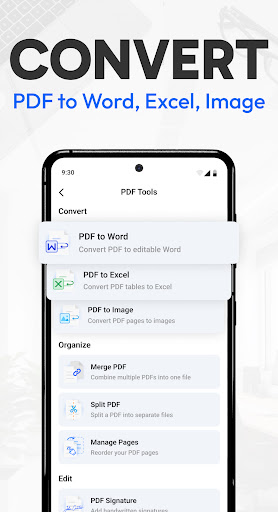
● Merge multiple files into a single PDF or split a PDF into separate files.
AI POWERED FILE TOOLS
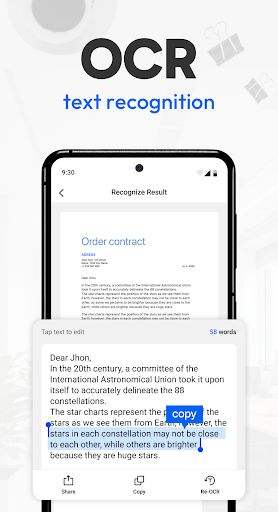
● OCR text recognition to extract, copy, and share text content;
● Convert PDFs into Word, JPG, and Excel with just a few taps;
● Tiny Scanner AI now supports uploading files for summaries, content polishing, key entity extraction, and more;
● Cloud sync with free storage and seamless access across all your devices.
ENSURE FILE SECURITY AT ALL TIMES
● Encrypt shared PDF files to protect document security;
● Supports app encryption to protect private information;
● Encrypt folders to securely store important files only on your device.
Tiny Scanner helps you transform paper documents into professional PDF files within seconds.
Edit PDF text, sign with ease, and manage your files with rich PDF tools that cover everything from conversion to secure sharing.
WHY Tiny Scanner?
● Speed: Decades of refining ensure the smoothest and fastest scanning experience.
● Convenience: Quickly access the functions you need through the "Actions" page.
● Accessibility: Cloud storage allows you to access your scanned documents anytime, anywhere.
● Reliability: With a decade of trust from millions of small businesses and individuals, Tiny Scanner stands as a reliable scanning solution.
● Free your space: Scan important documents into your phone to free up space in your backpack, eliminating the need for piles of paper documents.
Terms of Service: https://www.tinyscanner.app/terms
Privacy Policy: https://www.tinyscanner.app/privacy
Tiny Scanner is constantly updated with new features. Please write to us before leaving negative reviews, as we can often help with your problem or help you better use the app.
If you have any problem or suggestion, please send mail to [email protected], you will get the response and solution in a short time.
Info do App
O que há de novo
- German and French localization improvements.
We love hearing from you! Please leave a review or contact us at [email protected]
Permissões do aplicativo
-
Identity
- add or remove accounts
-
Photos/Media/Files
- read the contents of your USB storage
- modify or delete the contents of your USB storage
-
Storage
- read the contents of your USB storage
- modify or delete the contents of your USB storage
-
Camera
- take pictures and videos
-
Wi-Fi connection information
- view Wi-Fi connections
-
Other
- receive data from Internet
- view network connections
- control flashlight
- full network access
- use accounts on the device
- control vibration
- prevent device from sleeping
- read Google service configuration


Avaliações e resenhas
Insane company doesn't even let me save my own files to my own device. I shouldn't have to share files with some app just to save my own files. have premium purchase and PDF can't even be saved locally. have you guys lost your minds or what?
Love it! Makes working on the go easier!
Great app, no complaints.
I purchased the Pro version about 10 years ago. Back then, it was a one-time payment when you bought the software. Now, I’m expected to pay a monthly subscription just to keep using it. This is absolutely ridiculous. You are nothing but a bunch of liars and thieves!
It works
Great App!


