

My Footprint
Tools
3.2
7.3K+ ดาวน์โหลด
"Automatically record locations and provide all of the location related features."




เกี่ยวกับแอปนี้
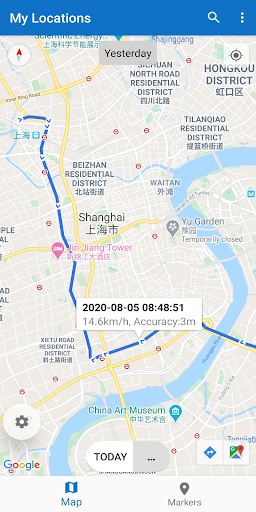
Based on the famous app My Track, this new application is very small and very easy to use, it is designed to automatically record your locations every day during the preset period in one's life, try to provide all of the location related features, and record routes.
The app has designed 5 methods to protect your privacy:
1. All locations are only saved in your mobile phone and will never be uploaded to the Internet.
2. Record locations only during your preset period.
3. Stop recording at any time.
4. Easily remove locations.
5. Use random 32 characters as the device id, which has nothing related to your device and you.
The application has 4 functions:
1. Locations
Automatically recording locations.
View all locations visited on a given day.
View all locations visited in a given year.
View all the dates and times you've been to a place.
2. Markers
Click on the map to mark points of interest.
Show all points of interest within 3km or 10km around.
3. Routes
Create a route for various activities: hiking, running, cycling, driving, etc.
Animation playback and video recording.
Import and Export of a route.
Follow a previously recorded route, or follow an imported route.
Statistics for routes.
4. Photos
Automatically join photos with a route.
Show on the map where a photo was taken.
Notice:
1. About 2GB of storage space is required for all locations of a person's life, and you can use the backup and restore function to transfer all data from the old phone to the new one.
2. Be sure to set this application to run in the background so that it can keep recording when the phone is silent.
3. The application can automatically record locations. The default location period is from 8:00 am to 8:00 pm, which you can edit at any time.
Tell us what you need, we can help you innovate.
The app has designed 5 methods to protect your privacy:
1. All locations are only saved in your mobile phone and will never be uploaded to the Internet.
2. Record locations only during your preset period.
3. Stop recording at any time.
4. Easily remove locations.
5. Use random 32 characters as the device id, which has nothing related to your device and you.
The application has 4 functions:
1. Locations
Automatically recording locations.
View all locations visited on a given day.
View all locations visited in a given year.
View all the dates and times you've been to a place.
2. Markers
Click on the map to mark points of interest.
Show all points of interest within 3km or 10km around.
3. Routes
Create a route for various activities: hiking, running, cycling, driving, etc.
Animation playback and video recording.
Import and Export of a route.
Follow a previously recorded route, or follow an imported route.
Statistics for routes.
4. Photos
Automatically join photos with a route.
Show on the map where a photo was taken.
Notice:
1. About 2GB of storage space is required for all locations of a person's life, and you can use the backup and restore function to transfer all data from the old phone to the new one.
2. Be sure to set this application to run in the background so that it can keep recording when the phone is silent.
3. The application can automatically record locations. The default location period is from 8:00 am to 8:00 pm, which you can edit at any time.
Tell us what you need, we can help you innovate.
ข้อมูลแอป
เวอร์ชัน
4.3.3
อัปเดตเมื่อ
Oct 19, 2024
ขนาด
ต้องการ Android
5.0
รหัสแพ็คเกจ
com.daniel.android.myglocations
การติดตั้ง
7.3K+
หมวดหมู่
Tools
มีอะไรใหม่
V4.3.3: Edit SDKs version and data security instructions.
สิทธิ์ของแอป
-
Location
- approximate location (network-based)
- precise location (GPS and network-based)
-
Photos/Media/Files
- read the contents of your USB storage
-
Storage
- read the contents of your USB storage
-
Other
- view network connections
- full network access
- run at startup
- prevent device from sleeping


คะแนนและรีวิว
3.2
คะแนนทั้งหมด
5
4
3
2
1
J
JP {Crazytekkie} (Crazytekkie)
Nov 25, 2024
Never even showed up in my app drawer but it did install and now uninstalled. When I tried to open it it just froze up and force closed
N
NaN NaN
Sep 18, 2022
Still no map, even after update.
M
Manjit Singh
Nov 10, 2020
Google timeline is much better, much easier to operate. Good initiative. Another star for your response. Hope you make it run smoothly.
