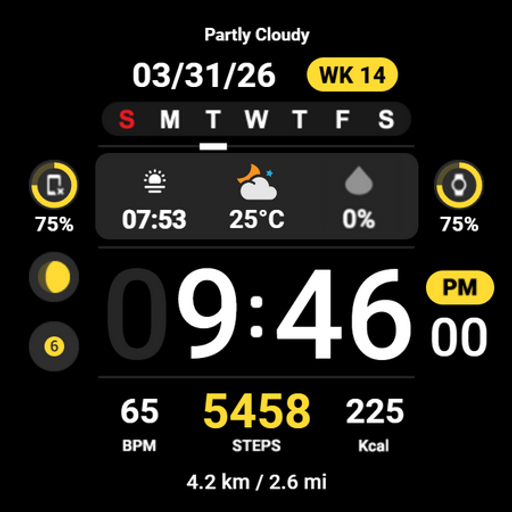
MIMIX Digital WP04 Watchface
Personalization
0.0
616 ดาวน์โหลด
"Watch Face with Wear os 5.0 and later support"
ติดตั้งบน Google Play
แอปเสียเงิน


เกี่ยวกับแอปนี้
*How to install
Payment and installation of the Play Store app on the smartphone (touch the right arrow and install the smart watch)
**Caution ** Need to check the connection between watch device and mobile phone
Find installed watchfaces
Press and hold the watch face > 2. Click the Decorate button > 3. Click ‘Add watch face’ on the last right > Confirm the purchased watch face
Installing as a Web browser
Copy the play store address of the watch face (click the three dots next to the magnifying glass in the upper right corner of the play store > share)
Go to the Samsung Internet on your PC or mobile phone and click 'Install on another device' (select a watch device)
How to set up Customize
Press and hold the watch face > 2. Click the Decorate button > 3. Tap each complication area to set the corresponding information > 4. Click OK
* In order to use all functions, consent to use the sensor is required.
*If the Play Store app is shown as incompatible, please install it using a web web browser on your PC/laptop in addition to the app on your phone.
*Supports Wear OS devices.
For new watch face news, please visit the link below
https://play.google.com/store/apps/dev?id=5105465284863988309
For inquiries about the app, please contact us at the email below.
[email protected]
ข้อมูลแอป
เวอร์ชัน
อัปเดตเมื่อ
N/A
ขนาด
ต้องการ Android
รหัสแพ็คเกจ
com.watchfacestudio.mx_digi_wp04
การติดตั้ง
616
หมวดหมู่
Personalization
คะแนนและรีวิว
0.0
คะแนนทั้งหมด
5
4
3
2
1
D
David S
Oct 17, 2026
Next two days weather does not show anything but an exclamation symbol. Please advise. Very nice watch face though.
S
Sean Smith
May 30, 2026
love the watch face!
S
Somdeth Souvanlasy
Mar 24, 2026
Nice and clean watch face. Would be good to be able to select a bolder font for the time.
A
Allen Goldblatt
Feb 17, 2026
I can't figure out what the three concentric circles (blue, green, red) to the left of the. time numerals are measuring. Does anyone know?
S
Sethor “the” Tiger
Feb 12, 2026
Terrible