h1803 Dashboard Watch Face
Personalization
0.0
333 İndirmeler
"Wear OS digital watch face con customizable complications, health data & colors."
Google Play'de Yükle
Ücretli Uygulama


Bu uygulama hakkında
📊 h1803 Dashboard Watch Face
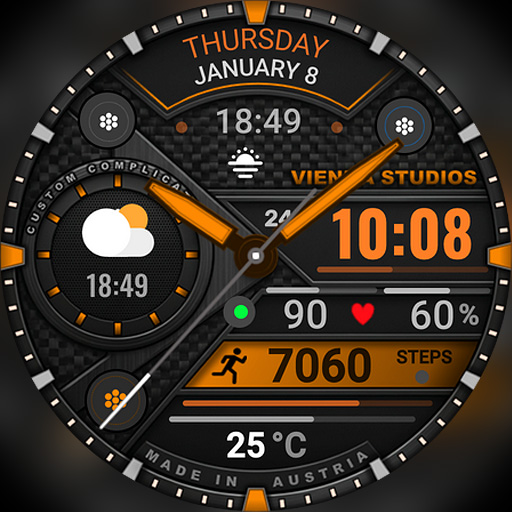
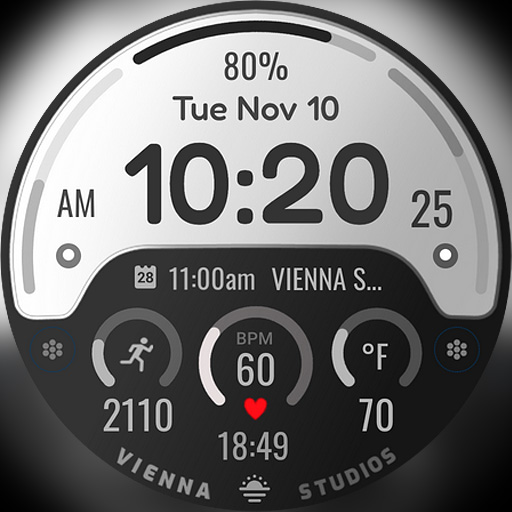
Everything you need at a single glance! h1803 is a data-rich digital dashboard watch face for Wear OS with a clean, technical design. Big time, heart rate, steps, date and battery are organized into clear segments – and multiple customizable complications let you add exactly the info you need, like weather, sunrise / sunset or your next calendar event.
⌚ Features
- Large digital time with hours, minutes and seconds
- AM/PM indicator
- 12h / 24h format (follows your phone settings)
- Heart rate (BPM)
- Daily step counter
- Day of the week, month and date
- Watch battery level (%) with visual arc indicator
- Technical dashboard layout with clearly defined segments
🎨 Customization
- Multiple customizable complication slots – e.g. weather, temperature, sunrise / sunset or calendar events
- Many high-contrast color themes, e.g. cyan, red, yellow, green, blue, purple and monochrome
- Background styles
- Touch and hold the watch face, then tap "Customize"
🌦️ Weather not showing or not updating?
1. Make sure location is enabled on your phone and watch.
2. Open the Weather app on your watch and refresh it (e.g. tap "Last updated" or pull down).
3. Switch to another watch face for a few seconds, then switch back – this often refreshes the weather data.
4. Wait a few minutes for the data to sync.
❤️ Heart rate not showing?
Allow the "Sensors / Body sensors" permission when asked, and check that heart rate measuring is turned on in your health app (e.g. Samsung Health).
📲 How to install
1. Make sure your watch is connected to your phone (Galaxy Wearable or Pixel Watch app) and uses the same Google account.
2. On your phone, open the Play Store, tap the arrow next to "Install" and select your watch.
3. Or open the Play Store directly on your watch and search for "h1803".
4. After installation, touch and hold your current watch face, swipe to the end, tap "+" and select h1803.
Tip: It can take a few minutes until the watch face appears on your watch.
⌚ Supported devices
Compatible with all Wear OS 5+ smartwatches (API level 34+), including:
- Samsung Galaxy Watch 4, 5, 6, 7, 8, Classic and Ultra series
- Google Pixel Watch 1, 2, 3 and 4
- Other Wear OS 5+ watches
Not compatible with Tizen (Galaxy Watch 3 or older) or Apple Watch.
💬 Support
Questions or problems? Please write to us before leaving a review – we are happy to help!
📩 [email protected]
🌐 www.viennastudios.com
💛 Thank you for choosing Happy Watch Faces by Vienna Studios!
We hope this design brightens your day and your wrist 😊
Everything you need at a single glance! h1803 is a data-rich digital dashboard watch face for Wear OS with a clean, technical design. Big time, heart rate, steps, date and battery are organized into clear segments – and multiple customizable complications let you add exactly the info you need, like weather, sunrise / sunset or your next calendar event.
⌚ Features
- Large digital time with hours, minutes and seconds
- AM/PM indicator
- 12h / 24h format (follows your phone settings)
- Heart rate (BPM)
- Daily step counter
- Day of the week, month and date
- Watch battery level (%) with visual arc indicator
- Technical dashboard layout with clearly defined segments
🎨 Customization
- Multiple customizable complication slots – e.g. weather, temperature, sunrise / sunset or calendar events
- Many high-contrast color themes, e.g. cyan, red, yellow, green, blue, purple and monochrome
- Background styles
- Touch and hold the watch face, then tap "Customize"
🌦️ Weather not showing or not updating?
1. Make sure location is enabled on your phone and watch.
2. Open the Weather app on your watch and refresh it (e.g. tap "Last updated" or pull down).
3. Switch to another watch face for a few seconds, then switch back – this often refreshes the weather data.
4. Wait a few minutes for the data to sync.
❤️ Heart rate not showing?
Allow the "Sensors / Body sensors" permission when asked, and check that heart rate measuring is turned on in your health app (e.g. Samsung Health).
📲 How to install
1. Make sure your watch is connected to your phone (Galaxy Wearable or Pixel Watch app) and uses the same Google account.
2. On your phone, open the Play Store, tap the arrow next to "Install" and select your watch.
3. Or open the Play Store directly on your watch and search for "h1803".
4. After installation, touch and hold your current watch face, swipe to the end, tap "+" and select h1803.
Tip: It can take a few minutes until the watch face appears on your watch.
⌚ Supported devices
Compatible with all Wear OS 5+ smartwatches (API level 34+), including:
- Samsung Galaxy Watch 4, 5, 6, 7, 8, Classic and Ultra series
- Google Pixel Watch 1, 2, 3 and 4
- Other Wear OS 5+ watches
Not compatible with Tizen (Galaxy Watch 3 or older) or Apple Watch.
💬 Support
Questions or problems? Please write to us before leaving a review – we are happy to help!
📩 [email protected]
🌐 www.viennastudios.com
💛 Thank you for choosing Happy Watch Faces by Vienna Studios!
We hope this design brightens your day and your wrist 😊
Uygulama Bilgisi
Sürüm
Güncellenme tarihi
N/A
Boyut
Android Gerektirir
Paket Kimliği
com.AAA.h1803
Yüklemeler
333
Kategori
Personalization
Uygulama İzinleri
-
Other
- control vibration
- Google Play license check

Puanlar ve Yorumlar
0.0
Toplam puanlar
5
4
3
2
1
D
David S
Sep 29, 2026
Very nice watch face. Highly customizable. I definitely recommend this one!
D
Dmytro Teslya
Sep 22, 2026
aaaaahh! so cool! thank you
F
Freddy Cloud
Sep 22, 2026
One of the many watch faces I've gotten from this developer. This one is another winner. Excellent job!
M
Magdy Said
Sep 22, 2026
awesome 👍 i got it 🙏
Benzer Uygulamalar

Oled - Digital v7 | YELE
YELE Watchfaces
0.0

SamWatch PointColor 6 2023
Samtree
0.0

WFP 324 Digital watch face
WFProduction by Alexandr Kovalev
4.8

ML2U 246 Watch Face
ML2U
0.0

SamWatch SIGN Gamma
Samtree
0.0

IA113 Digital Watchface
IONISEDATOM WATCHFACES
0.0