

h2001 Carbon Hybrid Dashboard
Personalization
0.0
8 İndirmeler
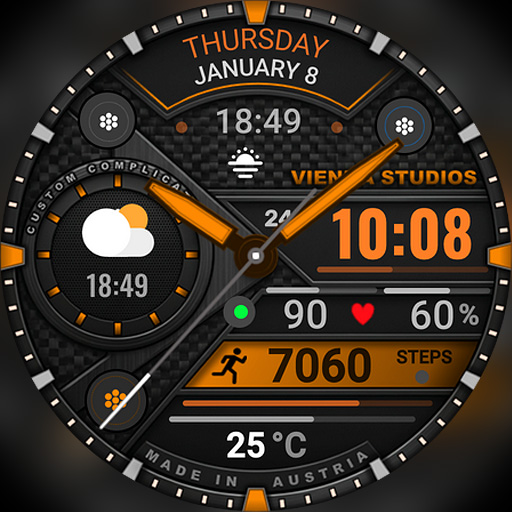
"Hybrid Wear OS watch face with weather forecast, steps, heart rate & 15+ colors"
Google Play'de Yükle
Ücretli Uygulama


Bu uygulama hakkında
⌚ h2001 – Carbon Hybrid Dashboard
A bold hybrid watch face for Wear OS with a carbon-style dial, analog hands and a large digital time. Weather, tomorrow's forecast, steps, heart rate and battery are all visible at a glance. Designed and made in Austria by Vienna Studios.
⌚ Features
• Analog hands with seconds plus digital time
• 12h/24h format (follows your phone settings), AM/PM indicator
• Day of week and date
• Current weather with day/night condition icon and temperature
• Today's minimum and maximum temperature
• Tomorrow's forecast with condition and min/max temperature
• Step count
• Heart rate (BPM)
• Battery level
• Celsius and Fahrenheit supported
• Always-on display mode
🧩 Complications & app shortcuts
• 2 text complications – defaults: sunrise/sunset and next calendar event
• 2 app shortcuts – open your favourite apps directly from the watch face
Possible data e.g. sunrise/sunset, next event, date, world clock or other compatible data. Available options depend on your watch model, software version and installed apps.
🎨 Customization
• 15+ color themes, e.g. orange, red, cyan, blue, magenta, pink, green, yellow, mint and white
Touch and hold the watch face, then tap Customize.
🌦️ Weather not showing?
• Turn on location on your phone and watch
• Open the Weather app on your watch to refresh the data
• Switch to another watch face for a few seconds and back
• Wait a few minutes for the first sync
❤️ Heart rate not showing?
• Allow the Sensors / Body sensors permission for the watch face
• Make sure heart rate measuring is enabled in your health app
📅 Calendar event not showing?
• Use a calendar app that syncs to your watch
• Allow calendar permission when asked
📲 How to install
1. Make sure your watch is connected to your phone
2. Tap Install and choose your watch as the device
3. On your watch, touch and hold the current watch face
4. Swipe to h2001 and tap it to apply
Tip: the installation can take a few minutes.
⌚ Supported devices
Wear OS 5 or newer (API 34+), e.g. Galaxy Watch 4, 5, 6, 7, 8 (incl. Classic and Ultra), Pixel Watch 1–4 and other Wear OS 5+ watches. Not compatible with Tizen watches (Galaxy Watch 3 or older) or Apple Watch.
💬 Support
Any problem or idea? Please write to us before leaving a review – we are happy to help.
[email protected]
www.viennastudios.com
💛 Thank you for choosing Happy Watch Faces by Vienna Studios!
A bold hybrid watch face for Wear OS with a carbon-style dial, analog hands and a large digital time. Weather, tomorrow's forecast, steps, heart rate and battery are all visible at a glance. Designed and made in Austria by Vienna Studios.
⌚ Features
• Analog hands with seconds plus digital time
• 12h/24h format (follows your phone settings), AM/PM indicator
• Day of week and date
• Current weather with day/night condition icon and temperature
• Today's minimum and maximum temperature
• Tomorrow's forecast with condition and min/max temperature
• Step count
• Heart rate (BPM)
• Battery level
• Celsius and Fahrenheit supported
• Always-on display mode
🧩 Complications & app shortcuts
• 2 text complications – defaults: sunrise/sunset and next calendar event
• 2 app shortcuts – open your favourite apps directly from the watch face
Possible data e.g. sunrise/sunset, next event, date, world clock or other compatible data. Available options depend on your watch model, software version and installed apps.
🎨 Customization
• 15+ color themes, e.g. orange, red, cyan, blue, magenta, pink, green, yellow, mint and white
Touch and hold the watch face, then tap Customize.
🌦️ Weather not showing?
• Turn on location on your phone and watch
• Open the Weather app on your watch to refresh the data
• Switch to another watch face for a few seconds and back
• Wait a few minutes for the first sync
❤️ Heart rate not showing?
• Allow the Sensors / Body sensors permission for the watch face
• Make sure heart rate measuring is enabled in your health app
📅 Calendar event not showing?
• Use a calendar app that syncs to your watch
• Allow calendar permission when asked
📲 How to install
1. Make sure your watch is connected to your phone
2. Tap Install and choose your watch as the device
3. On your watch, touch and hold the current watch face
4. Swipe to h2001 and tap it to apply
Tip: the installation can take a few minutes.
⌚ Supported devices
Wear OS 5 or newer (API 34+), e.g. Galaxy Watch 4, 5, 6, 7, 8 (incl. Classic and Ultra), Pixel Watch 1–4 and other Wear OS 5+ watches. Not compatible with Tizen watches (Galaxy Watch 3 or older) or Apple Watch.
💬 Support
Any problem or idea? Please write to us before leaving a review – we are happy to help.
[email protected]
www.viennastudios.com
💛 Thank you for choosing Happy Watch Faces by Vienna Studios!
Uygulama Bilgisi
Sürüm
Güncellenme tarihi
N/A
Boyut
Android Gerektirir
Paket Kimliği
com.AAA.h2001
Yüklemeler
8
Kategori
Personalization
Uygulama İzinleri
-
Other
- control vibration
- Google Play license check

Puanlar ve Yorumlar
0.0
Toplam puanlar
5
4
3
2
1
J
John Raddatz
Nov 06, 2026
Really amazing watchface. All the info I want is easy to read. Looks great!
k
kalaban1968
Nov 04, 2026
An amazing watch face. Lots of colors sets to choose from and multiple complications to add. This really is a classy but informative watch face that is my new daily driver. Easy to see information like weather, heart rate and time. The moving seconds hand is a nice touch!!
Benzer Uygulamalar
h1902 Vienna Hybrid Dashboard
Happy Watch Faces
5.0

Weather Hybrid Watch Face A6
Inspire Watch
0.0

Phantom - Hybrid v2 Watch Face
Yele Ramesh
0.0

Hybrid NOMATO Watch face
LIB LIB
0.0

LX028 Ultra Hybrid Watch Face
Inspector Studios
0.0

Digital Zyntra Watch Face
CERBER WATCH FACE
0.0
Geliştiriciden daha fazla

h018 Simple Digital Watch Face
Happy Watch Faces
3.9

h2002 Performance Dashboard
Happy Watch Faces
0.0
h2001 Carbon Hybrid Dashboard
Happy Watch Faces
0.0

h1903 Vienna Digital Dashboard
Happy Watch Faces
0.0
h1902 Vienna Hybrid Dashboard
Happy Watch Faces
5.0

h1901 Sport Dashboard Face
Happy Watch Faces
5.0