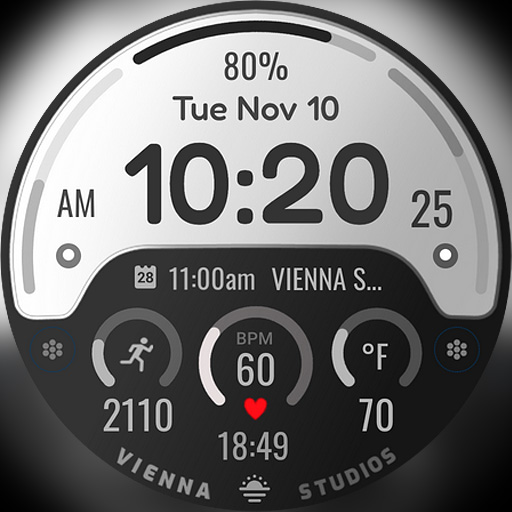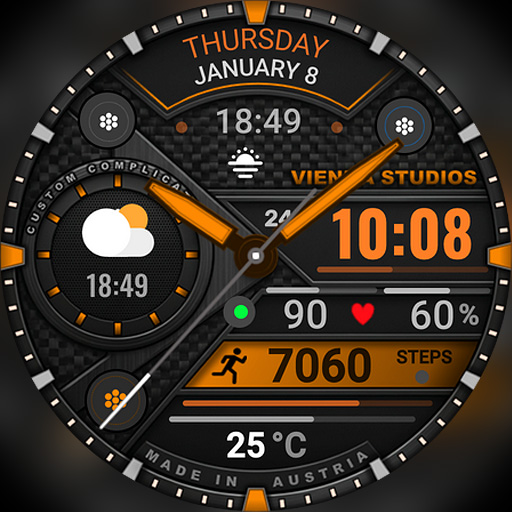
h1902 Vienna Hybrid Dashboard
Personalization
0.0
0 Завантаження
"Wear OS hybrid watch face with custom complications, health data, and weather."
Встановити в Google Play
Платное приложение


Про цей додаток
⌚ h1902 Vienna Hybrid Dashboard Watch Face
Classic watchmaking style meets a smart dashboard! h1902 is a sophisticated hybrid watch face for Wear OS that layers traditional analog hands over a bold digital time. With its mechanical, textured look and rich material details, it shows your date, steps, heart rate, temperature and battery in one elegant, information-rich design for everyday wear.
⌚ Features
- Hybrid design: analog hands + digital time
- 12h / 24h digital format (follows your phone settings)
- Full day of the week, month and date
- Daily step counter
- Heart rate (BPM)
- Current temperature
- Watch battery level (%)
- Mechanical, textured design with material details
🎨 Customization
- Many color accents, e.g. green, blue, purple, orange and red
- Background options
- Custom complication slot – e.g. weather conditions or sunrise / sunset
- Touch and hold the watch face, then tap "Customize"
🌦️ Weather not showing or not updating?
1. Make sure location is enabled on your phone and watch.
2. Open the Weather app on your watch and refresh it (e.g. tap "Last updated" or pull down).
3. Switch to another watch face for a few seconds, then switch back – this often refreshes the weather data.
4. Wait a few minutes for the data to sync.
❤️ Heart rate not showing?
Allow the "Sensors / Body sensors" permission when asked, and check that heart rate measuring is turned on in your health app (e.g. Samsung Health).
📲 How to install
1. Make sure your watch is connected to your phone (Galaxy Wearable or Pixel Watch app) and uses the same Google account.
2. On your phone, open the Play Store, tap the arrow next to "Install" and select your watch.
3. Or open the Play Store directly on your watch and search for "h1902".
4. After installation, touch and hold your current watch face, swipe to the end, tap "+" and select h1902.
Tip: It can take a few minutes until the watch face appears on your watch.
⌚ Supported devices
Compatible with all Wear OS 5+ smartwatches (API level 34+), including:
- Samsung Galaxy Watch 4, 5, 6, 7, 8, Classic and Ultra series
- Google Pixel Watch 1, 2, 3 and 4
- Other Wear OS 5+ watches
Not compatible with Tizen (Galaxy Watch 3 or older) or Apple Watch.
💬 Support
Questions or problems? Please write to us before leaving a review – we are happy to help!
📩 [email protected]
🌐 www.viennastudios.com
💛 Thank you for choosing Happy Watch Faces by Vienna Studios!
We hope this design brightens your day and your wrist 😊
Classic watchmaking style meets a smart dashboard! h1902 is a sophisticated hybrid watch face for Wear OS that layers traditional analog hands over a bold digital time. With its mechanical, textured look and rich material details, it shows your date, steps, heart rate, temperature and battery in one elegant, information-rich design for everyday wear.
⌚ Features
- Hybrid design: analog hands + digital time
- 12h / 24h digital format (follows your phone settings)
- Full day of the week, month and date
- Daily step counter
- Heart rate (BPM)
- Current temperature
- Watch battery level (%)
- Mechanical, textured design with material details
🎨 Customization
- Many color accents, e.g. green, blue, purple, orange and red
- Background options
- Custom complication slot – e.g. weather conditions or sunrise / sunset
- Touch and hold the watch face, then tap "Customize"
🌦️ Weather not showing or not updating?
1. Make sure location is enabled on your phone and watch.
2. Open the Weather app on your watch and refresh it (e.g. tap "Last updated" or pull down).
3. Switch to another watch face for a few seconds, then switch back – this often refreshes the weather data.
4. Wait a few minutes for the data to sync.
❤️ Heart rate not showing?
Allow the "Sensors / Body sensors" permission when asked, and check that heart rate measuring is turned on in your health app (e.g. Samsung Health).
📲 How to install
1. Make sure your watch is connected to your phone (Galaxy Wearable or Pixel Watch app) and uses the same Google account.
2. On your phone, open the Play Store, tap the arrow next to "Install" and select your watch.
3. Or open the Play Store directly on your watch and search for "h1902".
4. After installation, touch and hold your current watch face, swipe to the end, tap "+" and select h1902.
Tip: It can take a few minutes until the watch face appears on your watch.
⌚ Supported devices
Compatible with all Wear OS 5+ smartwatches (API level 34+), including:
- Samsung Galaxy Watch 4, 5, 6, 7, 8, Classic and Ultra series
- Google Pixel Watch 1, 2, 3 and 4
- Other Wear OS 5+ watches
Not compatible with Tizen (Galaxy Watch 3 or older) or Apple Watch.
💬 Support
Questions or problems? Please write to us before leaving a review – we are happy to help!
📩 [email protected]
🌐 www.viennastudios.com
💛 Thank you for choosing Happy Watch Faces by Vienna Studios!
We hope this design brightens your day and your wrist 😊
Інформація про додаток
Версія
Оновлено
N/A
Розмір
Вимагає Android
ID пакету
com.AAA.h1902
Установок
0
Категорія
Personalization
Дозволи програми
-
Other
- control vibration
- Google Play license check

Схожі додатки

Watch face CNW0023
10h08.com - Wear Os Watch Face
0.0

DEREZON CTS87 Watch face
CanvasTime Studio
0.0

LONDARUM WS01 Watch face
DenWork Studios
0.0

Phantom - Hybrid v2 Watch Face
YELE Watchfaces
0.0

Watch Face WF104
Timelines
0.0

SY56 Watch Face for Wear OS
Beluga Software
0.0